
Create Optimized Trains
Create Optimized Trains — Performance optimization addon for Create Mod trains.
Screenshots
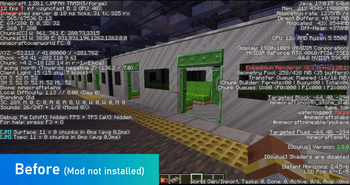
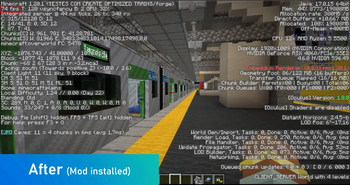
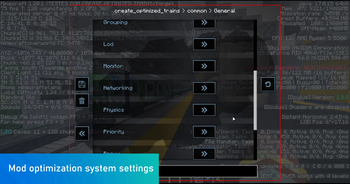
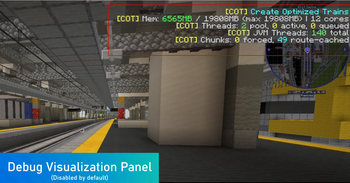
Über diese Mod
🚅⚡Create Optimized Trains
Performance optimization addon for Create Mod trains (Forge 1.20.1).


🔗Dependencies
This mod requires Create or Create Fabric.
- Minecraft 1.20.1
- Forge 47.1.33+
- Create Mod 6.0.8+
- Flywheel 1.0.6+ (bundled with Create)

📦Features
1. LOD (Level of Detail) for Trains
- FULL — Real carriages with full physics (player nearby)
- MEDIUM — Simplified physics, normal rendering
- LOW — No physics, no collisions, minimal contraption updates
- GHOST — Ghost entity, no rendering, abstract data only
2. Carriage Grouping / Abstraction
- Merges multiple carriages into a single logical entity (
TrainGroup) - Stores only: length, speed, position, carriage list as NBT
- Expands back when the player approaches
3. Safe Multi-threading
Secondary thread (safe):
- Route calculation
- Collision prediction
- Schedule optimization
- Priority management
- LOD decisions
- Predictive simulation
Main thread (required):
- Actual entity movement
- Create physics
- Rendering
- Block interaction
4. Tick Throttling (Partial Updates)
- FULL: every tick
- MEDIUM: every 3 ticks (configurable)
- LOW: every 8 ticks
- GHOST: every 20 ticks
5. Render Optimization
- Disables animations for distant trains
- Skips full rendering for GHOST LOD
- Reduces particles and visual effects
- Hides internal details when not visible
6. Proxy Entities
- Lightweight entity representing the entire train
- Replaces dozens of contraptions
- Keeps position, speed and direction
- Recreates real carriages when needed
7. Smart Chunk Loading Management
- Loads only essential chunks
- Unloads chunks behind the train earlier
- Pre-loads chunks ahead
- Anti-thrashing (prevents repeated load/unload cycles)
8. Physics Optimization
- Simplified physics for distant carriages
- Disables collisions between carriages at low LOD
- Reduces bogie checks
- Disables internal contraption physics when far away
9. Networking Optimization
- Sends updates only when speed/direction changes
- Batches packets (delta compression)
- Reduces sync frequency for distant trains
10. Priority System
- Priority by type (EXPRESS > PASSENGER > FREIGHT > LOW)
- Conflict resolution at junctions
- Track segment reservation
- Async conflict analysis
11. Dynamic Performance Monitor
- NORMAL (TPS >= 18): full fidelity
- DEGRADED (15 <= TPS < 18): light optimizations
- CRITICAL (TPS < 15): aggressive optimizations, reduced LOD distances

🏅 Technical Performance Certificate
Create Optimized Trains has undergone a series of internal and community tests, including:
Stress Tests
- Trains over 300 blocks long
- Simultaneous moving contraptions
- Rendering with hundreds of entities
- Worlds with aggressive preloading
Compatibility Tests
- Create
- Steam ’n’ Rails
- Embeddium
- Radium
- Copycats+
- Distant Horizons
Community Testing
Pre-release versions were made available on the official Discord, ensuring that every public update is stable and free of regressions.
⚙️Configuration
File: create_optimized_trains-common.toml
All features are individually configurable with distances, intervals and toggles.
🪄Backported Fixes from Create 6.0.9+
Create 6.0.9 (for Minecraft 1.21.1) introduced several important fixes that were never backported to 1.20.1. Since 1.20.1 is no longer receiving updates from the Create team, this mod backports the following fixes for users staying on 1.20.1:
Contraption Collision Box GC Pressure (#6902)
Original problem: When train doors open/close at a station, gatherBBsOffThread() combines ALL block collision shapes into a single VoxelShape using Shapes.joinUnoptimized() — an O(n²) operation that creates massive temporary objects. The garbage collector can't keep up, causing lag spikes of 1-30+ seconds depending on train complexity.
Our fix: ContraptionCollisionMixin replaces the collision gathering algorithm with the same O(n) approach used in Create 6.0.9 (commit 8f30c2c). Instead of joining VoxelShapes, it collects AABBs directly from each block's collision shape — no intermediate allocations, no GC pressure. Also includes related duplicates: #4607, #5685, #9026, #9389.
Train Stutter from carriageWaitingForChunks
Original problem: In Train.tick(), when a carriage enters an unloaded chunk, Create sets carriageWaitingForChunks which forces speed = 0 until the chunk finishes loading. On maps with many trains and limited view distance, this causes 0.5-1.5 second freezes every time a train crosses a chunk boundary.
Our fix: TrainMixin redirects all reads of carriageWaitingForChunks in tick() to always return -1, so speed is never zeroed. Combined with the Smart Chunk Loading system (pre-loading chunks ahead of the train), trains move continuously without stutter.
Collision Check Performance
Original problem: collideWithOtherTrains() runs every tick for every train, which becomes expensive on maps with 20+ trains.
Our fix: TrainMixin throttles collision checks adaptively based on server performance — every 4 ticks normally, every 8 when degraded, every 12 when critical. Each train's check is offset by its UUID hash to distribute the load evenly across ticks.

💚About us
Publisher: GreenToastSoftware Games® (C)GreenToastSoftware Corporation. All rights reserved 2020-2026.
Verfügbare Versionen
Create Optimized Trains auf deinem Client installieren
Mod-Loader lokal installieren
Installiere forge für deine lokale Minecraft-Version.
Passende Datei herunterladen
Wähle die Create Optimized Trains-Datei für forge und Minecraft 1.20.6.
Mod installieren
Lege die .jar-Datei in deinem lokalen .minecraft/mods-Ordner ab und starte Minecraft neu. Eine Installation auf dem Server ist nicht nötig.
Kompatibilität
Mod-Loader
Minecraft-Versionen
1.20.6, 1.20.5, 1.20.4 (+3 weitere)
Server-seitig
✗ Nicht unterstütztEmpfohlener RAM
6 GB(min. 4 GB)Häufige Fragen
Muss Create Optimized Trains auf dem Minecraft Server installiert werden?
Nein. Modrinth kennzeichnet Create Optimized Trains serverseitig als nicht unterstützt. Installiere die Mod nur im lokalen Minecraft-Mods-Ordner. Dein Server kann unverändert bleiben, sofern die Mod-Seite keine zusätzliche Abhängigkeit nennt.
Welche Version und welchen Loader braucht Create Optimized Trains?
Nutze eine Datei für forge und exakt deine Minecraft-Version. Unterstützte Versionen sind unter anderem 1.20.6, 1.20.5, 1.20.4. Loader-Dateien sind nicht untereinander austauschbar.
Create Optimized Trains funktioniert nicht – was kann ich prüfen?
Prüfe zuerst Minecraft-Version, Loader-Version und erforderliche Abhängigkeiten. Lege die .jar-Datei im lokalen .minecraft/mods-Ordner ab und entferne ältere Duplikate. Da die Mod clientseitig ist, löst mehr Server-RAM dieses Problem nicht.
Ähnliche Mods






Minecraft Server für deine Gruppe
Create Optimized Trains bleibt auf deinem Client. Hoste dazu eine kompatible Welt für deine Mitspieler.