
Create Picky Wheels
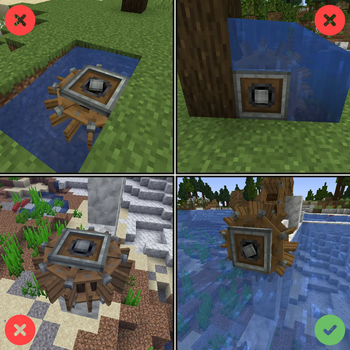
Makes Create's Waterwheels and Windmills have requirements [biome, space, position].
Screenshots



Über diese Mod
Create Picky Waterwheels modifies Create's Waterwheels default behavior. It makes it so they work similarly to Hose Pulleys, where the wheels require to be in contact with a large body of water, but in addition to that, they also require to be inside a River Biome to function. Otherwise, there is no power generation. This change is applied to both small and large waterwheels.
The mod also modifies Create's Windmill default behavior. It makes it so they check the surrounding area to see if there is enough open space for "air to circulate." It also checks the biome of placement, and by default only allows the Windmills to work inside the Overworld.
This mod adds no new blocks.
For the warning tooltips, like shown below for that windmill, use Create's Google.
Configuration is available for the threshold like for the Hose Pulley in Create. For the biome requirements, it can be tweaked via a biome tag.
This project was designed to work in tandem with Crete Low-Heated [plus, the intent is to pair it with capacity nerfed windmills and waterwheels].
Compat notes:
- TFC: set waterwheelsSourceRequiresFlow to true, and rivers will turn the wheel correctly.
- FlowingFluids: set waterwheelsAcceptsFlowing to true, and wheels will consider non-full water blocks. Change waterwheelsMinimumShallowness, if you want even shallower water to be included. For this to actually work, you must first set water_wheel_requirements in the config of flowing fluids mod to FLOW, so that this mod does the biome check and all instead of FF.
- By default, for structures that use wheels, waterwheelsPickyOnPlacement is set to true, so that requirements are only for player placed wheels.

Verfügbare Versionen
Create Picky Wheels auf dem Server installieren
Server bestellen
Bestelle einen Minecraft Java Server mit mindestens 4 GB RAM (6 GB empfohlen).
forge Loader setzen
Wähle im Panel unter "Egg" den forge-Loader und die passende Minecraft-Version (1.21.1).
Mod installieren
Öffne den Mod-Browser im Dashboard und suche nach "Create Picky Wheels". Klicke "Installieren" – fertig! Alternativ: Lade die .jar via SFTP in den /mods Ordner.
Kompatibilität
Mod-Loader
Minecraft-Versionen
1.21.1, 1.20.1, 1.19.2 (+1 weitere)
Server-seitig
✓ ErforderlichEmpfohlener RAM
6 GB(min. 4 GB)Häufige Fragen
Create Picky Wheels Server crasht beim Start – was tun?
Häufigste Ursache: falsche forge-Version oder zu wenig RAM. Prüfe im Server-Log (latest.log), ob ein "OutOfMemoryError" oder "Mixin"-Fehler auftritt. Bei Mado Hosting: Stelle sicher, dass mindestens 4 GB RAM zugewiesen sind und der Loader zur Mod-Version passt (1.21.1). Über das Panel kannst du den Loader mit einem Klick wechseln.
Ist Create Picky Wheels mit forge und neoforge kompatibel?
Create Picky Wheels unterstützt offiziell forge, neoforge für Minecraft 1.21.1, 1.20.1, 1.19.2. Im Mado Dashboard werden inkompatible Loader-Kombinationen automatisch erkannt.
Server laggt mit Create Picky Wheels – wie optimiere ich die Performance?
Empfohlener RAM: 6 GB (+1 GB pro 5 Spieler). Prüfe mit /spark profiler, ob Create Picky Wheels den meisten Tick-Time verbraucht. Häufige Fixes: Server-View-Distance auf 8-10 reduzieren, bei Forge "performant" oder "starlight" als Zusatz-Mod installieren. Bei Mado Hosting läuft dein Server auf NVMe-SSDs mit dedizierten CPU-Kernen für minimale Latenz.
Ähnliche Mods




Modded Server mieten
Installiere Create Picky Wheels mit nur einem Klick auf deinem Server.