
Modrinth · Forge
Create: pneumatic equipment auf deinem Minecraft Server
Create: pneumatic equipment läuft auf Minecraft Servern mit Forge. Bestell deinen Server, stell den Loader im Panel ein und installiere die Mod mit einem Klick im Mod-Browser.
Adds air tools and related blocks
- Downloads
- 9.1K
- Autor
- MrKM
- Loader
- Forge
- Minecraft
- 1.20.1
- Aktualisiert
- –
Screenshots
So sieht Create: pneumatic equipment aus


Bilder: Create: pneumatic equipment auf Modrinth, vom Projektteam veröffentlicht.
Einrichtung
Create: pneumatic equipment auf dem Server installieren
Server und Spieler brauchen denselben Loader und dieselbe Minecraft-Version. Sichere die Welt, bevor du Mods hinzufügst oder aktualisierst.
- 01
Konfigurieren
6 GB RAM sind vorausgewählt. Laufzeit und Add-ons wählst du selbst, bezahlt wird per Kreditkarte oder PayPal.
- 02
Loader einstellen
Stell im Panel die Serversoftware auf Forge und wähl die passende Minecraft-Version, zum Beispiel 1.20.1.
- 03
Mod installieren
Such im Mod-Browser nach „Create: pneumatic equipment“ und installiere die Version für deinen Loader. Alternativ lädst du die .jar per SFTP in den Ordner mods. Erforderliche Abhängigkeiten stehen auf der Projektseite.
- 04
Verbinden
Alle Spieler installieren Create: pneumatic equipment in derselben Version lokal und verbinden sich über die Serveradresse aus dem Panel.
- Auf dem Server
- Erforderlich
- Auf dem Client
- Erforderlich
- Loader
- Forge
- Minecraft
- 1.20.1
- Lizenz
- GNU General Public License v3.0 or later
Das Panel
Mods installieren, Fehler finden.
Echte Screenshots aus dem Mado Panel. Beides ist bei jedem Minecraft Server enthalten.
Mod-Browser
Modrinth und CurseForge direkt im Panel.
Der Browser filtert nach deiner Minecraft-Version. Mods installierst du mit einem Klick, ohne .jar-Dateien hochzuladen.

KI-Crash-Analyse
Wenn ein Mod crasht, liest die Analyse das Log.
Mods scheitern oft an einer falschen Loader-Version, Java-Version oder fehlenden Abhängigkeit. Die Analyse nennt eine wahrscheinliche Ursache und einen Lösungsvorschlag.

Versionen
Veröffentlichte Versionen
Nimm die Datei, die zu Loader und Minecraft-Version deines Servers passt. Server und Spieler brauchen dieselbe Version.
Create: pneumatic equipment · ModrinthOriginalbeschreibung des Projektautors
NOTE!
The mod is in beta because it has not been tested well and not all functions have been completed. If any errors are found, I recommend reporting them.

What is this mod about?
This is a small addon to the Create mod and it adds pneumatic tools and other things that work with the backtanks from the Create mod.
What does this mod add?
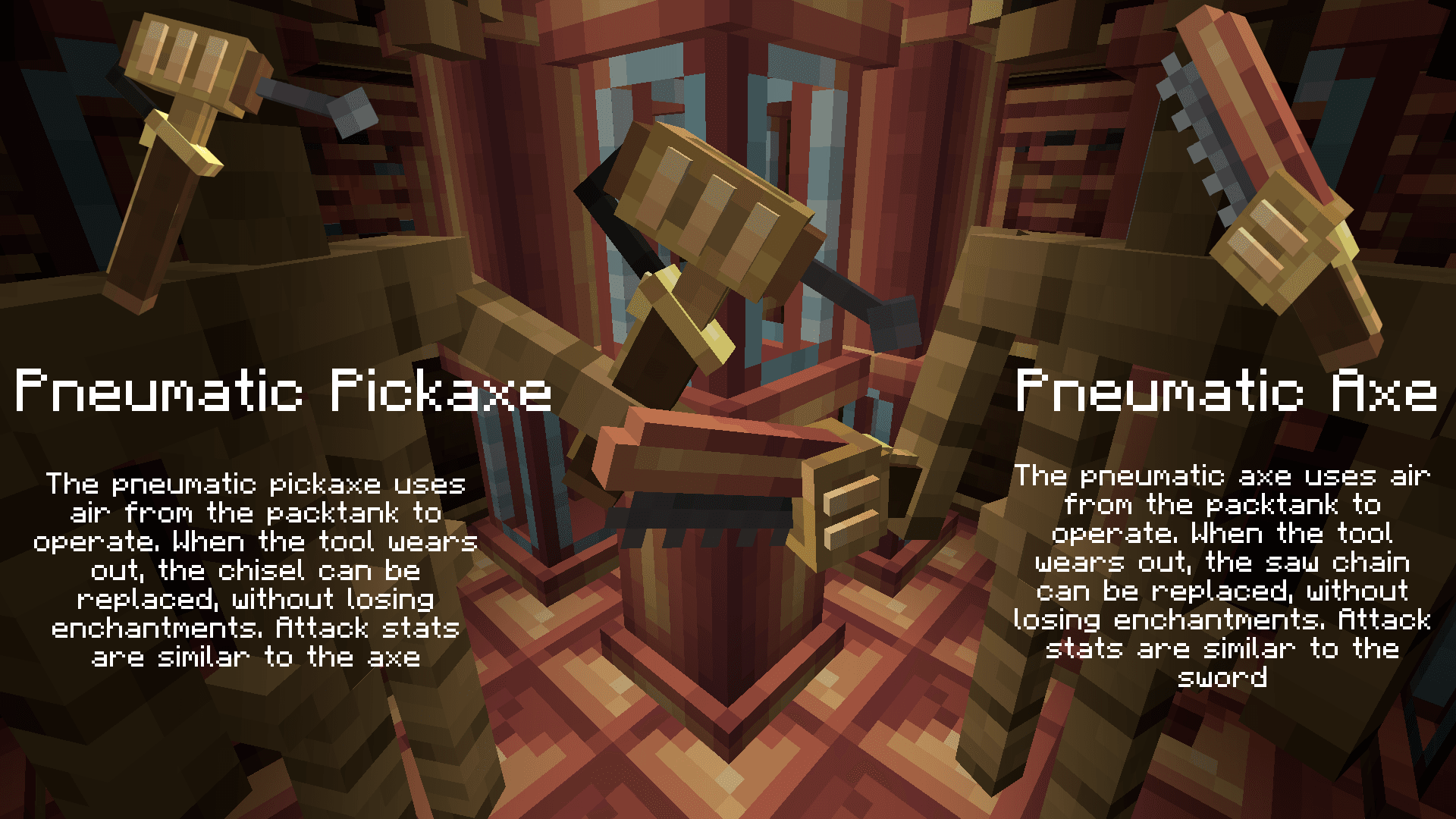
-Pneumatic Pickaxe & Pneumatic Axe
Both of these tools operate using air from the backtank. One advantage of these tools is that when worn out, you only lose the Chisel or Saw Chain, and the tool and its enchantments remain. (Mending increases air consumption.) In combat use, the pneumatic pickaxe has stats similar to the axe, and the pneumatic axe has stats similar to the sword.
pickaxe and axe
-Pneumatic Leggings
These leggings are effectively an exoskeleton that increases your mobility. When powered up, it increases your speed, increases your jump height, and increases the maximum height from which you can safely fall.
-Pneumatic Boots
These boots allow you to fly like a jetpack, they aren't super fast but they allow you to fly with precision and stand in the air by holding down shift.
leggings and boots
-Air Vent
This block allows you to draw air into the pipes and then use the accumulated pressure. How much air you can draw in per second depends on how good access to air this vent has.
-Air Dispenser
This block is basically supposed to make it easier to fill your backtank. When it has air in it (it can also be something else, but I don't recommend it) It will fill your tank after standing on it. Its second use is to suddenly release the accumulated pressure, this can be done with the redstone signal. Such a sudden release of air will push away all mobs in the block's blast zone.
What else does this mod not add but is planned?
-Air Dash It's supposed to use the air from the backtank to push you in a specific direction.
-Air Dispenser should include backtank capacity enchantment
-Special enchantments designed specifically for pneumatic equipment
-Add allows enchanting of inactive tools
Create: pneumatic equipment Server crasht beim Start – was tun?
Häufige Ursachen: Loader- oder Minecraft-Version passen nicht zur Mod-Datei, eine Abhängigkeit fehlt oder der RAM reicht nicht. Such im Log (latest.log) nach „OutOfMemoryError“, „Mixin“ oder fehlenden Mods. Bei Mado wertet die KI-Crash-Analyse das Log aus und schlägt eine Ursache vor. Loader und Version änderst du im Panel.
Mit welchem Loader läuft Create: pneumatic equipment?
Laut Modrinth unterstützt Create: pneumatic equipment Forge für Minecraft 1.20.1.
Wie viel RAM braucht ein Server mit Create: pneumatic equipment?
Als Orientierung 4–6 GB für einen Server mit dieser Mod. Das ist eine Schätzung, keine gemessene Mindestanforderung. Weitere Mods, viele Spieler und große Sichtweiten brauchen mehr. Ob eine Mod die Tick-Zeit belastet, siehst du mit dem spark-Profiler.
Ähnliche Mods
Beliebte Mods aus derselben Kategorie
 Server-fähig

VeinMiner
von Miraculixx
Mine the whole vein on mining a single ore/block. Make the tedious mining experience to something satisfying and fun! FTB Ultimine alternative
 Nur Client

VeinMiner Hotkey
von Miraculixx
Veinminer Addon - Use a hotkey to veinmine with a dynamic crosshair & block highlighting
 Server-fähig

Curios API
von TheIllusiveC4
A flexible and expandable accessory/equipment API for users and developers.
 Server-fähig

[TaCZ] Timeless and Classics Zero
von craneblock6666
The most Immersive and Customizable modern FPS experience in Minecraft - A complete Remaster of the TaC gun mod by the original team.
Bereit für deinen Server mit Create: pneumatic equipment?
6 GB RAM ab 12,00 € im Monat. 35 % auf den 1. Monat mit MADO35.