
Create Realism
A Create addon that adds a bunch of features to make Create trains more realistic.
Screenshots
Über diese Mod
Create Realism
A Create addon that adds a bunch of features to make Create trains more realistic.
⚠️Always Backup your worlds before updates⚠️
Features:
ETCS - Signal and track clearance
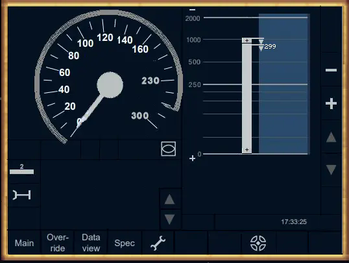
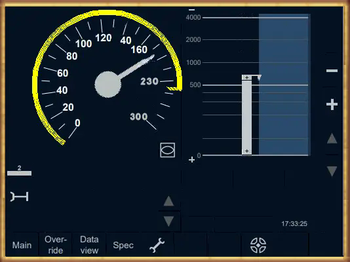
The mod also adds a Overlay when manually riding thrains that show the free track in front of the train,Braking curves to show when to start slwoing down and speed limits(IF Create: Tramways is installed)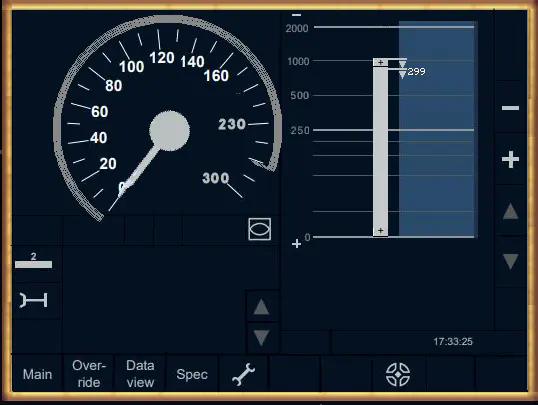
Use "+" and "-" to zoom in and out the track overview
-Changes the acceleration of trains to be dependent on the amount of cars attached to the train.
The more cars you have, the slower the train will accelerate. The more locomotives(cars with conductors) you have, the less the acceleration will be affected.
-Track speed and grade overview
While building train tracks you can now see the max speed and grade of the track you are building. This also includes the max speed as seen in train schedules, In (%). I recommend using Create Tramways to temporarily set the max speed for curves and slopes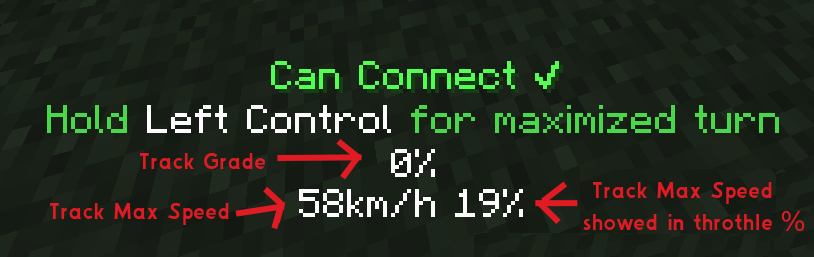
THIS DOES NOT CHANGE THE SPEED THE TRAINS RUN AT AND IS MEARLY A HELP FOR SETTING SPEED LIMITS
Use Create Tramways to set speed limits
More features coming soon!..
Verfügbare Versionen
Create Realism auf dem Server installieren
Server bestellen
Bestelle einen Minecraft Java Server mit mindestens 4 GB RAM (6 GB empfohlen).
fabric Loader setzen
Wähle im Panel unter "Egg" den fabric-Loader und die passende Minecraft-Version (1.21.1).
Mod installieren
Öffne den Mod-Browser im Dashboard und suche nach "Create Realism". Klicke "Installieren" – fertig! Alternativ: Lade die .jar via SFTP in den /mods Ordner.
Kompatibilität
Mod-Loader
Minecraft-Versionen
1.21.1, 1.20.1
Server-seitig
✓ ErforderlichEmpfohlener RAM
6 GB(min. 4 GB)Häufige Fragen
Create Realism Server crasht beim Start – was tun?
Häufigste Ursache: falsche fabric-Version oder zu wenig RAM. Prüfe im Server-Log (latest.log), ob ein "OutOfMemoryError" oder "Mixin"-Fehler auftritt. Bei Mado Hosting: Stelle sicher, dass mindestens 4 GB RAM zugewiesen sind und der Loader zur Mod-Version passt (1.21.1). Über das Panel kannst du den Loader mit einem Klick wechseln.
Ist Create Realism mit fabric und forge und neoforge kompatibel?
Create Realism unterstützt offiziell fabric, forge, neoforge für Minecraft 1.21.1, 1.20.1. Achtung: Forge- und Fabric-Mods sind NICHT untereinander kompatibel – wähle einen Loader und bleibe dabei. Im Mado Dashboard werden inkompatible Loader-Kombinationen automatisch erkannt.
Server laggt mit Create Realism – wie optimiere ich die Performance?
Empfohlener RAM: 6 GB (+1 GB pro 5 Spieler). Prüfe mit /spark profiler, ob Create Realism den meisten Tick-Time verbraucht. Häufige Fixes: Server-View-Distance auf 8-10 reduzieren, bei Forge "performant" oder "starlight" als Zusatz-Mod installieren. Bei Mado Hosting läuft dein Server auf NVMe-SSDs mit dedizierten CPU-Kernen für minimale Latenz.
Ähnliche Mods






Modded Server mieten
Installiere Create Realism mit nur einem Klick auf deinem Server.