
Create: Rock & Stone
Adds generation of underground resource deposits that can be mined with a customizable mining contraption. Inspired by Create: Molten Vents and Create Ore Excavation.
Screenshots


Über diese Mod
Create: Rock & Stone (Now with Create Aeronautics support!)
Adds generation of underground resource deposits that can be mined with a customizable mining contraption. Inspired by Create: Molten Vents and Create Ore Excavation.
If you find issues or have suggestions, please let me know by opening an issue here.


Features
Miner Bearing 
A replacement for old miners that lets you build massive miner contraptions and augment them with attachments!
Mine Head 
The core component of every miner. A single block by default, but can be upgraded to a 3x3 when placed in a special formation!
Deposit Scanner 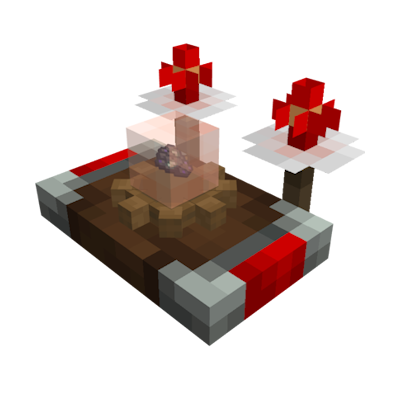
Used to scan for underground ore deposits. Once tuned onto a deposit, its antennas will periodically flash. If both antennas flash together, you are looking in the right direction. The faster they flash, the closer you are!
Modded Deposits

Vanilla Deposits
Compatibility
- JEI - Mining recipes and catalyst info.
- Jade - Shows remaining resources if finite deposits are enabled (1.21.1 only).
- Xaero's World Map or Journey Map - Shows found deposits as icons on the map.
- Create Aeronautics - Mining from physics contraptions
Deposits are too rare or too frequent?
Create: Rock & Stone provides 4 datapack flavors that let you control how often the deposits spawn in
the world. There are two ways to enable them:
- When starting a new world, go to the
Datapackssection and select the deisred flavor. - In existing worlds, use command:
/datapack enable "create_rns:<flavor>"and restart the world.
Everything is tweakable!
This mod includes a dedicated KubeJS plugin. Click here for more info and working examples.
For example, to select which deposits should be added and how often they should spawn, put this
in <game folder>/kubejs/startup_scripts/main.js:
StartupEvents.rnsEnableDeposits(event => {
  event.overworld()
    // Keep the deposits you want. Setting the second argument to false will disable worldgen, but keep the deposit enabled.
    .deposit('create_rns:deposit_coal', true)
    .deposit('create_rns:deposit_iron', true)
    .deposit('create_rns:deposit_copper', true)
    .deposit('create_rns:deposit_zinc', true)
    .deposit('create_rns:deposit_gold', true)
    .deposit('create_rns:deposit_lapis', true)
    .deposit('create_rns:deposit_redstone', true)
    .deposit('create_rns:deposit_tin', true)
    .deposit('create_rns:deposit_osmium', true)
    .deposit('create_rns:deposit_lead', true)
    .deposit('create_rns:deposit_nickel', true)
    .deposit('create_rns:deposit_silver', true)
    .deposit('create_rns:deposit_platinum', true)
    .deposit('create_rns:deposit_uranium', true)
    .deposit('create_rns:deposit_thorium', true)
    // Average distance between deposits in chunks
    .spacing(24)
    // Minimum distance between deposits in chunks
    .separation(4)

  event.nether()
    .deposit('create_rns:deposit_nether_gold', true)
    .deposit('create_rns:deposit_nether_quartz', true)
    .deposit('create_rns:deposit_nether_cobalt', true)
    .deposit('create_rns:deposit_nether_wolframite', true)
    .spacing(8)
    .separation(2)
})
Credits
Some models and textures in this mod make partial use of Create assets. All used Create assets are licensed under the MIT license.
Verfügbare Versionen
Create: Rock & Stone auf dem Server installieren
Server bestellen
Bestelle einen Minecraft Java Server mit mindestens 4 GB RAM (6 GB empfohlen).
forge Loader setzen
Wähle im Panel unter "Egg" den forge-Loader und die passende Minecraft-Version (1.21.1).
Mod installieren
Öffne den Mod-Browser im Dashboard und suche nach "Create: Rock & Stone". Klicke "Installieren" – fertig! Alternativ: Lade die .jar via SFTP in den /mods Ordner.
Kompatibilität
Mod-Loader
Minecraft-Versionen
1.21.1, 1.20.1
Server-seitig
✓ ErforderlichEmpfohlener RAM
6 GB(min. 4 GB)Häufige Fragen
Create: Rock & Stone Server crasht beim Start – was tun?
Häufigste Ursache: falsche forge-Version oder zu wenig RAM. Prüfe im Server-Log (latest.log), ob ein "OutOfMemoryError" oder "Mixin"-Fehler auftritt. Bei Mado Hosting: Stelle sicher, dass mindestens 4 GB RAM zugewiesen sind und der Loader zur Mod-Version passt (1.21.1). Über das Panel kannst du den Loader mit einem Klick wechseln.
Ist Create: Rock & Stone mit forge und neoforge kompatibel?
Create: Rock & Stone unterstützt offiziell forge, neoforge für Minecraft 1.21.1, 1.20.1. Im Mado Dashboard werden inkompatible Loader-Kombinationen automatisch erkannt.
Server laggt mit Create: Rock & Stone – wie optimiere ich die Performance?
Empfohlener RAM: 6 GB (+1 GB pro 5 Spieler). Prüfe mit /spark profiler, ob Create: Rock & Stone den meisten Tick-Time verbraucht. Häufige Fixes: Server-View-Distance auf 8-10 reduzieren, bei Forge "performant" oder "starlight" als Zusatz-Mod installieren. Bei Mado Hosting läuft dein Server auf NVMe-SSDs mit dedizierten CPU-Kernen für minimale Latenz.
Ähnliche Mods




Modded Server mieten
Installiere Create: Rock & Stone mit nur einem Klick auf deinem Server.
Details
- Lizenz
- GNU Lesser General Public License v3.0 or later
- Server-seitig
- Erforderlich