
Modrinth · Fabric, Forge, NeoForge
Create: Totem Factory auf deinem Minecraft Server
Create: Totem Factory läuft auf Minecraft Servern mit Fabric oder Forge oder NeoForge. Bestell deinen Server, stell den Loader im Panel ein und installiere die Mod mit einem Klick im Mod-Browser.
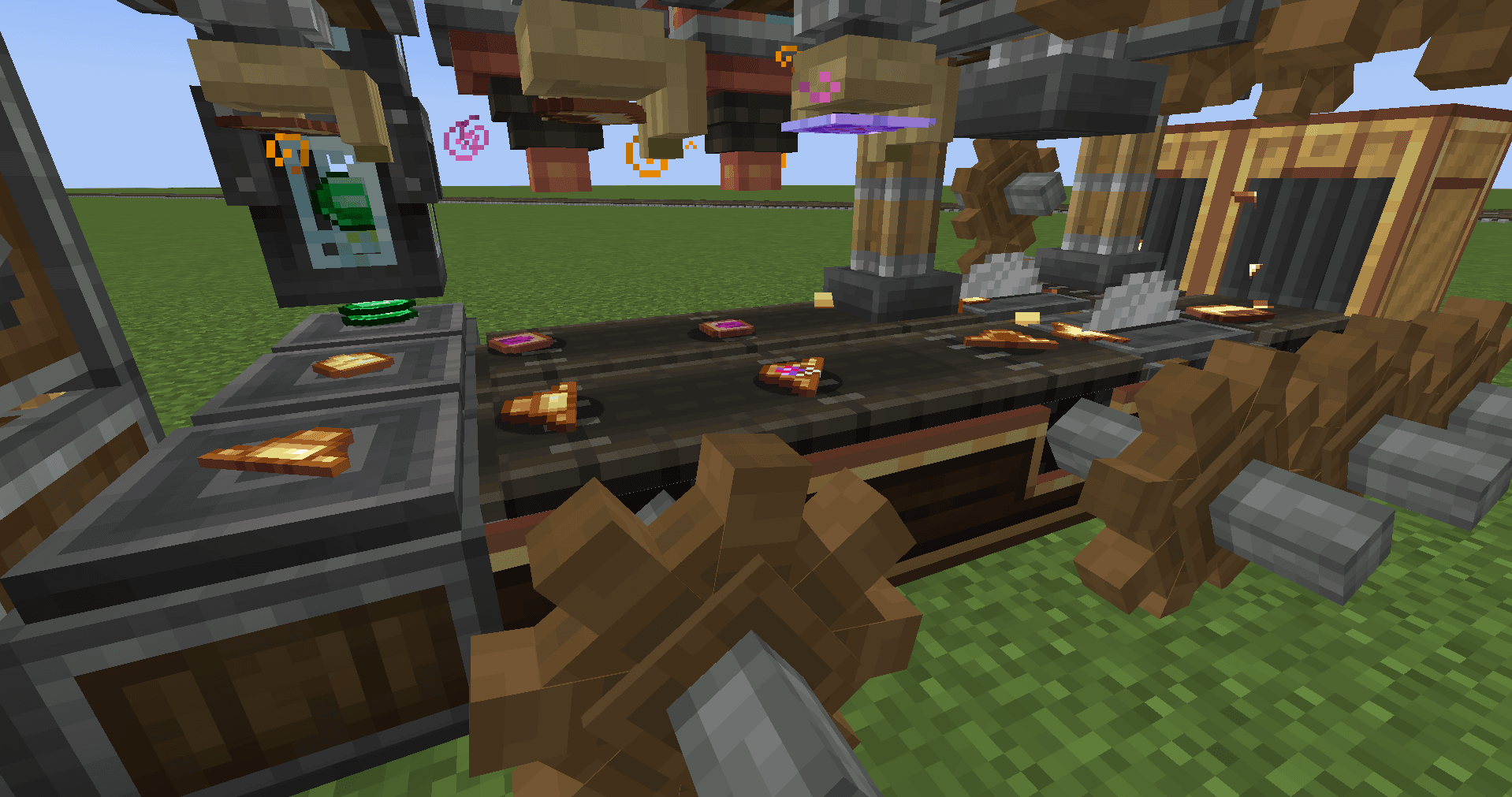
Adds a complex crafting recipe for the totem of undying, with multiple steps and items, using "Create" and "Create Enchantment Industry".
- Downloads
- 104.3K
- Autor
- MarcosJoestar
- Loader
- Fabric, Forge, NeoForge
- Minecraft
- 1.20.1 – 1.21.1
- Aktualisiert
- –
Screenshots
So sieht Create: Totem Factory aus


Bilder: Create: Totem Factory auf Modrinth, vom Projektteam veröffentlicht.
Einrichtung
Create: Totem Factory auf dem Server installieren
Server und Spieler brauchen denselben Loader und dieselbe Minecraft-Version. Sichere die Welt, bevor du Mods hinzufügst oder aktualisierst.
- 01
Konfigurieren
6 GB RAM sind vorausgewählt. Laufzeit und Add-ons wählst du selbst, bezahlt wird per Kreditkarte oder PayPal.
- 02
Loader einstellen
Stell im Panel die Serversoftware auf Fabric oder Forge oder NeoForge und wähl die passende Minecraft-Version, zum Beispiel 1.21.1.
- 03
Mod installieren
Such im Mod-Browser nach „Create: Totem Factory“ und installiere die Version für deinen Loader. Alternativ lädst du die .jar per SFTP in den Ordner mods. Erforderliche Abhängigkeiten stehen auf der Projektseite.
- 04
Verbinden
Alle Spieler installieren Create: Totem Factory in derselben Version lokal und verbinden sich über die Serveradresse aus dem Panel.
- Auf dem Server
- Erforderlich
- Auf dem Client
- Erforderlich
- Loader
- Fabric, Forge, NeoForge
- Minecraft
- 1.21.1, 1.20.1
- Lizenz
- MIT License
Das Panel
Mods installieren, Fehler finden.
Echte Screenshots aus dem Mado Panel. Beides ist bei jedem Minecraft Server enthalten.
Mod-Browser
Modrinth und CurseForge direkt im Panel.
Der Browser filtert nach deiner Minecraft-Version. Mods installierst du mit einem Klick, ohne .jar-Dateien hochzuladen.

KI-Crash-Analyse
Wenn ein Mod crasht, liest die Analyse das Log.
Mods scheitern oft an einer falschen Loader-Version, Java-Version oder fehlenden Abhängigkeit. Die Analyse nennt eine wahrscheinliche Ursache und einen Lösungsvorschlag.

Versionen
Veröffentlichte Versionen
Nimm die Datei, die zu Loader und Minecraft-Version deines Servers passt. Server und Spieler brauchen dieselbe Version.
Create: Totem Factory · Modrinth- Create: Totem Factory 1.1.214. Juni 2026Minecraft 1.20.1 · Forge
- Create: Totem Factory 1.1.214. Juni 2026Minecraft 1.20.1 · Fabric
- Create: Totem Factory 1.1.214. Juni 2026Minecraft 1.21.1 · NeoForge
- Create: Totem Factory 1.1.025. Januar 2026Minecraft 1.20.1 · Forge, NeoForge
Originalbeschreibung des Projektautors

"Engineering laughs in the face of death."jargames99 - Co-Creator, Og. Idea & Programming
Marcos Joestar - Co-Creator, Og. Art
Lumynity Studios - Maintenance and Updates
Description
The industrial revolution has come to Minecraft, and with it, new knowledge and discoveries both in the field of science and magic.
This mod adds a multistep complex recipe for the Totem of Undying using Create and optionally Create: Enchantment Industry.
Totem Creation

First step is to saw and press a tumbaga sheet to create the head casing, then you will then need to imbue the head with the effects of fire resistance and regeneration. When that is done, a tumbaga alloy is used to seal the potions and add the iconic nose, finishing the totem head.

A similar process follows the creation of the totem's body. You simply saw and press a tumbaga alloy, and instead of potions, you deploy a ghast tear to give the totem regenerative powers and then deploy a tumbaga alloy to seal it up.

With both of the totem parts you can now start the assembling procedure. Along with the totem parts you will also need to add the emerald eyes of the totem. This is done by placing all the needed parts into four mechanical crafters.

The final part of the process, is to deploy 5 experience blocks or spout 135mB of liquid experience to activate the assembled totem.
What is Tumbaga?
 Tumbaga Alloy
Tumbaga is an ancient alloy of gold and copper from around 400BCE, first used to mainly make jewelry but also sometimes things such as totems.
And now it's being brought back to use, to merge immortality with engineering.
 Tumbaga Armor & Tools
Armor and tools made of tumbaga alloy have a unique property of being liked by Piglins just like gold itself, has the same mining speed as gold and just almost being the durability of iron.
 Tumbaga Casing
It's just a decorational block made of bamboo and tumbaga alloy. Not much to it right now other than looking pretty nice.
Having issues, need to report a bug, want to suggest something or just chat? Join the Discord server(s)!
- Marcos Joestar's Discord
- Lumynity Studios's Discord
For bug reporting we recommend to report them to Lumynity Studios
Wanna see how the mod's code works or want to contribute? Check out the GitHub!
Create: Totem Factory Server crasht beim Start – was tun?
Häufige Ursachen: Loader- oder Minecraft-Version passen nicht zur Mod-Datei, eine Abhängigkeit fehlt oder der RAM reicht nicht. Such im Log (latest.log) nach „OutOfMemoryError“, „Mixin“ oder fehlenden Mods. Bei Mado wertet die KI-Crash-Analyse das Log aus und schlägt eine Ursache vor. Loader und Version änderst du im Panel.
Mit welchem Loader läuft Create: Totem Factory?
Laut Modrinth unterstützt Create: Totem Factory Fabric, Forge, NeoForge für Minecraft 1.21.1, 1.20.1. Forge- und Fabric-Dateien sind nicht untereinander austauschbar: Wähl einen Loader für Server und Clients.
Wie viel RAM braucht ein Server mit Create: Totem Factory?
Als Orientierung 4–6 GB für einen Server mit dieser Mod. Das ist eine Schätzung, keine gemessene Mindestanforderung. Weitere Mods, viele Spieler und große Sichtweiten brauchen mehr. Ob eine Mod die Tick-Zeit belastet, siehst du mit dem spark-Profiler.
Ähnliche Mods
Beliebte Mods aus derselben Kategorie
 Server-fähig

VeinMiner
von Miraculixx
Mine the whole vein on mining a single ore/block. Make the tedious mining experience to something satisfying and fun! FTB Ultimine alternative
 Nur Client

VeinMiner Hotkey
von Miraculixx
Veinminer Addon - Use a hotkey to veinmine with a dynamic crosshair & block highlighting
 Server-fähig

Curios API
von TheIllusiveC4
A flexible and expandable accessory/equipment API for users and developers.
 Server-fähig

[TaCZ] Timeless and Classics Zero
von craneblock6666
The most Immersive and Customizable modern FPS experience in Minecraft - A complete Remaster of the TaC gun mod by the original team.
Bereit für deinen Server mit Create: Totem Factory?
6 GB RAM ab 12,00 € im Monat. 35 % auf den 1. Monat mit MADO35.