
Create: Trial & Error
Automate the Trial Chambers with unique and challenging production lines!
Screenshots
Über diese Mod
This is Create: Trial & Error!
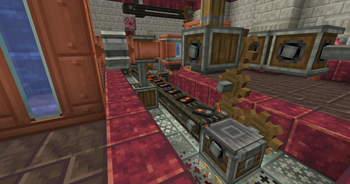
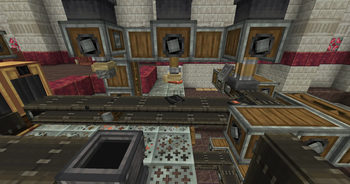
While Create has been updated to 1.21 for some time, there hasn't been much interaction between 1.21's new features and Create... until now! Create: Trial & Error allows for full automation of the Trial Chamber's Vaults through various features.
Key Casts: Both regular Trial and Ominous Keys can now be replicated by creating casts of them. While this process has a high chance of failure, once a cast is made, it can be used to make infinite keys using Tuff and Copper.
Deployers & Vaults: In base game, a Vault cannot be opened unless the player is within a certain distance. This has been changed so that Deployers can open Vaults without a player needing to be nearby, allowing for remote vault automation.
Blank Slate: Vaults can now be reattempted using the new Tabula Rasa item. Applying one to a Vault allows it to be reopened. They can be obtained through Ominous Vaults, as well as duplicated using Mechanical Crafters.
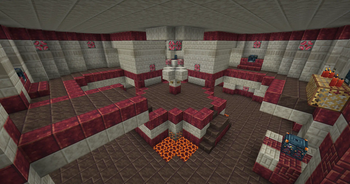
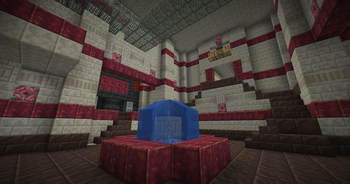
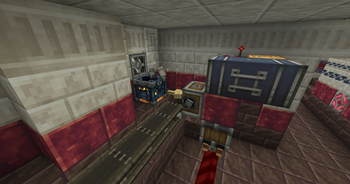
Trial Chambers Aesthetic Overhaul: The Trial Chambers have been palette swapped to feature decorative Create blocks. They also feature a new line of Andesite decorative blocks: Andesite Grates, Bulbs, and Trapdoors. Vaults now also contain Create items such as Zinc and Andesite Alloy with an added on loot pool.
Veridium & Tuff Automation: To facilitate the full automation of Trial Keys, recipes have been added for the automation of Tuff and Veridium, which can both be used to obtain renewable copper.
While the road to automating Trial Chambers is a long one, the end result is a (relatively balanced) infinite source of Diamonds, Heavy Cores, and even Enchanted Golden Apples.
Note that the Ominous Key requires Oxidized Copper. This mod does not provide a recipe for oxidizing copper for balancing purposes, you are meant to automate oxidization using Deployers and Drills. An alternative would be downloading Create: Oxidized, which adds oxidization recipes, here.
Verfügbare Versionen
Create: Trial & Error auf dem Server installieren
Server bestellen
Bestelle einen Minecraft Java Server mit mindestens 4 GB RAM (6 GB empfohlen).
neoforge Loader setzen
Wähle im Panel unter "Egg" den neoforge-Loader und die passende Minecraft-Version (1.21.7).
Mod installieren
Öffne den Mod-Browser im Dashboard und suche nach "Create: Trial & Error". Klicke "Installieren" – fertig! Alternativ: Lade die .jar via SFTP in den /mods Ordner.
Kompatibilität
Mod-Loader
Minecraft-Versionen
1.21.7, 1.21.6, 1.21.5 (+4 weitere)
Server-seitig
✓ ErforderlichEmpfohlener RAM
6 GB(min. 4 GB)Häufige Fragen
Create: Trial & Error Server crasht beim Start – was tun?
Häufigste Ursache: falsche neoforge-Version oder zu wenig RAM. Prüfe im Server-Log (latest.log), ob ein "OutOfMemoryError" oder "Mixin"-Fehler auftritt. Bei Mado Hosting: Stelle sicher, dass mindestens 4 GB RAM zugewiesen sind und der Loader zur Mod-Version passt (1.21.7). Über das Panel kannst du den Loader mit einem Klick wechseln.
Ist Create: Trial & Error mit neoforge kompatibel?
Create: Trial & Error unterstützt offiziell neoforge für Minecraft 1.21.7, 1.21.6, 1.21.5. Im Mado Dashboard werden inkompatible Loader-Kombinationen automatisch erkannt.
Server laggt mit Create: Trial & Error – wie optimiere ich die Performance?
Empfohlener RAM: 6 GB (+1 GB pro 5 Spieler). Prüfe mit /spark profiler, ob Create: Trial & Error den meisten Tick-Time verbraucht. Häufige Fixes: Server-View-Distance auf 8-10 reduzieren, bei Forge "performant" oder "starlight" als Zusatz-Mod installieren. Bei Mado Hosting läuft dein Server auf NVMe-SSDs mit dedizierten CPU-Kernen für minimale Latenz.
Ähnliche Mods




Modded Server mieten
Installiere Create: Trial & Error mit nur einem Klick auf deinem Server.