
Create Efficient Visuals
Create factory gauge client-side optimization. based on flywheel
Screenshots
Über diese Mod
This mod does a low-hanging-fruit optimization for Create factory gauge rendering.
Why It was Slow
Factory Gauge is a block entity, and the base mod renderer does vertex transform for gauge paths every frame. this has very high overhead considering the path is mostly unchanged across frames. Existing approaches such as createbetterfps, Flerovium does not change this immediate mode model; This mod utilizes flywheel to provide instancing support.
Limitations
Item may have custom renderer. those item will fallback to slow path.
This mod is client only. it doesn't optimize server ticks.
This mod is ad-hoc, low-hanging fruit optimization for create factory gauge rendering. it doesn't provide a full solution to making your fps better.
This mod optimizes CPU frame time more than GPU frame time. if shader used, improvement may be small.
Evaluation
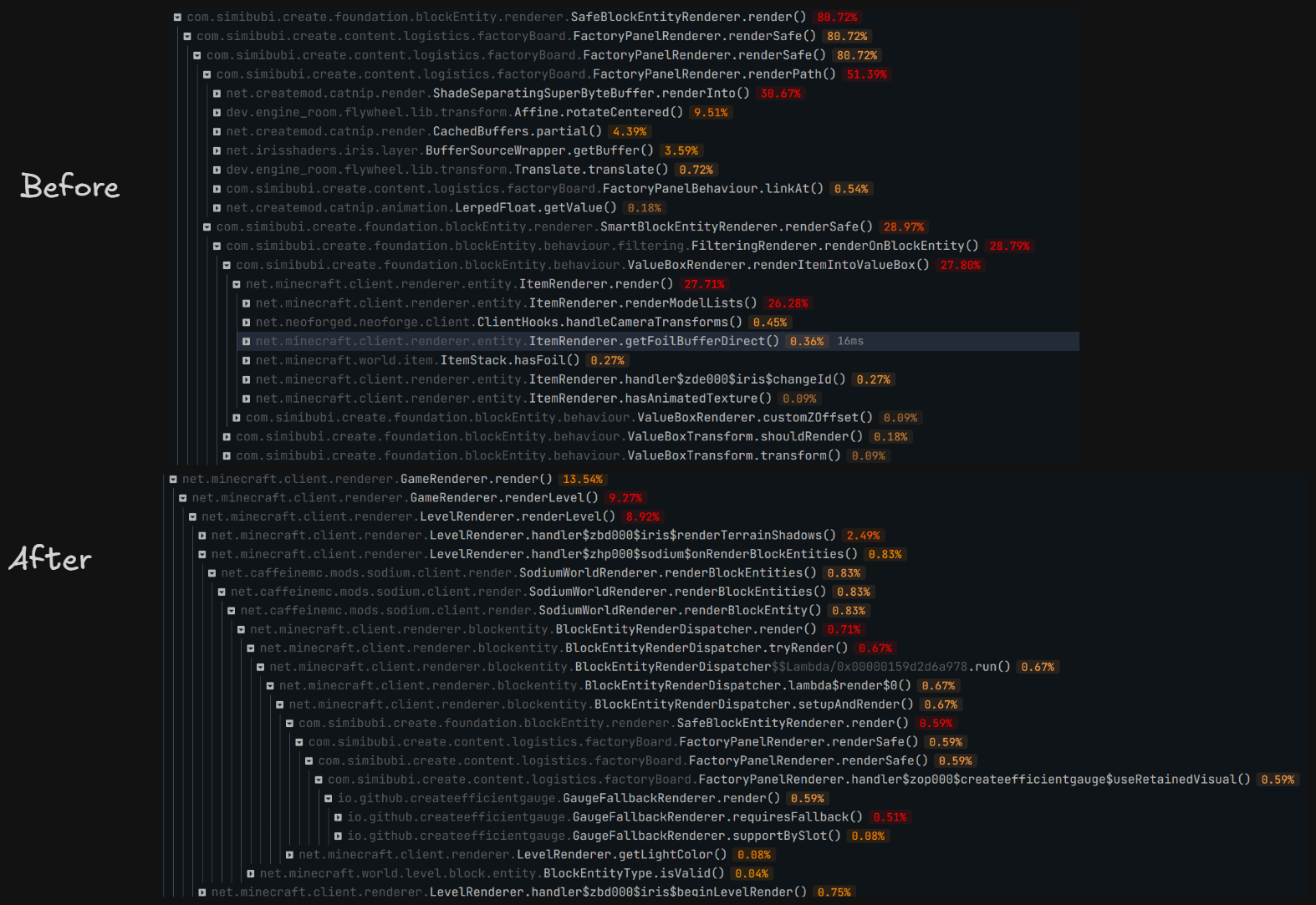
Evaluated in controlled scenario: superflat world, with a 10x30 wall, each block has 4 gauges. significant improvement in sparkc profiler. result in figure.
Evaluated in realworld scenario: referencial 80h+ survival world, same spot standing still. VSync off, max frame no limit, sodium: CPU render ahead 1 frame, photon shader ultra preset.after warm up, PresentMon shows (10s interval)
| Metric | Without | With | Change |
|---|---|---|---|
Avg frame interval MsBetweenPresents |
11.291 ms | 10.618 ms | Decreased by 0.673 ms, ~5.96% |
| Corresponding throughput | 88.57 FPS | 94.18 FPS | Increased by ~6.3% |
| p50 frame interval | 10.644 ms | 10.252 ms | Decreased by ~3.7% |
MsGPUTime |
11.290 ms | 10.617 ms | Decreased by 0.673 ms |
MsGPUBusy |
10.802 ms | 10.498 ms | Decreased by 0.304 ms, ~2.8% |
MsGPUWait |
0.489 ms | 0.120 ms | Decreased by 0.369 ms, ~75% |
MsGPULatency |
12.594 ms | 14.526 ms | Increased by 1.932 ms |
MsInPresentAPI |
0.124 ms | 0.109 ms | Both very small |
CPUUtilization reported by PresentMon |
29.10% | 20.16% | Decreased by ~31% |
Verfügbare Versionen
Create Efficient Visuals auf deinem Client installieren
Mod-Loader lokal installieren
Installiere neoforge für deine lokale Minecraft-Version.
Passende Datei herunterladen
Wähle die Create Efficient Visuals-Datei für neoforge und Minecraft 1.21.1.
Mod installieren
Lege die .jar-Datei in deinem lokalen .minecraft/mods-Ordner ab und starte Minecraft neu. Eine Installation auf dem Server ist nicht nötig.
Kompatibilität
Mod-Loader
Minecraft-Versionen
1.21.1
Server-seitig
✗ Nicht unterstütztEmpfohlener RAM
6 GB(min. 4 GB)Häufige Fragen
Muss Create Efficient Visuals auf dem Minecraft Server installiert werden?
Nein. Modrinth kennzeichnet Create Efficient Visuals serverseitig als nicht unterstützt. Installiere die Mod nur im lokalen Minecraft-Mods-Ordner. Dein Server kann unverändert bleiben, sofern die Mod-Seite keine zusätzliche Abhängigkeit nennt.
Welche Version und welchen Loader braucht Create Efficient Visuals?
Nutze eine Datei für neoforge und exakt deine Minecraft-Version. Unterstützte Versionen sind unter anderem 1.21.1. Loader-Dateien sind nicht untereinander austauschbar.
Create Efficient Visuals funktioniert nicht – was kann ich prüfen?
Prüfe zuerst Minecraft-Version, Loader-Version und erforderliche Abhängigkeiten. Lege die .jar-Datei im lokalen .minecraft/mods-Ordner ab und entferne ältere Duplikate. Da die Mod clientseitig ist, löst mehr Server-RAM dieses Problem nicht.
Ähnliche Mods


Minecraft Server für deine Gruppe
Create Efficient Visuals bleibt auf deinem Client. Hoste dazu eine kompatible Welt für deine Mitspieler.
Details
- Lizenz
- GNU Affero General Public License v3.0 only
- Server-seitig
- Nicht unterstützt