
Custom Time Cycle
Allows the day and night durations of Minecraft days to be customised, without changing tick speed.
Screenshots
Über diese Mod
Custom Time Cycle








Custom Time Cycle is a mod that allows changing the duration of Minecraft days and nights using a simple
command, without changing tick speed. It is available for both Fabric and NeoForge. It can be used on servers (without
being required on player clients), and in singleplayer.
Since Minecraft 26.1, Custom Time Cycle allows changing the duration/rate of change between every time marker for a clock, which are
data-driven. This allows very granular control over the rate at which time for a clock progresses.
The mod also applies a small fix to villager behaviour, so that they still properly spawn iron golems with longer day/night durations
than vanilla.
License
This mod is licensed under GNU LGPLv3.
Donating
If you like this mod, consider donating.
Discord
For support and/or any questions you may have, feel free to join my discord.
Version support
| Minecraft Version | Status |
|---|---|
| 26.3.x | ✅ Current |
| 26.2.x | ✔️ Available |
| 26.1.x | ✔️ Available |
| 1.21.11 | ✔️ Available |
| 1.21.9+10 | ✔️ Available |
| 1.21.6+7+8 | ✔️ Available |
| 1.21.5 | ✔️ Available |
| 1.21.4 | ✔️ Available |
| 1.21.2+3 | ✔️ Available |
| 1.21+1 | ✔️ Available |
| 1.20.5+6 | ✔️ Available |
| 1.20.4 | ✔️ Available |
| 1.20.1 | ✔️ Available |
I try to keep support up for the latest drop of Minecraft. Updates to newer Minecraft
versions may be delayed from time to time, as I do not always have the time to immediately update my mods.
Unsupported versions are still available to download, but they won't receive new features or bugfixes.
NeoForge ports are available for Minecraft 1.21+1 and for Minecraft 1.21.9 onwards.
Usage
Mod builds can be found on the releases page, as well as on Modrinth.
On Fabric, the Fabric API is required. When installed server-side, the mod is not required on clients.
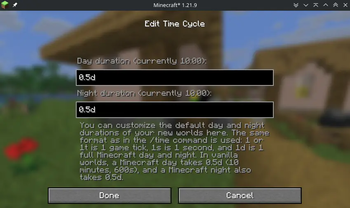
Durations of time markers can be configured for each periodic world clock and are saved across server restarts / world saves.
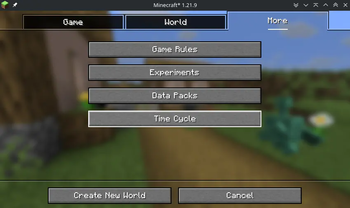
For clients, the time cycle of a world can be configured upon creation, by selecting the "More" tab at the top, then
clicking the "Time Cycle" button. You can also configure default time cycle durations for all new created worlds, in the mod's
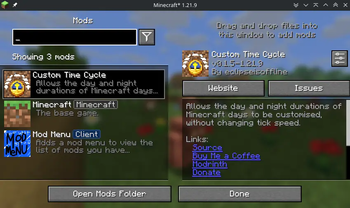
global configuration screen. This can be accessed on Fabric using the ModMenu mod, and on NeoForge using the built-in mod menu.
Global configuration is stored in .minecraft/config/customtimecyle.json.
The mod also adds a simple command, /timecycle, which can be used to alter the time cycle on servers and existing singleplayer worlds.
Its usage is as follows:
/timecycle status- Shows a simple status message displaying which time durations and rates are currently in use in the current dimension.
/timecycle set <dayduration> <nightduration>- Modifies the durations of the Minecraft day and night in the current dimension.
/timecycle set from <from> to <to> duration <duration>- Modifies the duration in ticks between 2 time markers in the current dimension.
/timecycle set from <from> to <to> rate <rate>- Modifies the rate at which time progresses between 2 time markers in the current dimension.
/timecycle reset- Resets the rates of all time markers in the current dimension.
/timecycle of <clock> ...- Allows running all of the above commands, but for that specific clock instead of the one of the current dimension.
The rate modifications the mod makes apply on top of the vanilla /time rate command.
Using the /timecycle command requires the timecycle.command permission or operator level 2.
Modpack developers can also include the following file in the config folder to preconfigure time cycle durations for
worlds on servers or clients:
{
  "daytime": <day time ticks>,
  "nighttime": <night time ticks>
}
How it works (technical explanation)
Since Minecraft 26.1, the game now has a "clock" concept. In vanilla, there are only 2 clocks, and only 1 that matters here:
the minecraft:overworld clock, for the overworld dimension.
Clocks in Minecraft control timelines, and can progress at a custom rate, though
by default, they progress at the same rate as the server's tick rate: 20 ticks per second. In vanilla, this rate can
be configured for the entire clock, using the /time rate command.
This mod simply allows configuring the rate at which a clock progresses on a time marker
basis. Time markers mark a certain moment along the clock, such as minecraft:day for the start of the day,
or minecraft:midnight for midnight. You'll have seen these in the /time set command too. The mod adds 2 custom time
markers for the vanilla minecraft:overworld clock, customtimecycle:sunrise and customtimecycle:sunset. These
are added primarily for legacy reasons, and are used for the /timecycle set <dayduration> <nightduration> command.
As was said before, this mod can work on any clock, as long as it is a periodic one, like minecraft:overworld. This makes
it work well with custom dimensions added by datapacks/mods that use their own clock.
Verfügbare Versionen
Custom Time Cycle auf dem Server installieren
Server bestellen
Bestelle einen Minecraft Java Server mit mindestens 3 GB RAM (4 GB empfohlen).
fabric Loader setzen
Wähle im Panel unter "Egg" den fabric-Loader und die passende Minecraft-Version (26.3).
Mod installieren
Öffne den Mod-Browser im Dashboard und suche nach "Custom Time Cycle". Klicke "Installieren" – fertig! Alternativ: Lade die .jar via SFTP in den /mods Ordner.
Kompatibilität
Mod-Loader
Minecraft-Versionen
26.3, 26.2, 26.1.2 (+22 weitere)
Server-seitig
✓ ErforderlichEmpfohlener RAM
4 GB(min. 3 GB)Häufige Fragen
Custom Time Cycle Server crasht beim Start – was tun?
Häufigste Ursache: falsche fabric-Version oder zu wenig RAM. Prüfe im Server-Log (latest.log), ob ein "OutOfMemoryError" oder "Mixin"-Fehler auftritt. Bei Mado Hosting: Stelle sicher, dass mindestens 3 GB RAM zugewiesen sind und der Loader zur Mod-Version passt (26.3). Über das Panel kannst du den Loader mit einem Klick wechseln.
Ist Custom Time Cycle mit fabric und neoforge kompatibel?
Custom Time Cycle unterstützt offiziell fabric, neoforge für Minecraft 26.3, 26.2, 26.1.2. Im Mado Dashboard werden inkompatible Loader-Kombinationen automatisch erkannt.
Server laggt mit Custom Time Cycle – wie optimiere ich die Performance?
Empfohlener RAM: 4 GB (+1 GB pro 8 Spieler). Prüfe mit /spark profiler, ob Custom Time Cycle den meisten Tick-Time verbraucht. Häufige Fixes: Server-View-Distance auf 8-10 reduzieren, bei Forge "performant" oder "starlight" als Zusatz-Mod installieren. Bei Mado Hosting läuft dein Server auf NVMe-SSDs mit dedizierten CPU-Kernen für minimale Latenz.
Ähnliche Mods






Modded Server mieten
Installiere Custom Time Cycle mit nur einem Klick auf deinem Server.
Details
- Lizenz
- GNU Lesser General Public License v3.0 only
- Server-seitig
- Erforderlich