Custom Waypoints
This mod allows you to create custom waypoints with extensive customization and utilities using the editor and commands.
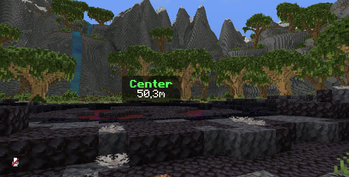
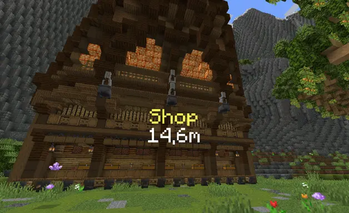
Screenshots
Über diese Mod
Custom Waypoints
Create waypoints, timers, counters, follow labels and mission markers anywhere in the world, with backgrounds, animations, gradients, movement, live distance and more. Use client commands, the visual editor with its in-world gizmo, or control everything from a server with the Custom Waypoints plugin.
Supported versions
| Loader | Versions |
|---|---|
| Fabric | 1.20.1 · 1.20.4 · 1.21.1 · 1.21.4 · 1.21.5 · 1.21.8 · 1.21.11 · 26.2 |
| NeoForge | 1.20.1 · 1.20.4 · 1.21.1 · 1.21.4 · 1.21.5 · 1.21.8 · 1.21.11 · 26.2 |
| Forge | 1.20.1 · 1.20.4 |
Base command
/waypoint
On 1.21.8 → 26.2 use /customwaypoint instead, because vanilla Minecraft already has its own /waypoint. Everything else is the same.
Features
- Display waypoints with text at any position, scale and rotation
- Display timers (countdown) and counters (count up, optional decimals) with tick sounds, any sound id from vanilla or resource packs
- Follow waypoints that stay on a player or entity, and come back when the target loads again
- Figures: GTA-style mission markers on the ground (circle, star, arrow, heart...) or any text/number, with walls that fade up or down, pitch/roll to put them on walls and an adjustable border (NEW)
- Looping figure animations (NEW): pulse, grow, spin, bob, height, wave, ripple, breathe, flicker and rainbow, each with its own time and amount, several at once
- Figure gradients (NEW): colors spread along the fade, edited on a gradient bar
- Visual editor with live preview, in-world gizmo (NEW), sliders, color wheel, undo/redo and history
- Move any waypoint to another position with interpolation presets and custom time
- Backgrounds with 4 styles, opacity and fade out, one background per line with its own color, size and style, plus a line spacing slider (NEW)
- Entry / exit animations: scale, slide, bounce, spin, pixelate, glitch
- Live distance
{distance}, look-to-reveal text{on_view_radius:N} - Copy and paste whole waypoints as one command (NEW)
- Inline items and textures inside text, HEX colors, multiline text
- Waypoints are saved per world and per dimension
- Server control with the Custom Waypoints plugin (Paper): waypoints for all players and for the ones who join later (NEW), synced timers, actions when a player reaches or removes a waypoint, and live editing from the editor (NEW)
- API for other mods (NEW)
Visual editor
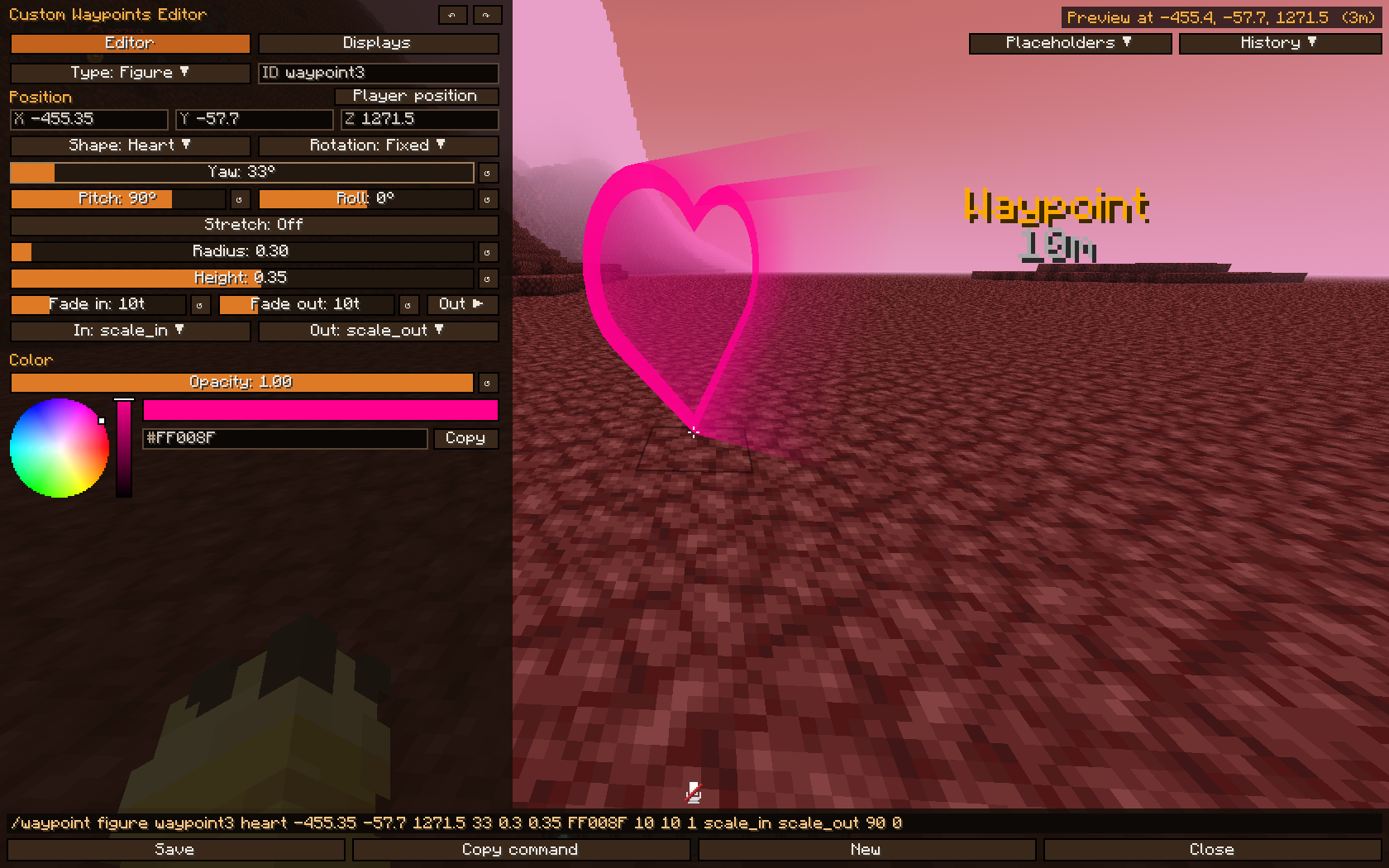
Press M (Controls → Custom Waypoints) or run /waypoint editor. Press N to open the Displays tab directly.
- Edit every waypoint type (text, timer, counter, follow and figure) with sliders, a color wheel and a live preview in the world
- Gizmo (NEW): the waypoint has handles in the world. Drag the red, green and blue arrows to move it along an axis, the white square in the middle to move it freely, the green ring to turn it, the red ring to tilt figures, the yellow knob to change its size, and with Stretch: On the cyan handles to change its widths. Hold Ctrl to snap to half blocks and 15°.
- Right click over the world turns the camera, and you keep walking while you do; F5 changes the camera view (NEW)
- Displays tab: every active waypoint of your dimension, nearest first, to Edit or Delete
- Animations (NEW): the switch opens every animation as a square; the ones you turn on appear below with their own time and amount
- Gradient bar (NEW): click to add a color, drag to move it, right click to take it out. It colors the fade, and the Base color button keeps editing the figure itself.
- Background per line (NEW): pick a line and give it its own color, opacity, size and style, or pick All for the whole text
- Set to everyone (NEW): on servers with the plugin, Save sends the waypoint to every player and Delete takes it away for everyone
- The bottom bar shows the paste command: click it or Copy command to use it in chat, command blocks or datapacks
- Ctrl+S saves, Ctrl+Z / Ctrl+Y undo and redo, and History keeps the last 8 saved, overwritten or deleted waypoints (also after restarting)
- The ↺ button puts a slider back to its default value, and holding Shift snaps sliders in steps of 5
- Placeholders button: click one to insert it in the text
- Save creates or updates the waypoint, New starts a fresh one at your position with the next free ID
- Works like an overlay: you can keep walking while the editor is open
Examples
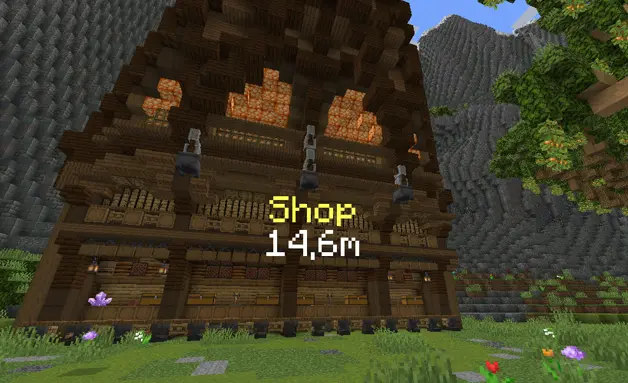
Shop with distance:
/waypoint set shop 464.49 -51.71 -724.91 9 follow far_front false 20 scale_in scale_out false &eShop/n{distance}m
Text with a rounded background, only revealed when you look at it:
/waypoint set shop 100 70 100 1 follow behind true black 0.4 1 rounded 10 scale_in scale_out false &6Shop{on_view_radius:2}/n&7Open 24/7{/on_view}
Timer with a sound:
/waypoint timer set raid 100 70 100 1 follow front true black 0.45 1.2 rounded 10 scale_in scale_out block.note_block.pling false Time: &c"01:00:00"
Stopwatch counter with decimals:
/waypoint counter set stopwatch 100 70 100 1 follow behind false 10 scale_in scale_out none true true Time: &a{counter}s/nDistance: {distance}
Label that follows a player:
/waypoint follow boss Steve 0 2.5 0 1 far_front true black 0.5 1 rounded 10 scale_in scale_out false &c{entity_displayname}/n&7{distance}m
Mission marker that spins and changes color along its fade (NEW):
/waypoint figure mission1 circle 100 64 100 0 1.5 2 gold 20
/waypoint animate mission1 spin+breathe 60 0.4
/waypoint gradient mission1 gold "#55FFFF"
Number "2" that turns to face you:
/waypoint figure step2 2 110 64 100 follow 1 1.5 "#55FFFF" 10
Arrow on a wall, with animations and fade out:
/waypoint figure door arrow 100 66 100 0 1 0.3 "#FFAA00" 10 20 0.9 scale_in scale_out 90 0
Move a waypoint and bring it back:
/waypoint move shop 470 -50 -720 9 follow smooth 40
/waypoint move_reset shop bounce 20
Copy a waypoint and paste it anywhere (NEW):
/waypoint copy shop
/waypoint paste
Commands
Base command: /waypoint   (1.21.8 → 26.2: /customwaypoint)

Text:
/waypoint set <id> <x> <y> <z> <scale> <rotation> <render> true <bgcolor> <bgopacity> <bgscale> <bgstyle> <fade_in> [<fade_out> <opacity>] <anim_in> <anim_out> <textbackground> <text>
/waypoint set <id> <x> <y> <z> <scale> <rotation> <render> false <fade_in> [<fade_out> <opacity>] <anim_in> <anim_out> <textbackground> <text>

Timer (counts down):
/waypoint timer set <id> <x> <y> <z> <scale> <rotation> <render> true <bgcolor> <bgopacity> <bgscale> <bgstyle> <fade_in> [<fade_out> <opacity>] <anim_in> <anim_out> <sound> <textbackground> <text + "HH:MM:SS">
/waypoint timer set <id> <x> <y> <z> <scale> <rotation> <render> false <fade_in> [<fade_out> <opacity>] <anim_in> <anim_out> <sound> <textbackground> <text + "HH:MM:SS">
/waypoint stoptimer <id>
/waypoint resumetimer <id>

Counter (counts up):
/waypoint counter set <id> <x> <y> <z> <scale> <rotation> <render> true <bgcolor> <bgopacity> <bgscale> <bgstyle> <fade_in> [<fade_out> <opacity>] <anim_in> <anim_out> <sound> <decimals> <textbackground> <text + {counter}>
/waypoint counter set <id> <x> <y> <z> <scale> <rotation> <render> false <fade_in> [<fade_out> <opacity>] <anim_in> <anim_out> <sound> <decimals> <textbackground> <text + {counter}>

Follow:
/waypoint follow <id> <player|UUID> <offsetX> <offsetY> <offsetZ> <scale> <render> true <bgcolor> <bgopacity> <bgscale> <bgstyle> <fade_in> [<fade_out> <opacity>] <anim_in> <anim_out> <textbackground> <text>
/waypoint follow <id> <player|UUID> <offsetX> <offsetY> <offsetZ> <scale> <render> false <fade_in> [<fade_out> <opacity>] <anim_in> <anim_out> <textbackground> <text>

Figures:
/waypoint figure <id> <shape> <x> <y> <z> <rotation> <radius> <height> <color> <fade_in> [<fade_out> <opacity> [<anim_in> <anim_out> [<pitch> <roll> [<width_x> <width_z>]]]]
/waypoint animate <id> <preset[+preset...]> [time] [amount]        (NEW)
/waypoint animate <id> add <preset> [time] [amount]                (NEW)
/waypoint animate <id> remove <preset> | stop                      (NEW)
/waypoint gradient <id> <color[:position]>... | none               (NEW)

Move:
/waypoint move <id> <x> <y> <z> <scale> <rotation> <interpolation> <time>
/waypoint move_reset <id> <interpolation> <time>

Other:
/waypoint background <id> multiline <true|false>                   (NEW)
/waypoint copy [id]                                                (NEW)
/waypoint paste [text]                                             (NEW)
/waypoint remove <id|all> [fadeout]
/waypoint remove_radius <id> <radius> <fadeout>
/waypoint list
/waypoint editor
Figure animations
Several can run at once, each with its own time (ticks of one loop) and amount. Two figures with the same animation never run in step.
| Preset | What it does | Amount |
|---|---|---|
pulse |
Grows and shrinks | Depth 0-1 |
grow |
Grows out of nothing and pulls back in | Depth 0-1 |
spin |
Turns around its own axis | Degrees per loop |
bob |
Floats up and down | Blocks |
height |
Takes the walls to this height and back | Height in blocks |
wave |
The top of the walls runs around the figure like a wave | Waves per loop |
ripple |
The same wave, from the middle outwards | Waves per loop |
breathe |
Fades out and back in | Depth 0-1 |
flicker |
Unsteady, like a broken sign | Strength 0-1 |
rainbow |
Cycles every color | Saturation 0-1 |
Options
| Option | Values |
|---|---|
| scale | Size of the waypoint |
| rotation | follow (faces the camera) · follow_horizontal · follow_vertical / follow_vertical_<yaw> · a fixed yaw like 0 90 180 270 |
| render | behind (hidden by blocks) · front (through blocks) · far_behind · far_front (stay readable from far away, the default in the editor) |
| bgcolor | BLACK DARK_BLUE DARK_GREEN DARK_AQUA DARK_RED DARK_PURPLE GOLD GRAY DARK_GRAY BLUE GREEN AQUA RED LIGHT_PURPLE YELLOW WHITE or HEX #RRGGBB |
| bgopacity / opacity | 0–1 |
| bgscale | Size of the background around the text |
| bgstyle | square square_small rounded rounded_small |
| fade_in / fade_out | Ticks (20 ticks = 1 second). fade_out and opacity are optional and go together |
| anim_in | none scale_in left_in right_in up_in down_in bounce_in spin_in pixelate_in glitch_in |
| anim_out | none scale_out left_out right_out up_out down_out bounce_out spin_out pixelate_out glitch_out |
| textbackground | true / false (vanilla shadow/background behind each letter) |
| sound | none or any sound id: block.note_block.pling, or "mypack:tick" with a namespace (in quotes) |
| decimals | true / false (tenths of a second) |
| interpolation | smooth linear step bounce |
| time (move) | Ticks |
| shape (figure) | circle square star triangle diamond pentagon hexagon octagon heart plus cross arrow lightning moon crown check question exclamation pin, or any text like 1, A, "10" |
| rotation (figure) | A fixed yaw, follow (turns with your position) or follow_<yaw> (follow_180 points an arrow at you) |
| radius / height (figure) | Blocks. A negative height fades the walls downward |
| border (figure) | Width of the bright edge, 1 being the usual one (NEW) |
| color (figure) | A color name or "#RRGGBB" |
| pitch / roll (figure) | Degrees. pitch 90 stands the figure up like a sign on a wall, roll turns it in its own plane |
| width_x / width_z (figure) | Stretch a shape to that many blocks instead of 2 × radius |
Tips
Text formatting
&a,&l... = Minecraft color and format codes&#RRGGBB,<#RRGGBB>,#RRGGBBor#(RRGGBB)= HEX color/n= new line|= space
Timers and counters
- Timer time goes in quotes:
"01:00:00". Text around it is kept:Time: &c"00:10:00" !!! - Hours hide under 1 hour (
59:59) and minutes under 1 minute (59) - In counters,
{counter}(orcounter) marks where the value goes
Inline items
{"diamond"}
{"diamond_sword,scale:1.5"}
{"diamond,scale:1.5,nbt:3"}     ← nbt = CustomModelData
{"diamond,s:1.5,n:3"}           ← short version
Inline textures
{"assets/minecraft/textures/item/apple.png,s:1"}
{"resourcepack MyPack/assets/minecraft/textures/custom/skull.png,scale:2.5"}
Per world and dimension
- Waypoints are saved per singleplayer world or server, and only show in the dimension they were created in
- The same ID can exist in the Overworld and in the Nether
- Figures only render over loaded chunks inside your render distance
Long texts
- Chat only allows 256 characters, so use command blocks, or
/waypoint copyand/waypoint paste, which reads the clipboard (NEW)
Copy and paste
/waypoint copy writes the waypoints as one paste command (all of them without an ID); paste without text reads the clipboard. The editor's bottom bar shows the same command, and several waypoints go one after another: {(...)(...)}.
/waypoint paste {(type:figure,id:mission1,pos:[100,64,100],scale:1,rotation:0,render:far_front,fadein:20,fadeout:20,opacity:1,animin:scale_in,animout:scale_out,shape:"circle",radius:1.5,height:2,color:#FFAA00,border:1,presets:[spin:60:360],gradient:[#FFAA00:0,#55FFFF:1])}
Placeholders
| Placeholder | Description |
|---|---|
{distance} |
Distance to the waypoint in whole blocks |
{distance_decimal} |
Distance with 1 decimal |
{counter} |
Live counter value (counters) |
"HH:MM:SS" |
Live remaining time (timers) |
{entity_displayname} |
Name of the followed player or entity (follow) |
{on_view_radius:N} |
Hides the text after it until your crosshair aims within N blocks of the waypoint |
{/on_view} |
Ends the {on_view_radius:N} section |
Custom Waypoints Plugin (servers)
With the plugin on a Paper server, send waypoints to players with the mod (Fabric, Forge or NeoForge). Players without the mod can still join normally.
- Every client command, as
/waypointplugin(alias/wpl) with a target before the ID:@aor a player name @awaypoints are kept for the players who join later, and their timers run once, so everybody sees the same time (NEW)- Waypoint actions: run console commands when a player walks into a waypoint (
on_step) or when it is removed (on_remove), with radius, waits and PlaceholderAPI support, all from the config - Live editing (NEW): with Set to everyone on in the client editor, an operator saves or deletes waypoints for every player
- Permission:
customwaypoints.admin(default: OP)
Plugin commands
/wpl set <@a|player> <id> <x> <y> <z> ...
/wpl timer set <@a|player> <id> <x> <y> <z> ...
/wpl counter set <@a|player> <id> <x> <y> <z> ...
/wpl follow <@a|player> <id> <target> ...
/wpl figure <@a|player> <id> <shape> <x> <y> <z> ...
/wpl animate <@a|player> <id> <presets|add|remove|stop> [time] [amount]   (NEW)
/wpl gradient <@a|player> <id> <color[:position]>... | none               (NEW)
/wpl background <@a|player> <id> multiline <true|false>                   (NEW)
/wpl paste <@a|player> {(...)}                                           (NEW)
/wpl copy <@a|player> [id]                                               (NEW)
/wpl move <@a|player> <id> ...
/wpl move_reset <@a|player> <id> ...
/wpl stoptimer <@a|player> <id>
/wpl resumetimer <@a|player> <id>
/wpl remove <@a|player> <id|all> [fadeout]
/wpl remove_radius <@a|player> <id> <radius> <fadeout>
/wpl list <@a|player>
/wpl reload
Plugin examples
/wpl set @a spawn 0 70 0 1.5 follow far_front true black 0.5 1 rounded 10 scale_in scale_out false &6&lSpawn/n&7{distance}m
/wpl timer set @a event 0 72 0 2 follow front true black 0.5 1.2 rounded 10 scale_in scale_out block.note_block.hat false &eEvent starts in &f"00:05:00"
/wpl figure Steve mission1 star 150 64 -30 0 2 3 gold 20 20 1 scale_in scale_out
/wpl animate @a mission1 wave 40 3
/wpl follow @a king Steve 0 2.5 0 1 far_front false 10 scale_in scale_out false &6King: &f{entity_displayname}
/wpl remove @a event 20
Waypoint actions (plugins/CustomWaypoints/config.yml)
Everything is set per waypoint id, or * for every waypoint. Apply changes with /wpl reload.
waypoint-actions:
  mission1:                        # waypoint id, or "*" for every waypoint
    remove_radius: 4               # removed when a player gets this close
    remove_only_for_player: true   # true: only for that player / false: for everyone who has it
    on_remove:
      - "console_command: say %player% completed the mission!"
      - "wait: 1"                  # seconds
      - "console_command: give %player% minecraft:diamond 3"
      - "wait_ticks: 10"           # ticks
      - "console_command: title %player% title {\"text\":\"Mission complete\",\"color\":\"gold\"}"
  checkpoint:
    step_radius: 5                 # runs on_step without removing the waypoint
    execute_only_once: true        # on_step only runs once per player
    on_step:
      - "action_wait_time: 3"      # NEW: only goes on if the player stays 3 seconds in the waypoint
      - "console_command: title %player% actionbar {\"text\":\"Checkpoint!\",\"color\":\"aqua\"}"
      - "console_command: playsound minecraft:entity.experience_orb.pickup master %player%"
remove_radius: removes the waypoint when a player walks into it, no extra command needed.on_removeruns for the player who reached it.remove_only_for_player:true(default) removes it only for that player,falseremoves it for every playeron_removealso runs with/wpl remove, when a timer ends or when a followed entity dies (once per player that loses the waypoint)step_radius+on_step: runs every time a player enters the radius, without removing the waypointexecute_only_once:truerunson_steponly once per player, even if they leave and come back (until/wpl reload, a restart or setting the waypoint again)console_command: <command>runs a command as the consolewait: <seconds>/wait_ticks: <ticks>wait before the next actionaction_wait_time: <seconds>: waits that long, but only while the player stays inside the waypoint. If they walk out, the actions after it never run, so you can reward standing still, capturing a point or finishing a channel.- Placeholders:
%player%,%waypoint%and every PlaceholderAPI placeholder
Mission example: send the marker, and the config above rewards the player who reaches it:
/wpl figure @a mission1 circle 150 64 -30 0 1.5 2 gold 20
API for other mods
CustomWaypointsApi.text("shop")
        .at(100.5, 70, 100.5)
        .text("&6Shop/n{distance}m")
        .background(0x000000, 0.4f)
        .fade(10, 20)
        .add();

CustomWaypointsApi.figure("mission1")
        .at(100, 64, 100).shape("circle").radius(1.5f).height(2.0f)
        .color(0xFFAA00).animate("spin", 60, 360).gradient(0xFFAA00, 0x55FFFF)
        .add();

CustomWaypointsApi.events().onEnter("mission1", 3.0, id -> ...);
CustomWaypointsApi.shapes().register("hexagram", outline);
CustomWaypointsApi.paste(text);
CustomWaypointsApi.remove("shop", 20);
- Builders:
text,followandfiguretake the same values as the commands;add()gives back a handle to read the waypoint, move it or remove it later - Paste and copy: the same text format as the commands, the shortest way to add anything
- Events:
onEnter/onLeavewhen the player walks into or out of a radius around a waypoint (*for every waypoint), andonAdded/onRemoved - Shapes:
shapes().register(name, outline)adds a figure shape of your own, which then shows in the command and the editor
Verfügbare Versionen
Custom Waypoints auf dem Server installieren
Server bestellen
Bestelle einen Minecraft Java Server mit mindestens 3 GB RAM (4 GB empfohlen).
bukkit Loader setzen
Wähle im Panel unter "Egg" den bukkit-Loader und die passende Minecraft-Version (26.2).
Mod installieren
Öffne den Mod-Browser im Dashboard und suche nach "Custom Waypoints". Klicke "Installieren" – fertig! Alternativ: Lade die .jar via SFTP in den /mods Ordner.
Kompatibilität
Mod-Loader
Minecraft-Versionen
26.2, 1.21.11, 1.21.8 (+5 weitere)
Server-seitig
~ OptionalEmpfohlener RAM
4 GB(min. 3 GB)Häufige Fragen
Custom Waypoints Server crasht beim Start – was tun?
Häufigste Ursache: falsche bukkit-Version oder zu wenig RAM. Prüfe im Server-Log (latest.log), ob ein "OutOfMemoryError" oder "Mixin"-Fehler auftritt. Bei Mado Hosting: Stelle sicher, dass mindestens 3 GB RAM zugewiesen sind und der Loader zur Mod-Version passt (26.2). Über das Panel kannst du den Loader mit einem Klick wechseln.
Ist Custom Waypoints mit bukkit und fabric und forge und neoforge und paper und purpur und spigot kompatibel?
Custom Waypoints unterstützt offiziell bukkit, fabric, forge, neoforge, paper, purpur, spigot für Minecraft 26.2, 1.21.11, 1.21.8. Achtung: Forge- und Fabric-Mods sind NICHT untereinander kompatibel – wähle einen Loader und bleibe dabei. Im Mado Dashboard werden inkompatible Loader-Kombinationen automatisch erkannt.
Server laggt mit Custom Waypoints – wie optimiere ich die Performance?
Empfohlener RAM: 4 GB (+1 GB pro 8 Spieler). Prüfe mit /spark profiler, ob Custom Waypoints den meisten Tick-Time verbraucht. Häufige Fixes: Server-View-Distance auf 8-10 reduzieren, bei Forge "performant" oder "starlight" als Zusatz-Mod installieren. Bei Mado Hosting läuft dein Server auf NVMe-SSDs mit dedizierten CPU-Kernen für minimale Latenz.
Ähnliche Mods





Modded Server mieten
Installiere Custom Waypoints mit nur einem Klick auf deinem Server.