
Desired Servers
Your desired servers will always be listed.
Über diese Mod





Join atleast  of us on Discord right now!
From a page that is GPLv3 licensed that sounds very familiar to this.

Desired Servers
This is a mod that removes the need to ship a servers.dat file that overwrites player-added servers.
Stop shipping that file and add Desired Servers! You can add multiple servers with a simple json format.
On first run, the mod will generate a desiredservers.json with the following content if one isn't present:
[
  {
    "serverName": "Desired Server",
    "serverIP": "127.0.0.1"
  },
  {
    "serverName": "Another Desired Server!",
    "serverIP": "192.168.1.1"
  }
]
Adding a server is as simple as adding another json block with the details.
The server is added to the server list on load, if it is already there it will be ignored.
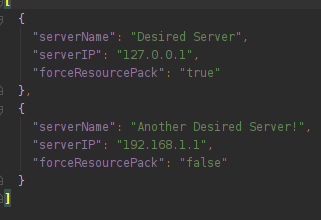
Server list JSON
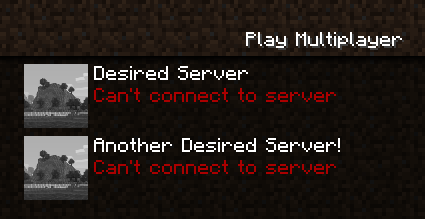
Servers in the multiplayer screen
The TidBit
The Featured Servers/ folder now lives in the config folder.
The What and How
Forge didn't like how the mod was laid out and wanted it to be more like the default example. So I added in some stuff for that. Also the mod was catching way too much stuff with reporting, so I unwrapped that added try/catch clauses where it was absolutely necessary.

Other Info
* Same license as the original GPLv3 at https://www.curseforge.com/minecraft/mc-mods/featured-serversported to 1.16.1
source now available
client only
Verfügbare Versionen
Desired Servers auf deinem Client installieren
Mod-Loader lokal installieren
Installiere fabric für deine lokale Minecraft-Version.
Passende Datei herunterladen
Wähle die Desired Servers-Datei für fabric und Minecraft 1.21.1.
Mod installieren
Lege die .jar-Datei in deinem lokalen .minecraft/mods-Ordner ab und starte Minecraft neu. Eine Installation auf dem Server ist nicht nötig.
Kompatibilität
Mod-Loader
Minecraft-Versionen
1.21.1, 1.20.6, 1.20.4 (+12 weitere)
Server-seitig
✗ Nicht unterstütztEmpfohlener RAM
4 GB(min. 3 GB)Häufige Fragen
Muss Desired Servers auf dem Minecraft Server installiert werden?
Nein. Modrinth kennzeichnet Desired Servers serverseitig als nicht unterstützt. Installiere die Mod nur im lokalen Minecraft-Mods-Ordner. Dein Server kann unverändert bleiben, sofern die Mod-Seite keine zusätzliche Abhängigkeit nennt.
Welche Version und welchen Loader braucht Desired Servers?
Nutze eine Datei für fabric, forge, neoforge und exakt deine Minecraft-Version. Unterstützte Versionen sind unter anderem 1.21.1, 1.20.6, 1.20.4. Loader-Dateien sind nicht untereinander austauschbar.
Desired Servers funktioniert nicht – was kann ich prüfen?
Prüfe zuerst Minecraft-Version, Loader-Version und erforderliche Abhängigkeiten. Lege die .jar-Datei im lokalen .minecraft/mods-Ordner ab und entferne ältere Duplikate. Da die Mod clientseitig ist, löst mehr Server-RAM dieses Problem nicht.
Ähnliche Mods




![[ETF] Entity Texture Features](https://cdn.modrinth.com/data/BVzZfTc1/af683d206d50b05258d865b0d6e4aa2f2cee12f2_96.webp)

Minecraft Server für deine Gruppe
Desired Servers bleibt auf deinem Client. Hoste dazu eine kompatible Welt für deine Mitspieler.