DisplayFPS
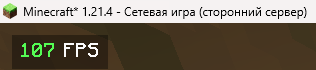
DisplayFPS shows your in-game FPS with customizable colors, positions, and background options. Perfect for monitoring performance in style!
Screenshots
Über diese Mod
[EN]
DisplayFPS is a lightweight and highly customizable mod that displays your in-game FPS (frames per second) directly on your screen. Whether you're optimizing your game or just want to keep an eye on performance, DisplayFPS has you covered with a variety of features:
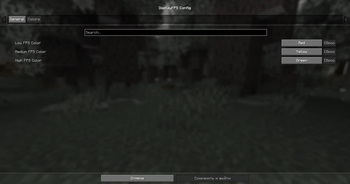
- Customizable Colors: Set different colors for low, medium, and high FPS values to quickly see your performance at a glance.
- Flexible Positioning: Choose from four predefined positions (top-left, top-right, bottom-left, bottom-right) to place the FPS counter wherever you like.
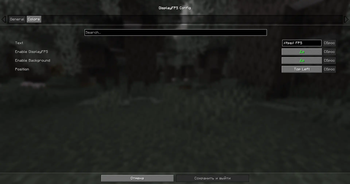
- Background Options: Enable or disable a background for better readability, with adjustable padding.
- Custom Text: Personalize the display text using placeholders like
$fps$to show the FPS value in your preferred format (e.g., "FPS: $fps$"). - Cloth Config Integration: Easily tweak all settings through an intuitive in-game configuration menu (requires Cloth Config).
- ModMenu Support: Access the config screen directly from ModMenu for a seamless experience.
Compatibility:
- Supports Minecraft 1.20.x, and 1.21.x.
- Requires Fabric API and Fabric Language Kotlin.
- Optional: Cloth Config for in-game settings, ModMenu for easy config access.
Note: Java 21 or higher is required!
Enhance your Minecraft experience with DisplayFPS and keep track of your performance in style!
================================================================================
[RU]
DisplayFPS — это лёгкий и гибкий мод, который отображает ваш FPS (кадры в секунду) прямо на экране в Minecraft. Хотите оптимизировать игру или просто следить за производительностью? DisplayFPS предлагает множество функций для удобного мониторинга:
- Настраиваемые цвета: Установите разные цвета для низкого, среднего и высокого FPS, чтобы сразу видеть, как работает игра.
- Гибкое расположение: Выберите одну из четырёх позиций (верхний левый, верхний правый, нижний левый, нижний правый угол) для отображения счётчика FPS.
- Настройка фона: Включите или отключите фон для лучшей читаемости, с регулируемыми отступами.
- Персонализированный текст: Настройте отображаемый текст с помощью плейсхолдеров, таких как
$fps$, чтобы показывать FPS в нужном формате (например, "FPS: $fps$"). - Интеграция с Cloth Config: Удобно изменяйте все настройки через интуитивное меню в игре (требуется Cloth Config).
- Поддержка ModMenu: Открывайте экран настроек прямо из ModMenu для простоты использования.
Совместимость:
- Поддерживает Minecraft 1.20.x и 1.21.x.
- Требует Fabric API и Fabric Language Kotlin.
- Опционально: Cloth Config для настроек в игре, ModMenu для удобного доступа к настройкам.
Примечание: Для мода требуется Java 21 или выше!
Улучшайте свой игровой опыт в Minecraft с DisplayFPS и следите за производительностью стильно!
Verfügbare Versionen
DisplayFPS auf deinem Client installieren
Mod-Loader lokal installieren
Installiere fabric für deine lokale Minecraft-Version.
Passende Datei herunterladen
Wähle die DisplayFPS-Datei für fabric und Minecraft 1.21.5.
Mod installieren
Lege die .jar-Datei in deinem lokalen .minecraft/mods-Ordner ab und starte Minecraft neu. Eine Installation auf dem Server ist nicht nötig.
Kompatibilität
Mod-Loader
Minecraft-Versionen
1.21.5, 1.21.4, 1.21.3 (+10 weitere)
Server-seitig
✗ Nicht unterstütztEmpfohlener RAM
4 GB(min. 3 GB)Häufige Fragen
Muss DisplayFPS auf dem Minecraft Server installiert werden?
Nein. Modrinth kennzeichnet DisplayFPS serverseitig als nicht unterstützt. Installiere die Mod nur im lokalen Minecraft-Mods-Ordner. Dein Server kann unverändert bleiben, sofern die Mod-Seite keine zusätzliche Abhängigkeit nennt.
Welche Version und welchen Loader braucht DisplayFPS?
Nutze eine Datei für fabric und exakt deine Minecraft-Version. Unterstützte Versionen sind unter anderem 1.21.5, 1.21.4, 1.21.3. Loader-Dateien sind nicht untereinander austauschbar.
DisplayFPS funktioniert nicht – was kann ich prüfen?
Prüfe zuerst Minecraft-Version, Loader-Version und erforderliche Abhängigkeiten. Lege die .jar-Datei im lokalen .minecraft/mods-Ordner ab und entferne ältere Duplikate. Da die Mod clientseitig ist, löst mehr Server-RAM dieses Problem nicht.
Ähnliche Mods






Minecraft Server für deine Gruppe
DisplayFPS bleibt auf deinem Client. Hoste dazu eine kompatible Welt für deine Mitspieler.