
Dokko's Hotbar Optimizer
Makes hotbar sync 1 tick sooner, reducing ghost totems and making attribute swapping easier
Screenshots
Über diese Mod
Dokko's Hotbar Optimizer
Dokko's Hotbar Optimizer is a client-side mod designed to refine how Minecraft handles hotbar slot changes.
Disclaimer
This mod may be detected as a cheat by some anti-cheats.
Please ask if this mod is allowed before using it on a server.
Disallowed on PvPClub, Stray and FlowPvP
Probably banned on most servers
This mod breaks the Minecraft protocol, this mod has been banned from most servers.
The owner and I therefore decided to make this project unmaintained, in particular because of the first problemWith all this, I do not recommend using this mod (except on private servers)
This mod is also a cheat on <50ms latency
What does the mod do?
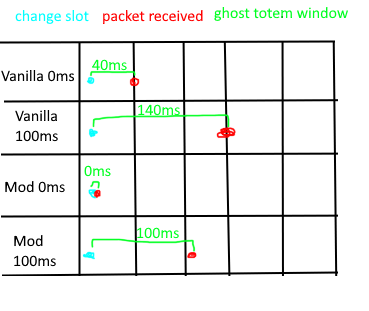
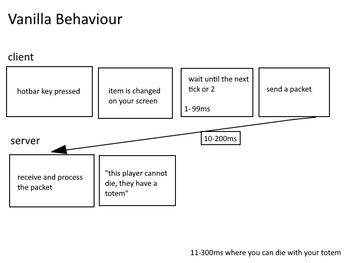
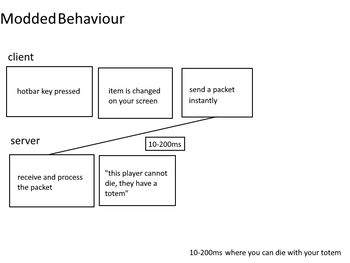
In vanilla Minecraft, when you switch hotbar slots, your client waits up to 50ms (one game tick) before telling the server. This mod removes that delay and sends the update instantly.
This fundamental change brings noticeable improvements to several key areas of gameplay:
Ghost Totem Reduction:
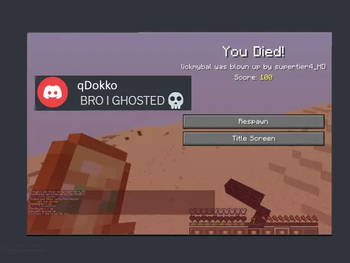
Totems are more reliable because the server knows you’re holding one sooner, reducing the amount of time in which you can "ghost".- Low ping (20ms): Reduces the chance of ghost totems by ~71%
- High Ping (150ms): Still helps, ~25% better
Attribute Swapping Improvement:
Quick swaps for things like axe combos or breach tech feel smoother and hit more reliably.- Low ping: Server sees your swap ~71% faster
- High ping: ~25% faster
Basically, it makes hotbar actions more responsive and consistent—great for PvP, crystal fights, and clutch totem saves.
How do I turn it on / off?
You can enable / disable the mod with ModMenu's settings screen.
Mod settings (v1.2.2)
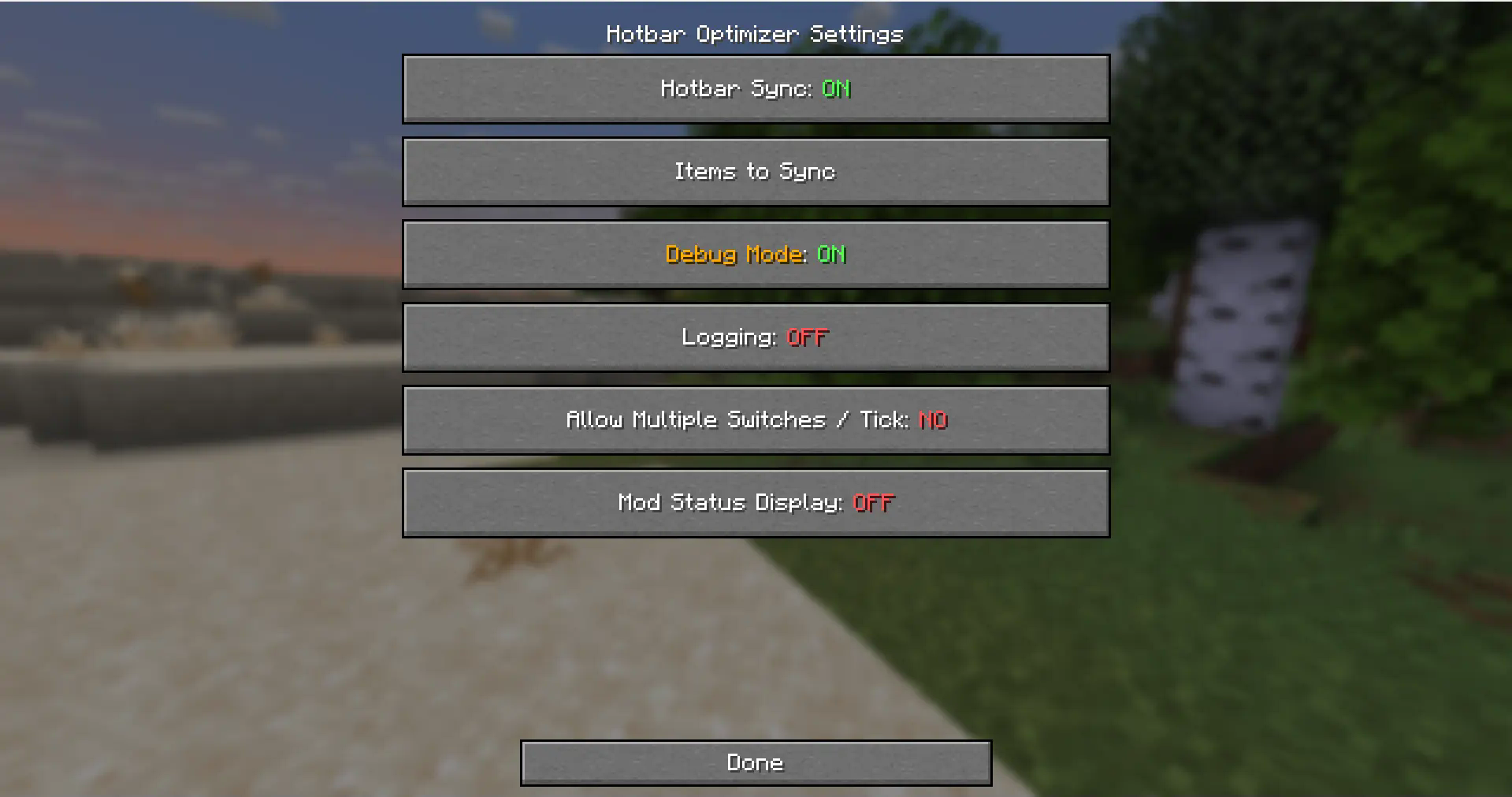
- Hotbar Sync: the state of the mod.
- Items To Sync: the items that the mod will run on.
- Debug Mode: thats for developers, don't use it.
- Logging: also for developers.
- Allow Multiple Switches / Tick: if enabled some servers might flag more.
- Mod Status Display: when you join a server that bans the mod it will tell you.
Verfügbare Versionen
Dokko's Hotbar Optimizer auf deinem Client installieren
Mod-Loader lokal installieren
Installiere fabric für deine lokale Minecraft-Version.
Passende Datei herunterladen
Wähle die Dokko's Hotbar Optimizer-Datei für fabric und Minecraft 1.21.8.
Mod installieren
Lege die .jar-Datei in deinem lokalen .minecraft/mods-Ordner ab und starte Minecraft neu. Eine Installation auf dem Server ist nicht nötig.
Kompatibilität
Mod-Loader
Minecraft-Versionen
1.21.8, 1.21.7, 1.21.6 (+8 weitere)
Server-seitig
✗ Nicht unterstütztEmpfohlener RAM
4 GB(min. 3 GB)Häufige Fragen
Muss Dokko's Hotbar Optimizer auf dem Minecraft Server installiert werden?
Nein. Modrinth kennzeichnet Dokko's Hotbar Optimizer serverseitig als nicht unterstützt. Installiere die Mod nur im lokalen Minecraft-Mods-Ordner. Dein Server kann unverändert bleiben, sofern die Mod-Seite keine zusätzliche Abhängigkeit nennt.
Welche Version und welchen Loader braucht Dokko's Hotbar Optimizer?
Nutze eine Datei für fabric, quilt und exakt deine Minecraft-Version. Unterstützte Versionen sind unter anderem 1.21.8, 1.21.7, 1.21.6. Loader-Dateien sind nicht untereinander austauschbar.
Dokko's Hotbar Optimizer funktioniert nicht – was kann ich prüfen?
Prüfe zuerst Minecraft-Version, Loader-Version und erforderliche Abhängigkeiten. Lege die .jar-Datei im lokalen .minecraft/mods-Ordner ab und entferne ältere Duplikate. Da die Mod clientseitig ist, löst mehr Server-RAM dieses Problem nicht.
Ähnliche Mods






Minecraft Server für deine Gruppe
Dokko's Hotbar Optimizer bleibt auf deinem Client. Hoste dazu eine kompatible Welt für deine Mitspieler.