
dotMod
Client-side Fabric PvP/survival utility mod with quick craft, draggable HUD editor, local player name colors, and toggle sneak.
Screenshots
Über diese Mod
dotMOD
dotMOD is a lightweight client-side Fabric utility mod for Minecraft 1.21.11, focused on PvP and survival quality-of-life features.
The mod adds a small set of configurable client tools: quick crafting from selected inventory slots, a draggable HUD editor, local player name coloring, and toggle sneak.
Features
Quick Craft
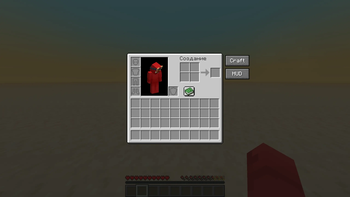
Adds a Craft button to the player inventory and crafting table screen.
When pressed, dotMOD moves items from configured inventory slots into the crafting grid using normal client click actions.
Default source slots:
2x2 player inventory:
- 9
- 10
- 18
- 19
3x3 crafting table:
- 9
- 10
- 11
- 18
- 19
- 20
- 27
- 28
- 29
Source slots are configured as logical player inventory slots, not raw GUI slot ids.
HUD Editor
Adds a HUD button to the inventory and creative inventory.
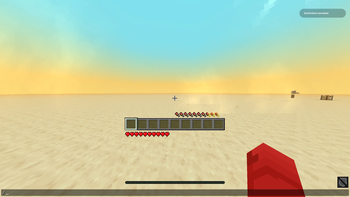
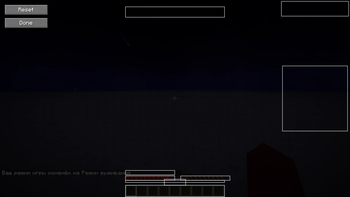
The HUD Editor lets you move selected vanilla HUD elements by dragging them with the mouse.
Supported elements include:
- Hearts
- Armor
- Hunger
- Hotbar
- Experience bar / level positions in config
- Status effects
- Bossbar
- Scoreboard
The editor includes:
- draggable element frames
- element labels
- reset button
- optional grid snapping
- saved
dx/dyoffsets
Name Colors
dotMOD lets you locally recolor the name of the player you are looking at.
Default keybinds:
G- color targeted player greenR- color targeted player redV- reset targeted player's name color
Colors are stored by player UUID and only affect your own client.
Supported displays:
- Nameplate above the player
- Tab list name, when possible
Optional chat notifications can be enabled in the config.
Toggle Shift
Adds a toggle sneak keybind.
Default keybind:
Right Shift
When enabled, your sneak key is held client-side until you toggle it off again. Normal physical sneak still works as usual.
Configuration
dotMOD has a Mod Menu + Cloth Config settings screen.
Config sections:
- General
- Quick Craft
- HUD Editor
- Name Colors
- Toggle Shift
- Keybinds info
The config is client-only and saved between game launches.
Requirements
- Minecraft 1.21.11
- Fabric Loader
- Fabric API
- Mod Menu
- Cloth Config API
Notes
dotMOD is fully client-side.
It does not add server-side content and does not require installation on the server.
HUD movement is designed for vanilla HUD behavior. Compatibility with large HUD overhaul mods may vary.
Verfügbare Versionen
dotMod auf dem Server installieren
Server bestellen
Bestelle einen Minecraft Java Server mit mindestens 3 GB RAM (4 GB empfohlen).
fabric Loader setzen
Wähle im Panel unter "Egg" den fabric-Loader und die passende Minecraft-Version (1.21.11).
Mod installieren
Öffne den Mod-Browser im Dashboard und suche nach "dotMod". Klicke "Installieren" – fertig! Alternativ: Lade die .jar via SFTP in den /mods Ordner.
Kompatibilität
Mod-Loader
Minecraft-Versionen
1.21.11
Server-seitig
✗ Nicht unterstütztEmpfohlener RAM
4 GB(min. 3 GB)Häufige Fragen
dotMod Server crasht beim Start – was tun?
Häufigste Ursache: falsche fabric-Version oder zu wenig RAM. Prüfe im Server-Log (latest.log), ob ein "OutOfMemoryError" oder "Mixin"-Fehler auftritt. Bei Mado Hosting: Stelle sicher, dass mindestens 3 GB RAM zugewiesen sind und der Loader zur Mod-Version passt (1.21.11). Über das Panel kannst du den Loader mit einem Klick wechseln.
Ist dotMod mit fabric kompatibel?
dotMod unterstützt offiziell fabric für Minecraft 1.21.11. Im Mado Dashboard werden inkompatible Loader-Kombinationen automatisch erkannt.
Server laggt mit dotMod – wie optimiere ich die Performance?
Empfohlener RAM: 4 GB (+1 GB pro 8 Spieler). Prüfe mit /spark profiler, ob dotMod den meisten Tick-Time verbraucht. Häufige Fixes: Server-View-Distance auf 8-10 reduzieren, bei Forge "performant" oder "starlight" als Zusatz-Mod installieren. Bei Mado Hosting läuft dein Server auf NVMe-SSDs mit dedizierten CPU-Kernen für minimale Latenz.
Ähnliche Mods




![[ETF] Entity Texture Features](https://cdn.modrinth.com/data/BVzZfTc1/af683d206d50b05258d865b0d6e4aa2f2cee12f2_96.webp)

Modded Server mieten
Installiere dotMod mit nur einem Klick auf deinem Server.