![[ETF] Entity Texture Features](https://cdn.modrinth.com/data/BVzZfTc1/af683d206d50b05258d865b0d6e4aa2f2cee12f2_96.webp)
[ETF] Entity Texture Features
Emissive, Random & Custom texture support for entities in resourcepacks just like Optifine but for Fabric
Screenshots

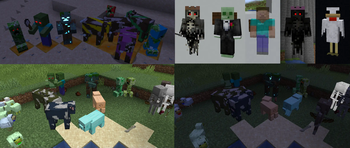

About this Mod
Entity Texture Features


About
ETF is a Fabric, Forge & NeoForge mod that adds many Entity Texture Features, including entity and player skin features!
ETF primarily supports the OptiFine format, acting as one of the alternative mods to OptiFine, but with many more features and options!
If you want more OptiFine features on Fabric, you can either check this list, made by LambdaAurora, or you can use the Fabulously Optimized modpack, which includes all the OptiFine parity mods!
Features
- Custom & random entity textures with the OptiFine format, including even more properties! [guide]
- Emissive/glowing entity textures with the OptiFine format, [guide]
- Simple format for blinking mobs. [guide]
- Player skin features, including blinking, emissive textures, and more! [guide]
Compatible with
- OptiFine's random/custom or emissive entity resource packs
- Entity Model Features (EMF)
- dorianpb's old CEM mod
- Sodium
- Iris Shaders (Support varies depending on the shader)
- Modded entities (Only if the mod creator uses the vanilla rendering code to render their mobs)
- And many more
Settings & configuration
Settings can be changed in-game using Mod Menu, the settings button in the resource pack screen, or by editing the config file, located under config/entity_texture_features.json
Mod support
This mod should be compatible with any mod added entities as long as they use regular vanilla rendering
Any mod displaying an entity in a custom GUI can force the default texture by having the entity.getblockstate set to either null or of type VOID_AIR, the same can be achieved by settings the display mob's UUID to UUID.nameUUIDFromBytes(("GENERIC").getBytes()).
Changelog
You can find the changelog here.
Need help or have questions?
You can reach out on my Discord (preferred) or open an issue on GitHub.
Hosting Partner deal

Available Versions
How to Install [ETF] Entity Texture Features on Your Client
Install the Mod Loader Locally
Install fabric for your local Minecraft version.
Download the Matching File
Choose the [ETF] Entity Texture Features file for fabric and Minecraft 26.2.
Install Mod
Place the .jar file in your local .minecraft/mods folder and restart Minecraft. No server-side installation is required.
Compatibility
Mod Loaders
Minecraft Versions
26.2, 26.1.2, 26.1.1 (+48 more)
Server-side
✗ UnsupportedRecommended RAM
4 GB(min. 3 GB)Frequently Asked Questions
Does [ETF] Entity Texture Features need to be installed on the Minecraft server?
No. Modrinth marks [ETF] Entity Texture Features as unsupported on the server side. Install it only in your local Minecraft mods folder. Your server can remain unchanged unless the mod page lists an additional dependency.
Which version and loader does [ETF] Entity Texture Features require?
Use a file for fabric, forge, neoforge, quilt and your exact Minecraft version. Supported versions include 26.2, 26.1.2, 26.1.1. Files for different loaders are not interchangeable.
[ETF] Entity Texture Features is not working – what should I check?
First check the Minecraft version, loader version and required dependencies. Put the .jar file in your local .minecraft/mods folder and remove older duplicates. Because this mod is client-side, adding server RAM will not fix it.
Similar Mods

![[EMF] Entity Model Features](https://cdn.modrinth.com/data/4I1XuqiY/6e5bbd0d06b1741bfdab6c0cfab6de8fdaf0064c_96.webp)




Minecraft Server for Your Group
[ETF] Entity Texture Features stays on your client. Host a compatible world for your group.