
Dream Displays
Create in-game screens to stream your favorite videos in Minecraft.
Screenshots
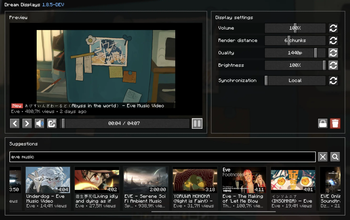
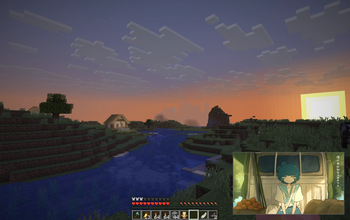


Über diese Mod


Bring real video playback to Minecraft
Watch videos, livestreams, and more directly on in-game displays — together with
your friends.
Create a display, paste a link and that's it!

Watch anything

| Source | What works | |
|---|---|---|
 |
YouTube | Videos and livestreams, ad-free, up to 4K, with multiple audio languages |
 |
Twitch | Live channels, VODs, and clips |
 |
Kick | Live channels and VODs |
 |
Vimeo | Public videos and live events |
 |
Bilibili | Videos, live channels, bungumi |
 |
Any video link | Direct video files and live streams |
   |
Share links | Google Drive, Dropbox, and Imgur direct links |
 |
Pretty much anywhere else | Not on the list? Try it anyway |
Built for multiplayer
Watch together with your friends with seamless multiplayer synchronization. Choose between local, synchronized, and
broadcast playback depending on how you want your displays to behave.
Dream Displays keeps playback synchronized across the server while keeping network usage extremely low.

Made for you
Dream Displays is built to make watching videos in Minecraft feel as natural as possible.
Your experience
|
Your server
|
Get started
Now it's your turn! Build your first display, invite your friends, and make displays a part of your world.
 ∙ Thanks to @whysumi_official for renders.
Verfügbare Versionen
Dream Displays auf dem Server installieren
Server bestellen
Bestelle einen Minecraft Java Server mit mindestens 3 GB RAM (4 GB empfohlen).
bukkit Loader setzen
Wähle im Panel unter "Egg" den bukkit-Loader und die passende Minecraft-Version (26.3).
Mod installieren
Öffne den Mod-Browser im Dashboard und suche nach "Dream Displays". Klicke "Installieren" – fertig! Alternativ: Lade die .jar via SFTP in den /mods Ordner.
Kompatibilität
Mod-Loader
Minecraft-Versionen
26.3, 26.2, 26.1.2 (+14 weitere)
Server-seitig
✓ ErforderlichEmpfohlener RAM
4 GB(min. 3 GB)Häufige Fragen
Dream Displays Server crasht beim Start – was tun?
Häufigste Ursache: falsche bukkit-Version oder zu wenig RAM. Prüfe im Server-Log (latest.log), ob ein "OutOfMemoryError" oder "Mixin"-Fehler auftritt. Bei Mado Hosting: Stelle sicher, dass mindestens 3 GB RAM zugewiesen sind und der Loader zur Mod-Version passt (26.3). Über das Panel kannst du den Loader mit einem Klick wechseln.
Ist Dream Displays mit bukkit und bungeecord und fabric und folia und neoforge und paper und purpur und quilt und spigot und velocity kompatibel?
Dream Displays unterstützt offiziell bukkit, bungeecord, fabric, folia, neoforge, paper, purpur, quilt, spigot, velocity für Minecraft 26.3, 26.2, 26.1.2. Im Mado Dashboard werden inkompatible Loader-Kombinationen automatisch erkannt.
Server laggt mit Dream Displays – wie optimiere ich die Performance?
Empfohlener RAM: 4 GB (+1 GB pro 8 Spieler). Prüfe mit /spark profiler, ob Dream Displays den meisten Tick-Time verbraucht. Häufige Fixes: Server-View-Distance auf 8-10 reduzieren, bei Forge "performant" oder "starlight" als Zusatz-Mod installieren. Bei Mado Hosting läuft dein Server auf NVMe-SSDs mit dedizierten CPU-Kernen für minimale Latenz.
Ähnliche Mods






Modded Server mieten
Installiere Dream Displays mit nur einem Klick auf deinem Server.
Details
- Lizenz
- GNU Lesser General Public License v3.0 only
- Server-seitig
- Erforderlich