
Duplication Table
Adds a very important new table to Minecraft! (it's too op, believe me. Absolutely when combined with the phone mod)
Screenshots
Über diese Mod
Version 1.17.1 support arrived!
1.17 Now allows you to craft the special block. In order to craft it, fill the entire Crafting Grid with Cobblestone. It's easy as that.
There was a problem that it showed the mod was for Fabric, but that is now fixed. This mod allows Forge only.
NEW: 1.16.5 version fixed, added crafting recipe, and removed "X" slot.
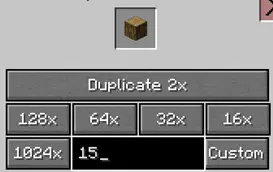
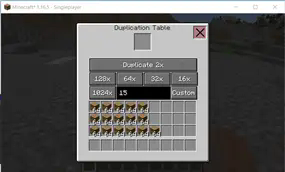
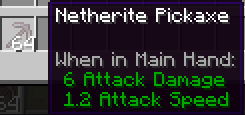
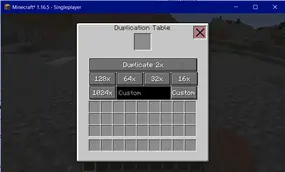
This mod gives you the opportunity to clone, duplicate or whatever you call it. You have a LOT of different buttons, 16x the current amount, 32x, 64x, 128x and 1024 And, off course, the main button: 2x the amount. You can clone every item you want, with this mod. It's extremely helpful in survival, and it can be lots of fun to play with. The maximum duplication size per item is 1024. But i think that isn't a really big of a problem. There's also a bug; if you duplicate tools, or armor, to 64, and if you then drop it directly from the dupe table, you will get stacked tools. It's actually a bug of Minecraft. But there are many cool things you can do with it.
Verfügbare Versionen
Duplication Table auf dem Server installieren
Server bestellen
Bestelle einen Minecraft Java Server mit mindestens 3 GB RAM (4 GB empfohlen).
forge Loader setzen
Wähle im Panel unter "Egg" den forge-Loader und die passende Minecraft-Version (1.17.1).
Mod installieren
Öffne den Mod-Browser im Dashboard und suche nach "Duplication Table". Klicke "Installieren" – fertig! Alternativ: Lade die .jar via SFTP in den /mods Ordner.
Kompatibilität
Mod-Loader
Minecraft-Versionen
1.17.1, 1.16.5
Server-seitig
✓ ErforderlichEmpfohlener RAM
4 GB(min. 3 GB)Häufige Fragen
Duplication Table Server crasht beim Start – was tun?
Häufigste Ursache: falsche forge-Version oder zu wenig RAM. Prüfe im Server-Log (latest.log), ob ein "OutOfMemoryError" oder "Mixin"-Fehler auftritt. Bei Mado Hosting: Stelle sicher, dass mindestens 3 GB RAM zugewiesen sind und der Loader zur Mod-Version passt (1.17.1). Über das Panel kannst du den Loader mit einem Klick wechseln.
Ist Duplication Table mit forge kompatibel?
Duplication Table unterstützt offiziell forge für Minecraft 1.17.1, 1.16.5. Im Mado Dashboard werden inkompatible Loader-Kombinationen automatisch erkannt.
Server laggt mit Duplication Table – wie optimiere ich die Performance?
Empfohlener RAM: 4 GB (+1 GB pro 8 Spieler). Prüfe mit /spark profiler, ob Duplication Table den meisten Tick-Time verbraucht. Häufige Fixes: Server-View-Distance auf 8-10 reduzieren, bei Forge "performant" oder "starlight" als Zusatz-Mod installieren. Bei Mado Hosting läuft dein Server auf NVMe-SSDs mit dedizierten CPU-Kernen für minimale Latenz.
Ähnliche Mods




![[ETF] Entity Texture Features](https://cdn.modrinth.com/data/BVzZfTc1/af683d206d50b05258d865b0d6e4aa2f2cee12f2_96.webp)

Modded Server mieten
Installiere Duplication Table mit nur einem Klick auf deinem Server.