
Dyed
Dye leather horse armor only where it is meant to be dyed!
Screenshots
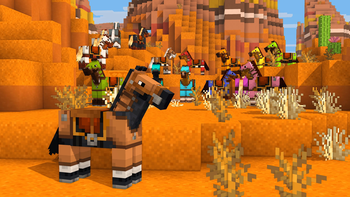
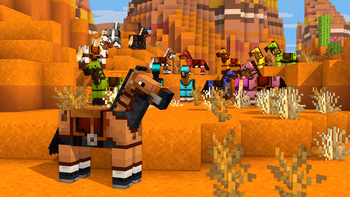
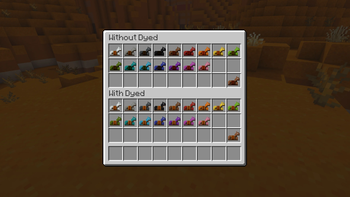
Über diese Mod
Dye leather horse armor only where it is meant to be dyed!
Something isn't quite right!
Has suiting up your prized horse in leather horse armor ever caught your eye as queer? Something is dreadfully off with leather horse armor in Minecraft. Unlike the player armor, the colored details of leather horse armor get dyed! Dyed fixes this mistake so your horses can wear their leather armor with pride!
What is wrong?
Originally an exclusive feature of Pocket Edition, when ported to Java Edition the leather horse armor textures were flattened into a single texture, causing both the colored details and monochrome base texture to be dyed. As well, any code that would have allowed for a separate overlay was lost, meaning this was not as simple to fix as adding a texture. You may think that because this already existed with the leather armor for the player, how could it have possibly gone awry for the leather horse armor? Such remains a mystery!
Give your horses some love!
Dyed cleaves the leather horse armor texture in two once again and fixes the model code to dye only the base texture! The item model for the leather horse armor is also replaced to fix the dyeing for the item as well!
Please note that this bug has finally been fixed in Minecraft 1.21.11, so while Dyed will still work, it is now unnecessary! It will no longer be marked as compatible starting with 1.21.11.
Get the goods!
You can find releases of Dyed on both Modrinth and CurseForge and also access development builds on GitHub!
Dyed supports Fabric 1.16+, Forge 1.16+, and NeoForge 1.20.2+.
Figure it all out!
You can delve into the wiki for details or submit a bug report if something isn't quite right!
Still need something? Head on over to the discussions forum for support, to read announcements, or discuss anything about the mod!
Verfügbare Versionen
Dyed auf deinem Client installieren
Mod-Loader lokal installieren
Installiere fabric für deine lokale Minecraft-Version.
Passende Datei herunterladen
Wähle die Dyed-Datei für fabric und Minecraft 25w46a.
Mod installieren
Lege die .jar-Datei in deinem lokalen .minecraft/mods-Ordner ab und starte Minecraft neu. Eine Installation auf dem Server ist nicht nötig.
Kompatibilität
Mod-Loader
Minecraft-Versionen
25w46a, 25w45a, 25w44a (+345 weitere)
Server-seitig
✗ Nicht unterstütztEmpfohlener RAM
4 GB(min. 3 GB)Häufige Fragen
Muss Dyed auf dem Minecraft Server installiert werden?
Nein. Modrinth kennzeichnet Dyed serverseitig als nicht unterstützt. Installiere die Mod nur im lokalen Minecraft-Mods-Ordner. Dein Server kann unverändert bleiben, sofern die Mod-Seite keine zusätzliche Abhängigkeit nennt.
Welche Version und welchen Loader braucht Dyed?
Nutze eine Datei für fabric, forge, neoforge und exakt deine Minecraft-Version. Unterstützte Versionen sind unter anderem 25w46a, 25w45a, 25w44a. Loader-Dateien sind nicht untereinander austauschbar.
Dyed funktioniert nicht – was kann ich prüfen?
Prüfe zuerst Minecraft-Version, Loader-Version und erforderliche Abhängigkeiten. Lege die .jar-Datei im lokalen .minecraft/mods-Ordner ab und entferne ältere Duplikate. Da die Mod clientseitig ist, löst mehr Server-RAM dieses Problem nicht.
Ähnliche Mods




![[ETF] Entity Texture Features](https://cdn.modrinth.com/data/BVzZfTc1/af683d206d50b05258d865b0d6e4aa2f2cee12f2_96.webp)

Minecraft Server für deine Gruppe
Dyed bleibt auf deinem Client. Hoste dazu eine kompatible Welt für deine Mitspieler.
Details
- Lizenz
- GNU Lesser General Public License v3.0 or later
- Server-seitig
- Nicht unterstützt