
Eccentric Tome
The book to end all books (Akashic Tome rewrite)
Über diese Mod
Eccentric Tome
This mod adds a single item: the Eccentric Tome.
The Tome solves a single problem: managing all of your guide books.
The Tome allows many (infinite?) books to be combined into a single item, and enables them to be retrieved when needed.
Crafting
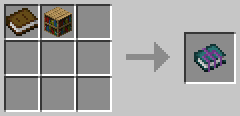
Craft the Tome in the crafting grid with a book and a bookcase
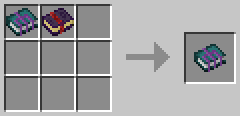
Craft the Tome with other books in the crafting grid to attach them
Controls
Right-click while holding Tome to open the book selection screen
Shift + Right-click while holding Tome to convert to the book for the block you're looking at
Left-click on air to revert a book back into the Tome
Shift + Q while holding the converted tome to eject a book from it
Caution
Single-use items added to the tome will still be single use!
Items that vanish or break (such as Tome of Helmets or Galactic Tome) will cause the Eccentric Tome to vanish or break along with all the books stored inside of it.
Contributing
Translations and bug-fixes are always welcome! Read the guidelines for contributing and then open a pull request.
Frequently asked questions
Question: Why rewrite Akashic Tome?
Answer: This mod was originally created was because the maintainers of Akashic Tome released it for 1.18.1 in a broken state without any testing. I was able to fix it within a few minutes (the fix was two lines of code) and I opened a pull request. My pull request was ignored for almost a month. So, I closed the pull request and created this mod.
Question: How is Eccentric Tome different from Akashic Tome?
Answer: This mod differs from Akashic Tome in that it actually works for 1.18.1 and it does not require AutoRegLib. Additionally, Vazkii also hasn't put a license on the GitHub repository for Akashic Tome, which means that it's "all rights reserved". I personally disagree with that choice, so I rewrote the Eccentric Tome from scratch and licensed it under the LGPL so that people can copy and learn from it.
Credits
Vazkii for the original idea
Verfügbare Versionen
Eccentric Tome auf dem Server installieren
Server bestellen
Bestelle einen Minecraft Java Server mit mindestens 3 GB RAM (4 GB empfohlen).
forge Loader setzen
Wähle im Panel unter "Egg" den forge-Loader und die passende Minecraft-Version (26.1.1).
Mod installieren
Öffne den Mod-Browser im Dashboard und suche nach "Eccentric Tome". Klicke "Installieren" – fertig! Alternativ: Lade die .jar via SFTP in den /mods Ordner.
Kompatibilität
Mod-Loader
Minecraft-Versionen
26.1.1, 26.1, 1.21.1 (+9 weitere)
Server-seitig
✓ ErforderlichEmpfohlener RAM
4 GB(min. 3 GB)Häufige Fragen
Eccentric Tome Server crasht beim Start – was tun?
Häufigste Ursache: falsche forge-Version oder zu wenig RAM. Prüfe im Server-Log (latest.log), ob ein "OutOfMemoryError" oder "Mixin"-Fehler auftritt. Bei Mado Hosting: Stelle sicher, dass mindestens 3 GB RAM zugewiesen sind und der Loader zur Mod-Version passt (26.1.1). Über das Panel kannst du den Loader mit einem Klick wechseln.
Ist Eccentric Tome mit forge und neoforge kompatibel?
Eccentric Tome unterstützt offiziell forge, neoforge für Minecraft 26.1.1, 26.1, 1.21.1. Im Mado Dashboard werden inkompatible Loader-Kombinationen automatisch erkannt.
Server laggt mit Eccentric Tome – wie optimiere ich die Performance?
Empfohlener RAM: 4 GB (+1 GB pro 8 Spieler). Prüfe mit /spark profiler, ob Eccentric Tome den meisten Tick-Time verbraucht. Häufige Fixes: Server-View-Distance auf 8-10 reduzieren, bei Forge "performant" oder "starlight" als Zusatz-Mod installieren. Bei Mado Hosting läuft dein Server auf NVMe-SSDs mit dedizierten CPU-Kernen für minimale Latenz.
Ähnliche Mods




![[ETF] Entity Texture Features](https://cdn.modrinth.com/data/BVzZfTc1/af683d206d50b05258d865b0d6e4aa2f2cee12f2_96.webp)

Modded Server mieten
Installiere Eccentric Tome mit nur einem Klick auf deinem Server.
Details
- Lizenz
- GNU Lesser General Public License v3.0 only
- Server-seitig
- Erforderlich