Effect Timer Plus
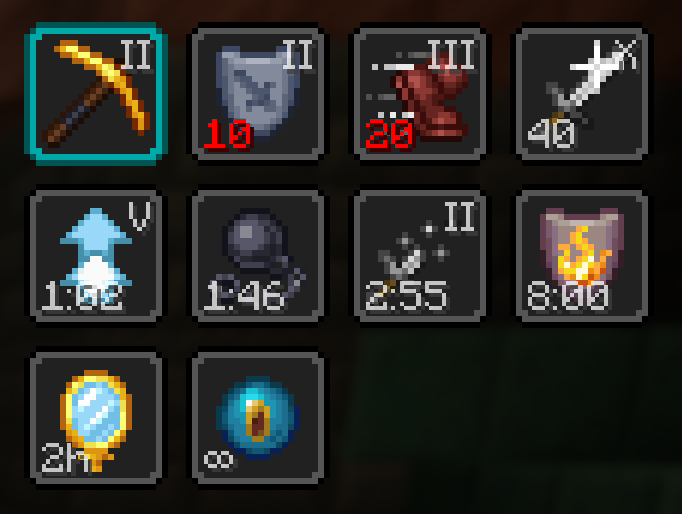
Adds a potency and time indicator overlay to status effect icons.
Über diese Mod
EffectTimerPlus
Adds a potency indicator and countdown overlay to status effect icons.
An update of Status Effect Timer with a focus on customizability.





Features
- Fully adjustable text color and opacity
- Optional text shadow
- Optional and adjustable text background
- 8 options for text position
- Optional low-time warning color and flash
- Option to disable either indicator separately
- Option to hide timer on ambient (beacon) effects
- Scaling option to change the size of effect icons
- Scaling option to change the text size relative to the effect icon
Dependencies
Fabric: Fabric API, ModMenu, YACL
NeoForge: YACL
Compatibility
Sometimes the scaling option can cause problems for other mods. If you encounter issues, please report on Discord or GitHub.
Credits
EffectTimerPlus is based on Status Effect Timer by magicus and includes
code reused under license.
Contact



Verfügbare Versionen
Effect Timer Plus auf deinem Client installieren
Mod-Loader lokal installieren
Installiere fabric für deine lokale Minecraft-Version.
Passende Datei herunterladen
Wähle die Effect Timer Plus-Datei für fabric und Minecraft 26.3.
Mod installieren
Lege die .jar-Datei in deinem lokalen .minecraft/mods-Ordner ab und starte Minecraft neu. Eine Installation auf dem Server ist nicht nötig.
Kompatibilität
Mod-Loader
Minecraft-Versionen
26.3, 26.3-rc-3, 26.3-rc-2 (+29 weitere)
Server-seitig
✗ Nicht unterstütztEmpfohlener RAM
4 GB(min. 3 GB)Häufige Fragen
Muss Effect Timer Plus auf dem Minecraft Server installiert werden?
Nein. Modrinth kennzeichnet Effect Timer Plus serverseitig als nicht unterstützt. Installiere die Mod nur im lokalen Minecraft-Mods-Ordner. Dein Server kann unverändert bleiben, sofern die Mod-Seite keine zusätzliche Abhängigkeit nennt.
Welche Version und welchen Loader braucht Effect Timer Plus?
Nutze eine Datei für fabric, forge, neoforge, quilt und exakt deine Minecraft-Version. Unterstützte Versionen sind unter anderem 26.3, 26.3-rc-3, 26.3-rc-2. Loader-Dateien sind nicht untereinander austauschbar.
Effect Timer Plus funktioniert nicht – was kann ich prüfen?
Prüfe zuerst Minecraft-Version, Loader-Version und erforderliche Abhängigkeiten. Lege die .jar-Datei im lokalen .minecraft/mods-Ordner ab und entferne ältere Duplikate. Da die Mod clientseitig ist, löst mehr Server-RAM dieses Problem nicht.
Ähnliche Mods




![[ETF] Entity Texture Features](https://cdn.modrinth.com/data/BVzZfTc1/af683d206d50b05258d865b0d6e4aa2f2cee12f2_96.webp)

Minecraft Server für deine Gruppe
Effect Timer Plus bleibt auf deinem Client. Hoste dazu eine kompatible Welt für deine Mitspieler.
Details
- Lizenz
- GNU Lesser General Public License v3.0 only
- Server-seitig
- Nicht unterstützt