Enbeon's Custom Books
Yet another mod that gives Enchanted Books unique textures based on the enchantments they have.
Screenshots

Über diese Mod
Enbeon's Custom Books
Yet another Minecraft mod that gives Enchanted Books unique textures based on the enchantments they have.
Compatible with Fabric and Quilt. Sorry if you run Forge or NeoForge!
This mod is compatible with 1.21.4+. I probably won't backport unless there's demand for it.
Preamble
This mod is the product of wanting a solution to component-controlled textures for Enchanted Books,
when CIT is unavailable and Mojang's vanilla solution is infeasible.
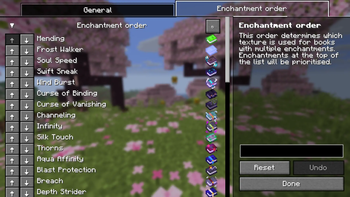
Enbeon's Custom Books uses a precedence-based system to decide which texture is used for books with multiple enchantments.
I've provided what I feel is a sensible default order, with rarer enchantments taking priority over more common ones
(for example, Mending has the highest priority, while Sharpness has the lowest).
The order is also fully configurable in the mod config.
I took inspiration from Even Better Enchants for some of the textures in this mod.
Dependencies
Fabric API is required to run this mod.
Additionally, to access the in-game config screen, you will need:
Textures
See the gallery for all of the book textures.
The animation for the Mending book texture can be disabled in the in-game config.
Language support
As of v1.0.4, Enbeon's Custom Books supports:
- English
- Simplified Chinese (thanks moqyng!)
Mod compatibility
If you find this mod useful and want me to add modded enchantments to it, feel free to create an issue or pull request.
I'm also happy to accept pull requests to add support for new languages.
Special thanks
This project uses the Stonecutter build tool, which allows compiling a single codebase to multiple different game versions.
Verfügbare Versionen
Enbeon's Custom Books auf deinem Client installieren
Mod-Loader lokal installieren
Installiere fabric für deine lokale Minecraft-Version.
Passende Datei herunterladen
Wähle die Enbeon's Custom Books-Datei für fabric und Minecraft 26.3.
Mod installieren
Lege die .jar-Datei in deinem lokalen .minecraft/mods-Ordner ab und starte Minecraft neu. Eine Installation auf dem Server ist nicht nötig.
Kompatibilität
Mod-Loader
Minecraft-Versionen
26.3, 26.2, 26.1.2 (+25 weitere)
Server-seitig
✗ Nicht unterstütztEmpfohlener RAM
4 GB(min. 3 GB)Häufige Fragen
Muss Enbeon's Custom Books auf dem Minecraft Server installiert werden?
Nein. Modrinth kennzeichnet Enbeon's Custom Books serverseitig als nicht unterstützt. Installiere die Mod nur im lokalen Minecraft-Mods-Ordner. Dein Server kann unverändert bleiben, sofern die Mod-Seite keine zusätzliche Abhängigkeit nennt.
Welche Version und welchen Loader braucht Enbeon's Custom Books?
Nutze eine Datei für fabric, quilt und exakt deine Minecraft-Version. Unterstützte Versionen sind unter anderem 26.3, 26.2, 26.1.2. Loader-Dateien sind nicht untereinander austauschbar.
Enbeon's Custom Books funktioniert nicht – was kann ich prüfen?
Prüfe zuerst Minecraft-Version, Loader-Version und erforderliche Abhängigkeiten. Lege die .jar-Datei im lokalen .minecraft/mods-Ordner ab und entferne ältere Duplikate. Da die Mod clientseitig ist, löst mehr Server-RAM dieses Problem nicht.
Ähnliche Mods




![[ETF] Entity Texture Features](https://cdn.modrinth.com/data/BVzZfTc1/af683d206d50b05258d865b0d6e4aa2f2cee12f2_96.webp)

Minecraft Server für deine Gruppe
Enbeon's Custom Books bleibt auf deinem Client. Hoste dazu eine kompatible Welt für deine Mitspieler.
Details
- Lizenz
- GNU Lesser General Public License v3.0 or later
- Server-seitig
- Nicht unterstützt