Enhanced Boss Bars
New improved boss bars!
Screenshots

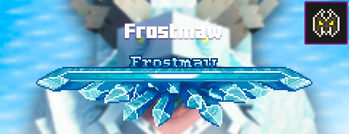
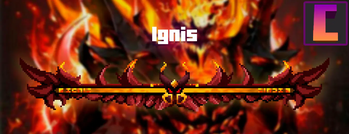
Über diese Mod

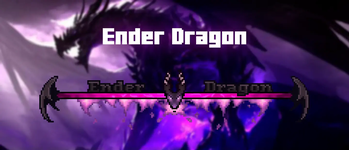
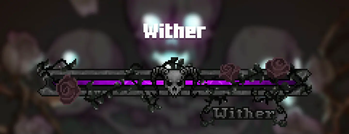
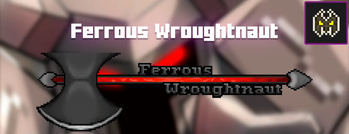
Enhanced Boss Bars is a project that aims to improve all the boss bars so that there is a better immersion in the amazing world of minecraft, since the default bars are very uncreative.
If you have any suggestions for a mod boss, please comment on the CurseForge page and I'll put it on the mod list :)
I hope you enjoy it and thank you very much for watching.
Fabric version soon.
Mod List
Click here to show
Mowzie's Mobs
- ✅ Frostmaw
- ✅ Ferrous Wroughtnaut
- ◻️ Umvuthi
L_Ender's Cataclysm
- ✅ Ignis
- ✅ Netherite Monstrosity
- ✅ Ender Guardian
- ✅ The Harbinger
- ✅ The Leviathan
- ◻️ Ancient Remnant
Bosses of Mass Destruction
- ✅ Night Lich
- ✅ Void Blossom
- ✅ Obsidilith
- ✅ Nether Gauntlet
The Aether
- ✅ Slider
- ✅ Sun Spirit
- ✅ Valkyrie Queen
Meet your Fight
- ✅ Swampjaw
- ✅ Bellringer
- ◻️ Dame Fortuna
- ◻️ Rosalyne, Blade of Dusk
Cracker's Witherstorm
- ✅ Wither Storm
- ◻️ Withered Symbiont
Alex's Mobs
- ✅ Voidworm
Mod Compatibility Errors
In the next update, I'll be adding options to set where you want the boss bars, but for now if you're using the upcoming mods, you'll need to do these things:
Jade
You can set where you want to see Jade HUD by modifying Horizontal Ratio and Vertical Ratio
or you can turning it off by doing the following:
1.19.2 and older versions:
- Main Menu -> Mods -> Jade -> Config -> Jade Settings -> Display entities -> OFF
1.20.1 and new versions:
- Main Menu -> Mods -> Jade -> Config -> Mod Settings -> Display Bosses -> OFF
- Main Menu -> Mods -> Jade -> Config -> Mod Settings -> Boss Bars Overlap -> Push Down Tooltip
RPG-HUD
- (In game) Press Esc -> RPG-Hud -> Entity Inspector -> Show Entity Inspect: OFF (or just
change the position) - (In game) Press Esc -> RPG-Hud -> Compass -> Enable Compass: OFF (or just change the
position)
What's new?
Hey! As some of you probably know, there are mods that are incompatible in the texture pack version of Enhanced Boss Bars, so I made this mod to make them compatible. These mods were L_Ender's Cataclysm and The Aether. Both of them works now and you can see them in the gallery.
Verfügbare Versionen
Enhanced Boss Bars auf deinem Client installieren
Mod-Loader lokal installieren
Installiere forge für deine lokale Minecraft-Version.
Passende Datei herunterladen
Wähle die Enhanced Boss Bars-Datei für forge und Minecraft 1.21.1.
Mod installieren
Lege die .jar-Datei in deinem lokalen .minecraft/mods-Ordner ab und starte Minecraft neu. Eine Installation auf dem Server ist nicht nötig.
Kompatibilität
Mod-Loader
Minecraft-Versionen
1.21.1, 1.21, 1.20.1 (+2 weitere)
Server-seitig
✗ Nicht unterstütztEmpfohlener RAM
4 GB(min. 3 GB)Häufige Fragen
Muss Enhanced Boss Bars auf dem Minecraft Server installiert werden?
Nein. Modrinth kennzeichnet Enhanced Boss Bars serverseitig als nicht unterstützt. Installiere die Mod nur im lokalen Minecraft-Mods-Ordner. Dein Server kann unverändert bleiben, sofern die Mod-Seite keine zusätzliche Abhängigkeit nennt.
Welche Version und welchen Loader braucht Enhanced Boss Bars?
Nutze eine Datei für forge, neoforge und exakt deine Minecraft-Version. Unterstützte Versionen sind unter anderem 1.21.1, 1.21, 1.20.1. Loader-Dateien sind nicht untereinander austauschbar.
Enhanced Boss Bars funktioniert nicht – was kann ich prüfen?
Prüfe zuerst Minecraft-Version, Loader-Version und erforderliche Abhängigkeiten. Lege die .jar-Datei im lokalen .minecraft/mods-Ordner ab und entferne ältere Duplikate. Da die Mod clientseitig ist, löst mehr Server-RAM dieses Problem nicht.
Ähnliche Mods




Minecraft Server für deine Gruppe
Enhanced Boss Bars bleibt auf deinem Client. Hoste dazu eine kompatible Welt für deine Mitspieler.