
Entity Culling
Skip rendering of hidden entities
Über diese Mod
Entity Culling - 1.16.5 - 2.1.4 and newer versions are only compatible with Optifine G8!
Entity Culling - 1.16.5 - 2.1.3 and older versions are only compatible with Optifine G7!
Entity Culling - 1.12.2 - 2.0.8 and newer versions are only compatible with Optifine G5!
Entity Culling - 1.12.2 - 2.0.7 and older versions are only compatible with Optifine F5!
This mod requires MixinBootstrap (curseforge, modrinth) and RenderLib (curseforge, modrinth) to run (MC 1.12.2 only)!
Mixin 0.7-0.8 Compatibility (curseforge, modrinth) might be helpful when another mod uses an older mixin version and you are thus unable to launch the game (MC 1.12.2 only).
Entity Culling is a client-side performance mod that aims to skip rendering of hidden (tile-)entities.
In vanilla, it just renders all (tile-)entities that are in the field of view of the player. This means there may be hundreds of (tile-)entities eating your fps while you can't even see them because they are hidden behind a wall.
Culling of hidden Entities
By default, this mod uses an OpenGL occlusion culling implementation which gives you pixel-perfect bounding box culling with only one frame delay and a very small overhead.
If your hardware does not support OpenGL 4.3 then this mod uses a raytraced culling implementation. The raytraced culling is more CPU intensive while the OpenGL culling is more GPU intensive and thus depending on your hardware you might want to prefer one over the other.
This can result in massive FPS improvements when a lot of (tile-)entities are on the screen but not visible because they are occluded.
Test with EntityCulling-1.12.2-6.0.2 inside a Chocolate Quest Repoured dungeon with ~200 entities on screen shows huge improvements!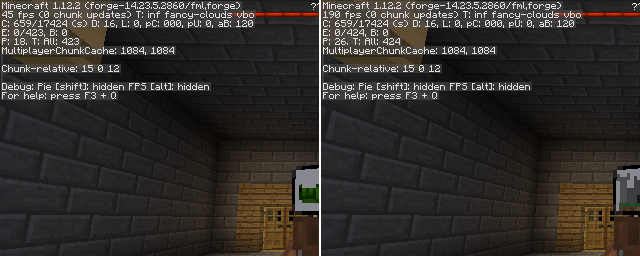


Verfügbare Versionen
Entity Culling auf deinem Client installieren
Mod-Loader lokal installieren
Installiere forge für deine lokale Minecraft-Version.
Passende Datei herunterladen
Wähle die Entity Culling-Datei für forge und Minecraft 1.16.5.
Mod installieren
Lege die .jar-Datei in deinem lokalen .minecraft/mods-Ordner ab und starte Minecraft neu. Eine Installation auf dem Server ist nicht nötig.
Kompatibilität
Mod-Loader
Minecraft-Versionen
1.16.5, 1.12.2
Server-seitig
✗ Nicht unterstütztEmpfohlener RAM
4 GB(min. 3 GB)Häufige Fragen
Muss Entity Culling auf dem Minecraft Server installiert werden?
Nein. Modrinth kennzeichnet Entity Culling serverseitig als nicht unterstützt. Installiere die Mod nur im lokalen Minecraft-Mods-Ordner. Dein Server kann unverändert bleiben, sofern die Mod-Seite keine zusätzliche Abhängigkeit nennt.
Welche Version und welchen Loader braucht Entity Culling?
Nutze eine Datei für forge und exakt deine Minecraft-Version. Unterstützte Versionen sind unter anderem 1.16.5, 1.12.2. Loader-Dateien sind nicht untereinander austauschbar.
Entity Culling funktioniert nicht – was kann ich prüfen?
Prüfe zuerst Minecraft-Version, Loader-Version und erforderliche Abhängigkeiten. Lege die .jar-Datei im lokalen .minecraft/mods-Ordner ab und entferne ältere Duplikate. Da die Mod clientseitig ist, löst mehr Server-RAM dieses Problem nicht.
Ähnliche Mods


Minecraft Server für deine Gruppe
Entity Culling bleibt auf deinem Client. Hoste dazu eine kompatible Welt für deine Mitspieler.