
EXP Counter
See your total XP and see exactly how much you need to level up, fully configurable
Screenshots
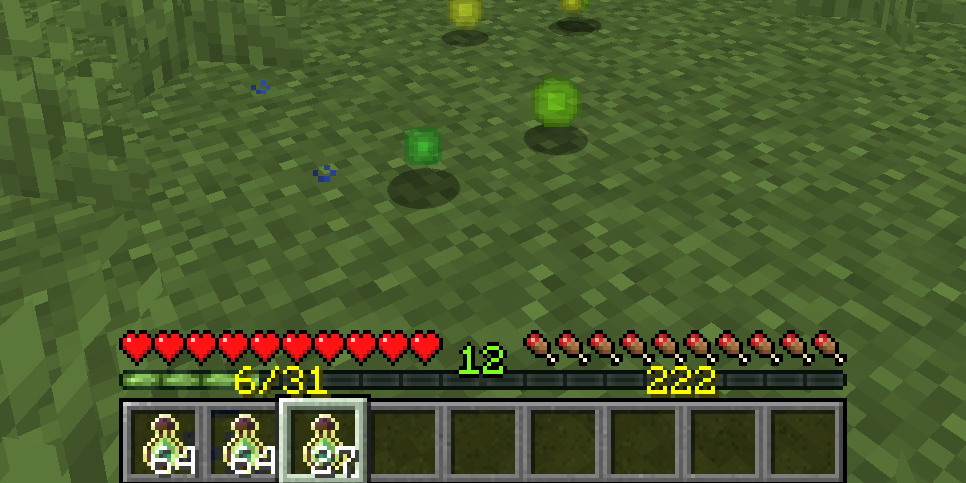
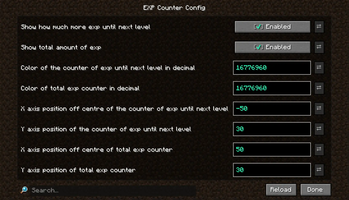
Über diese Mod





This fully configurable client-side mod displays the experience points you've gathered toward your next level, and your total accumulated XP.

Configuration
You can configure this mod directly in-game or edit the JSON file config/expcounter.json in your profile folder. If you're using Fabric and want to adjust the config values in-game, you'll need to install Mod Menu.
show_next_level - Whether the counter of xp collected towards the next level should be displayed
show_total - Whether the total accumulated XP should be displayed
color_next_level - Color of the counter of xp collected towards the next level should be displayed in decimal
color_total - color of the total XP counter in decimal
position_off_centre_next_level - X-axis offset off center of the xp to next level counter
position_y_next_level - Y-axis position of the xp to next level counter
position_off_centre_total - X-axis offset off center of the total xp counter counter
position_y_total - Y-axis position of total xp counter


Verfügbare Versionen
EXP Counter auf deinem Client installieren
Mod-Loader lokal installieren
Installiere fabric für deine lokale Minecraft-Version.
Passende Datei herunterladen
Wähle die EXP Counter-Datei für fabric und Minecraft 26.3.
Mod installieren
Lege die .jar-Datei in deinem lokalen .minecraft/mods-Ordner ab und starte Minecraft neu. Eine Installation auf dem Server ist nicht nötig.
Kompatibilität
Mod-Loader
Minecraft-Versionen
26.3, 26.2, 26.1.2 (+29 weitere)
Server-seitig
✗ Nicht unterstütztEmpfohlener RAM
4 GB(min. 3 GB)Häufige Fragen
Muss EXP Counter auf dem Minecraft Server installiert werden?
Nein. Modrinth kennzeichnet EXP Counter serverseitig als nicht unterstützt. Installiere die Mod nur im lokalen Minecraft-Mods-Ordner. Dein Server kann unverändert bleiben, sofern die Mod-Seite keine zusätzliche Abhängigkeit nennt.
Welche Version und welchen Loader braucht EXP Counter?
Nutze eine Datei für fabric, forge, neoforge, quilt und exakt deine Minecraft-Version. Unterstützte Versionen sind unter anderem 26.3, 26.2, 26.1.2. Loader-Dateien sind nicht untereinander austauschbar.
EXP Counter funktioniert nicht – was kann ich prüfen?
Prüfe zuerst Minecraft-Version, Loader-Version und erforderliche Abhängigkeiten. Lege die .jar-Datei im lokalen .minecraft/mods-Ordner ab und entferne ältere Duplikate. Da die Mod clientseitig ist, löst mehr Server-RAM dieses Problem nicht.
Ähnliche Mods






Minecraft Server für deine Gruppe
EXP Counter bleibt auf deinem Client. Hoste dazu eine kompatible Welt für deine Mitspieler.