
Falings' Summonings
Adds a new ender mob with trades to spare, a new currency and a new magic structure
Screenshots


Über diese Mod
What is it?
The order of the eye lives once more. A long-lost race of traders from another plane have made their answer to extinction: by interjecting Ender magic into villagers, they are able to create a gateway to the Overworld to find a new life and spread their trades to all.
Features
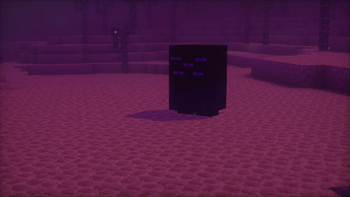
Faling

This is the Faling. It's summoned by throwing an eye of ender at a villager, and harnessing their ancient ender magic, a faling will take its place.
Trading with falings
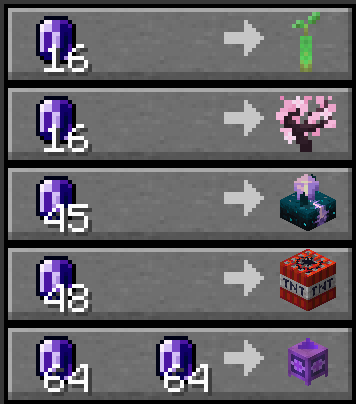
Falings have collected a specific collection of rare items that they intend to trade off to players, seeing as these are some of the rarest items out there.
Endmeralds
The falings trade for a rare material dubbed endmerald, due to them looking similar to emeralds.

Endmeralds can be obtained by mining endstone with a pickaxe and hoping luck is on your side. The Fortune enchantment on the pickaxe increases the amounts of endmeralds dropped.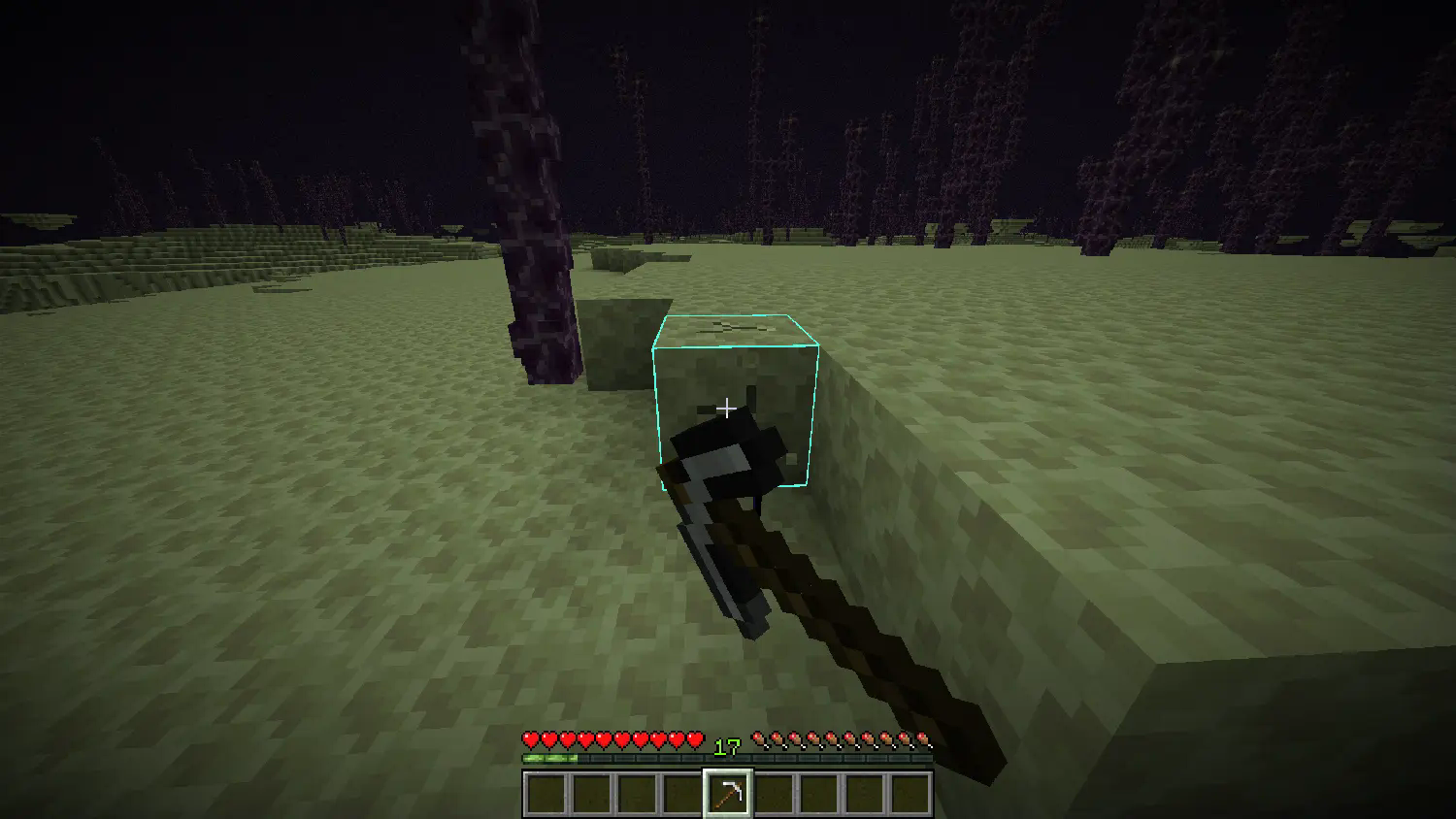
The End Combine

The faling race's newest genius: the End Combine, a machination that utilizes mysterious hammerspace tech to build itself when placed. Upon so, it provides the Slow Falling effect to all players nearby, useful for places with a lot of vertical travel.
Advancements
- Faling From the Deep: Summon a Faling by throwing an Eye of Ender at a Villager
- World Trade: Trade with a Faling using Endmeralds
- Acquire Floatware: Buy and End Combine from a Faling
- Combined Power: Place an End Combine
Installation Guide:
Data Pack version:
- Make sure your Minecraft version matches the data pack version
- Download the data pack
- Download the resource pack provided with the data pack by clicking on the data pack at the downloads page
- Exit the world you want to install the data pack in
- Select that world in the world selection screen, click on "Edit", then "Open world folder".
- Open the folder named "datapacks", and put the downloaded 'faling[version you downloaded]-data.zip' file into it.
- Go back to the main ".minecraft" folder and enter the "resourcepacks" folder
- Place the "faling[version you downloaded]-resources.zip" file provided with the data pack file into this folder
- Now enter the world, and have fun :)
Mod version:
- Make sure your Minecraft version matches the mod version
- Download the mod
- Go to your main ".minecraft" folder
- Enter the "mods" folder (or if you don't have one yet create one)
- Place the downloaded mod into the mods folder
- Now enter the world, and have fun :)
Using the Modrinth App on desktop:
- Install the mod/data pack
- That's it, have fun :)
Verfügbare Versionen
Falings' Summonings auf dem Server installieren
Server bestellen
Bestelle einen Minecraft Java Server mit mindestens 3 GB RAM (4 GB empfohlen).
datapack Loader setzen
Wähle im Panel unter "Egg" den datapack-Loader und die passende Minecraft-Version (26.2).
Mod installieren
Öffne den Mod-Browser im Dashboard und suche nach "Falings' Summonings". Klicke "Installieren" – fertig! Alternativ: Lade die .jar via SFTP in den /mods Ordner.
Kompatibilität
Mod-Loader
Minecraft-Versionen
26.2, 26.1.2, 26.1.1 (+11 weitere)
Server-seitig
✓ ErforderlichEmpfohlener RAM
4 GB(min. 3 GB)Häufige Fragen
Falings' Summonings Server crasht beim Start – was tun?
Häufigste Ursache: falsche datapack-Version oder zu wenig RAM. Prüfe im Server-Log (latest.log), ob ein "OutOfMemoryError" oder "Mixin"-Fehler auftritt. Bei Mado Hosting: Stelle sicher, dass mindestens 3 GB RAM zugewiesen sind und der Loader zur Mod-Version passt (26.2). Über das Panel kannst du den Loader mit einem Klick wechseln.
Ist Falings' Summonings mit datapack und fabric und forge und neoforge und quilt kompatibel?
Falings' Summonings unterstützt offiziell datapack, fabric, forge, neoforge, quilt für Minecraft 26.2, 26.1.2, 26.1.1. Achtung: Forge- und Fabric-Mods sind NICHT untereinander kompatibel – wähle einen Loader und bleibe dabei. Im Mado Dashboard werden inkompatible Loader-Kombinationen automatisch erkannt.
Server laggt mit Falings' Summonings – wie optimiere ich die Performance?
Empfohlener RAM: 4 GB (+1 GB pro 8 Spieler). Prüfe mit /spark profiler, ob Falings' Summonings den meisten Tick-Time verbraucht. Häufige Fixes: Server-View-Distance auf 8-10 reduzieren, bei Forge "performant" oder "starlight" als Zusatz-Mod installieren. Bei Mado Hosting läuft dein Server auf NVMe-SSDs mit dedizierten CPU-Kernen für minimale Latenz.
Ähnliche Mods






Modded Server mieten
Installiere Falings' Summonings mit nur einem Klick auf deinem Server.