
Farla's Hotbar Optimizer
Lightweight continuation of Dokko’s Hotbar Optimizer with improved hotbar synchronization.
Screenshots
Über diese Mod
Farla's Hotbar Optimizer
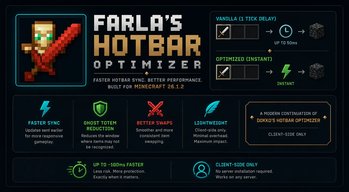
Farla's Hotbar Optimizer is a modern continuation of Dokko's Hotbar Optimizer, rebuilt for Minecraft 26.1.2 with improved runtime handling, adaptive safe mode, and lightweight client-side hotbar synchronization.
⚡ What does the mod do?
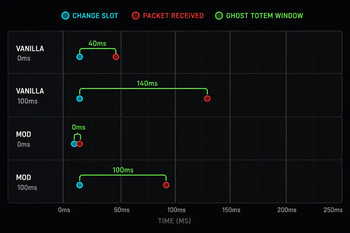
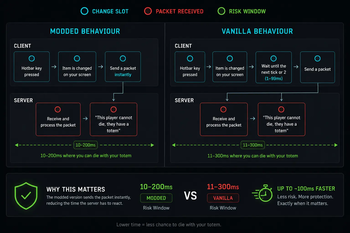
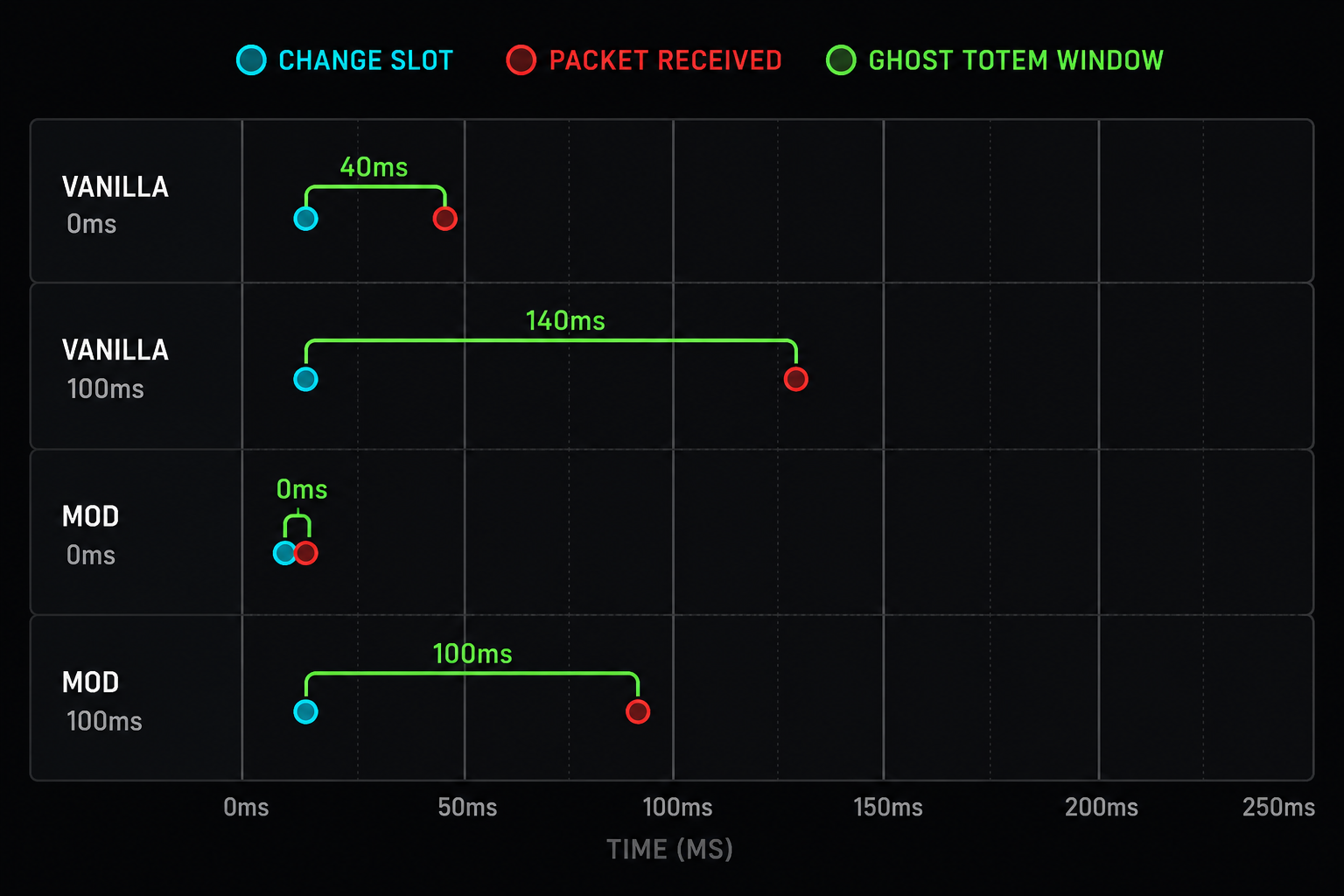
In vanilla Minecraft, when you switch hotbar slots, your client waits up to 50ms (one game tick) before sending the update to the server.
Farla's Hotbar Optimizer reduces that delay by synchronizing slot changes earlier, helping hotbar actions feel faster and more consistent during gameplay.
This can improve:
- ghost totem consistency
- fast item swapping
- crystal PvP responsiveness
- general hotbar reliability
Spoiler
📊 Improvements
| Scenario | Vanilla | Farla's Hotbar Optimizer |
|---|---|---|
| Hotbar synchronization delay | ~50ms | Near-instant |
| Ghost totem consistency | Standard | Improved |
| Fast item swaps | Vanilla timing | More responsive |
| Crystal PvP swapping | Delayed at times | More consistent |
| Inventory responsiveness | Vanilla | Improved |
🛡️ Ghost Totem Reduction
Because the server receives slot updates earlier, the amount of time where the server may not correctly recognize your held item is reduced.
Low ping (~20ms)
- Noticeably improves swap consistency
- Reduces ghost totem situations significantly
Higher ping (~150ms)
- Still improves synchronization timing
- Helps reduce delayed item recognition
⚔️ Better Swapping
Quick swaps for:
- totems
- swords
- crystals
- utility items
feel smoother and more responsive compared to vanilla behavior.
🚀 Lightweight
Farla's Hotbar Optimizer is:
- client-side only
- lightweight
- focused on a single feature
- designed with minimal runtime overhead
No unnecessary UI changes or bundled features.
⚠️ Compatibility Notice
Farla's Hotbar Optimizer modifies how hotbar slot synchronization is handled between the client and server.
While the mod is designed to remain lightweight and minimally invasive, behavior may vary depending on:
- server software
- anti-cheat configuration
- latency conditions
- custom server rules
Some servers may restrict or disallow modifications affecting inventory or hotbar synchronization behavior.
Users are responsible for ensuring the mod is permitted on servers they join.
💜 Credits
Inspired by and based on Dokko's Hotbar Optimizer.
This project is an independent continuation/rebuild for newer Minecraft versions including 26.1.2.
Verfügbare Versionen
Farla's Hotbar Optimizer auf deinem Client installieren
Mod-Loader lokal installieren
Installiere fabric für deine lokale Minecraft-Version.
Passende Datei herunterladen
Wähle die Farla's Hotbar Optimizer-Datei für fabric und Minecraft 26.1.2.
Mod installieren
Lege die .jar-Datei in deinem lokalen .minecraft/mods-Ordner ab und starte Minecraft neu. Eine Installation auf dem Server ist nicht nötig.
Kompatibilität
Mod-Loader
Minecraft-Versionen
26.1.2
Server-seitig
✗ Nicht unterstütztEmpfohlener RAM
4 GB(min. 3 GB)Häufige Fragen
Muss Farla's Hotbar Optimizer auf dem Minecraft Server installiert werden?
Nein. Modrinth kennzeichnet Farla's Hotbar Optimizer serverseitig als nicht unterstützt. Installiere die Mod nur im lokalen Minecraft-Mods-Ordner. Dein Server kann unverändert bleiben, sofern die Mod-Seite keine zusätzliche Abhängigkeit nennt.
Welche Version und welchen Loader braucht Farla's Hotbar Optimizer?
Nutze eine Datei für fabric und exakt deine Minecraft-Version. Unterstützte Versionen sind unter anderem 26.1.2. Loader-Dateien sind nicht untereinander austauschbar.
Farla's Hotbar Optimizer funktioniert nicht – was kann ich prüfen?
Prüfe zuerst Minecraft-Version, Loader-Version und erforderliche Abhängigkeiten. Lege die .jar-Datei im lokalen .minecraft/mods-Ordner ab und entferne ältere Duplikate. Da die Mod clientseitig ist, löst mehr Server-RAM dieses Problem nicht.
Ähnliche Mods






Minecraft Server für deine Gruppe
Farla's Hotbar Optimizer bleibt auf deinem Client. Hoste dazu eine kompatible Welt für deine Mitspieler.