
FastPipes
A modern, high-performance pipe system for items, fluids, and energy—optimized for low overhead on servers and clients. Built for NeoForge 1.21.1 with optional JEI and Jade integration.
Screenshots

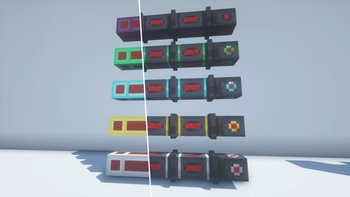
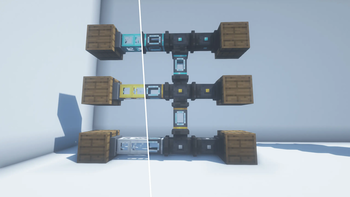

Über diese Mod
⚡ FastPipes — The Pipe Mod That Doesn't Lag Your Server
Tired of pipe mods that eat TPS for breakfast? FastPipes is a high-performance pipe system for items, fluids, and energy — built from the ground up for NeoForge 1.21.1. Zero unnecessary ticking, smart caching, minimal network traffic. Your server will thank you.
Originally forked from the abandoned Refined Pipes and completely rewritten for modern Minecraft.
🔧 Three Pipe Types. Zero Compromises.
Item Pipes (Basic, Improved, Advanced)
— Smart priority routing, visual item animations flying through pipes, and machines can push items directly into the network. No extractors needed on the receiving end.
Fluid Pipes (Basic, Improved, Advanced, Elite, Ultimate)
— Real fluid transport with animated fill levels you can actually see. Filter what flows. Scale from 1,000 mB to massive throughput.
Energy Pipes (Basic, Improved, Advanced, Elite, Ultimate)
— FE/RF compatible. From early-game 1k FE/t to endgame 32k FE/t. Just connect and go.
🎯 Attachments That Actually Do Things
Extractors (5 tiers) — Pull items/fluids from inventories with whitelist/blacklist filters, redstone control, exact matching, and four routing modes: nearest, furthest, random, or round robin.
Inserters (5 tiers) — Mark where items should GO. Priority-based delivery means your storage system actually works. Items bounce back when destinations are full — no void, no loss.
Void — Destroys overflow items and fluids. Supports filtering by items/fluids.
Sensor — Emits redstone signal when matching items/fluids pass through.
👀 It Looks Good Too
- Pipes connect intelligently in all 6 directions with smooth 3D models
- Items visually fly through pipes with rotation animation
- Fluid levels animate in real-time inside fluid pipes
- All attachments render as proper 3D models on the pipe
- All pipes can be painted in any color by clicking on the pipe with a dye, they will be transferred to a separate network
- It comes with its own wrench! You can use it to disconnect and remove pipes. If you don't like the original, wrenches from other mods are supported thanks to NeoForge Itemabilites!
🧩 Plays Nice With Others
- Jade — hover over any pipe to see transfer rates, fluid contents, items in transit
- JEI — full info pages for every pipe, extractor, and inserter
⚙️ Fully Configurable
Every pipe tier's speed, capacity, and transfer rate is tweakable in the server config. Make it balanced for your modpack or crank everything to 11.
Verfügbare Versionen
FastPipes auf dem Server installieren
Server bestellen
Bestelle einen Minecraft Java Server mit mindestens 3 GB RAM (4 GB empfohlen).
forge Loader setzen
Wähle im Panel unter "Egg" den forge-Loader und die passende Minecraft-Version (26.2).
Mod installieren
Öffne den Mod-Browser im Dashboard und suche nach "FastPipes". Klicke "Installieren" – fertig! Alternativ: Lade die .jar via SFTP in den /mods Ordner.
Kompatibilität
Mod-Loader
Minecraft-Versionen
26.2, 26.1.2, 1.21.11 (+2 weitere)
Server-seitig
✓ ErforderlichEmpfohlener RAM
4 GB(min. 3 GB)Häufige Fragen
FastPipes Server crasht beim Start – was tun?
Häufigste Ursache: falsche forge-Version oder zu wenig RAM. Prüfe im Server-Log (latest.log), ob ein "OutOfMemoryError" oder "Mixin"-Fehler auftritt. Bei Mado Hosting: Stelle sicher, dass mindestens 3 GB RAM zugewiesen sind und der Loader zur Mod-Version passt (26.2). Über das Panel kannst du den Loader mit einem Klick wechseln.
Ist FastPipes mit forge und neoforge kompatibel?
FastPipes unterstützt offiziell forge, neoforge für Minecraft 26.2, 26.1.2, 1.21.11. Im Mado Dashboard werden inkompatible Loader-Kombinationen automatisch erkannt.
Server laggt mit FastPipes – wie optimiere ich die Performance?
Empfohlener RAM: 4 GB (+1 GB pro 8 Spieler). Prüfe mit /spark profiler, ob FastPipes den meisten Tick-Time verbraucht. Häufige Fixes: Server-View-Distance auf 8-10 reduzieren, bei Forge "performant" oder "starlight" als Zusatz-Mod installieren. Bei Mado Hosting läuft dein Server auf NVMe-SSDs mit dedizierten CPU-Kernen für minimale Latenz.
Ähnliche Mods


Modded Server mieten
Installiere FastPipes mit nur einem Klick auf deinem Server.