
Fast Trading
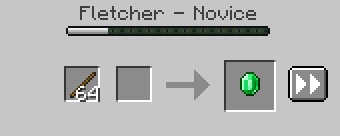
Adds a button to the villager trading GUI to repeat the current trade until it's no longer available again. (Fork of SpeedTrading)
Screenshots
Über diese Mod
Fast Trading
Adds a button to the villager trading GUI to repeat the current trade until it's no longer available (again).
Configuration
This mod can be configured in-game using Mod Menu or by editing the configuration file at config/fasttrading.json.
Config Options
| Config name | Description | Options | Default value |
|---|---|---|---|
| Ticks Between Actions | Delay between moving items | Any number greater than 0.025 |
1 |
| Autofill Behavior | Use Vanilla autofill or match items exactly | Vanilla, Strict |
Vanilla |
| Speed Trade Block | When to disallow trading | Result is Damageable, Result is Unstackable, Allow |
Result is Damageable |
| Stop on Price Change | Stop trading whenever the price changes | On Increase, On Change, Never |
On Increase |
| Stop on New Offers | Stop when new trade offers appear | Yes, No |
No |
This is an updated fork of SpeedTrading by ModsByLeo. Full credit goes to them for creating it.
Verfügbare Versionen
Fast Trading auf deinem Client installieren
Mod-Loader lokal installieren
Installiere fabric für deine lokale Minecraft-Version.
Passende Datei herunterladen
Wähle die Fast Trading-Datei für fabric und Minecraft 26.3.
Mod installieren
Lege die .jar-Datei in deinem lokalen .minecraft/mods-Ordner ab und starte Minecraft neu. Eine Installation auf dem Server ist nicht nötig.
Kompatibilität
Mod-Loader
Minecraft-Versionen
26.3, 26.3-rc-2, 26.2 (+25 weitere)
Server-seitig
✗ Nicht unterstütztEmpfohlener RAM
4 GB(min. 3 GB)Häufige Fragen
Muss Fast Trading auf dem Minecraft Server installiert werden?
Nein. Modrinth kennzeichnet Fast Trading serverseitig als nicht unterstützt. Installiere die Mod nur im lokalen Minecraft-Mods-Ordner. Dein Server kann unverändert bleiben, sofern die Mod-Seite keine zusätzliche Abhängigkeit nennt.
Welche Version und welchen Loader braucht Fast Trading?
Nutze eine Datei für fabric, quilt und exakt deine Minecraft-Version. Unterstützte Versionen sind unter anderem 26.3, 26.3-rc-2, 26.2. Loader-Dateien sind nicht untereinander austauschbar.
Fast Trading funktioniert nicht – was kann ich prüfen?
Prüfe zuerst Minecraft-Version, Loader-Version und erforderliche Abhängigkeiten. Lege die .jar-Datei im lokalen .minecraft/mods-Ordner ab und entferne ältere Duplikate. Da die Mod clientseitig ist, löst mehr Server-RAM dieses Problem nicht.
Ähnliche Mods




![[ETF] Entity Texture Features](https://cdn.modrinth.com/data/BVzZfTc1/af683d206d50b05258d865b0d6e4aa2f2cee12f2_96.webp)

Minecraft Server für deine Gruppe
Fast Trading bleibt auf deinem Client. Hoste dazu eine kompatible Welt für deine Mitspieler.