
flaming(火焰熊熊)
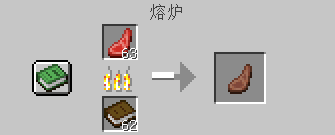
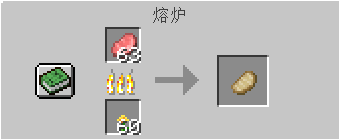
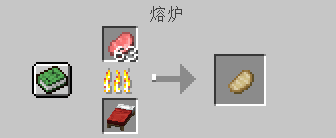
Repurpose some wood products and similar items that cannot be used as fuel in the original version, and add new fuels and burning durations to the available item tags
Screenshots
Über diese Mod
Preface:
In the original game, the fuel structure is too limited: wood/carpet/coal/lava
And those "little tricks" of Mojang:
For example, items like beds, which are synthesized using fuel,cannot even burn!
Therefore, it takes up a lot of space in survival, and it feels wasteful to discard it.
It's like chicken ribs - tasteless to eat, but a pity to throw away.
Now, this module can help you solve this problem without wasting anything!
Introduction:
A simple mod that re-enables some wood products and similar wood-based items that cannot be used as fuel in the vanilla game to become fuel again.
Note: (Must read before use!!!)
The Fabric side also requires the installation of the Fabric API (please place the Fabric API in the directory: game instance name/mods);
(This module adopts a semi-passive update approach.) I am a high school student, and with my busy schoolwork, I may decide to update at any time.
FAQ
Q: What should I do if there are BUGs, crashes, or no effects after adding a mod?
A: Please first confirm whether your operating mode (Forge or Fabric) is correct. If the issue persists after confirmation, please inquire in the comment section.
Verfügbare Versionen
flaming(火焰熊熊) auf dem Server installieren
Server bestellen
Bestelle einen Minecraft Java Server mit mindestens 3 GB RAM (4 GB empfohlen).
fabric Loader setzen
Wähle im Panel unter "Egg" den fabric-Loader und die passende Minecraft-Version (1.20.4).
Mod installieren
Öffne den Mod-Browser im Dashboard und suche nach "flaming(火焰熊熊)". Klicke "Installieren" – fertig! Alternativ: Lade die .jar via SFTP in den /mods Ordner.
Kompatibilität
Mod-Loader
Minecraft-Versionen
1.20.4, 1.20.3, 1.20.2 (+10 weitere)
Server-seitig
~ OptionalEmpfohlener RAM
4 GB(min. 3 GB)Häufige Fragen
flaming(火焰熊熊) Server crasht beim Start – was tun?
Häufigste Ursache: falsche fabric-Version oder zu wenig RAM. Prüfe im Server-Log (latest.log), ob ein "OutOfMemoryError" oder "Mixin"-Fehler auftritt. Bei Mado Hosting: Stelle sicher, dass mindestens 3 GB RAM zugewiesen sind und der Loader zur Mod-Version passt (1.20.4). Über das Panel kannst du den Loader mit einem Klick wechseln.
Ist flaming(火焰熊熊) mit fabric und forge und neoforge kompatibel?
flaming(火焰熊熊) unterstützt offiziell fabric, forge, neoforge für Minecraft 1.20.4, 1.20.3, 1.20.2. Achtung: Forge- und Fabric-Mods sind NICHT untereinander kompatibel – wähle einen Loader und bleibe dabei. Im Mado Dashboard werden inkompatible Loader-Kombinationen automatisch erkannt.
Server laggt mit flaming(火焰熊熊) – wie optimiere ich die Performance?
Empfohlener RAM: 4 GB (+1 GB pro 8 Spieler). Prüfe mit /spark profiler, ob flaming(火焰熊熊) den meisten Tick-Time verbraucht. Häufige Fixes: Server-View-Distance auf 8-10 reduzieren, bei Forge "performant" oder "starlight" als Zusatz-Mod installieren. Bei Mado Hosting läuft dein Server auf NVMe-SSDs mit dedizierten CPU-Kernen für minimale Latenz.
Ähnliche Mods






Modded Server mieten
Installiere flaming(火焰熊熊) mit nur einem Klick auf deinem Server.