
Flashables
Flashables is a dynamic lights and flashlight mod for minecraft 1.20.+
Screenshots
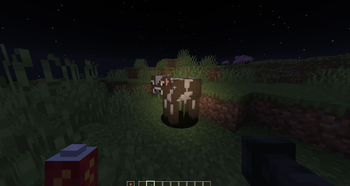
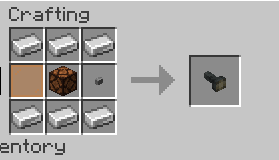
Über diese Mod
⚠ IMPORTANT!
This mod is NOT compatible with Embeddium!
Flashables adds multiplayer-compatible dynamic lights and a variety of custom flashlight items to Minecraft.
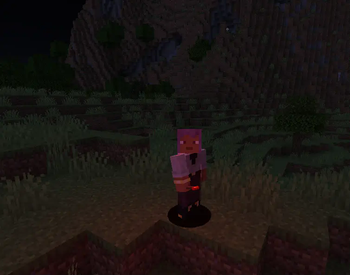
Bring light with you wherever you go — no more fumbling in the dark!
🔦 Features
Dynamic Lighting: Works in multiplayer without the usual flicker or lag.
Custom Flashlights:
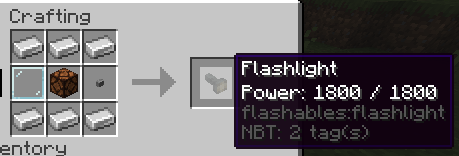
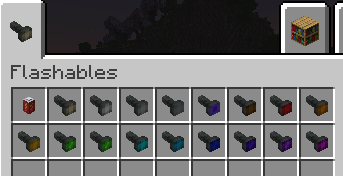
Multiple beam colors (17 total, from classic white to vivid pink).
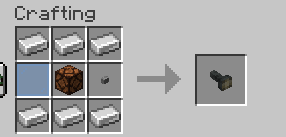
Change the color of your flashlight at any time — just combine it with a matching glass pane in a crafting grid.
Battery System:
Flashlights run on replaceable batteries.
Energy drains while active, so plan ahead!
Recharge or swap in fresh ones.
Crafting Recipes:
Recipes for flashlights and batteries included right in the mod.
Color-changing recipe works with any flashlight and glass pane.
Dynamic Light Items:
Not just flashlights — many vanilla and modded items can emit light when held!
Includes torches, lanterns, froglights, end rods… and a few surprises you’ll have to discover yourself.
🛠 Mod Integration
You can register your own light items or add compatibility for other mods using the built-in registrar:
com.smibii.flashables.lights.LightItemRegistry.register(
Items.TORCH, LightMode.AREA, LightColor.ORANGE, List.of(LightPosition.MAINHAND, LightPosition.OFFHAND)
);
Add as many as you like — the system is flexible enough to handle anything from handheld lamps to magical glowing artifacts.
📣 Support / Issues
- Do not report issues to Veil. If something breaks while using Veil with Flashables, please report it here on the Flashables page/issue tracker. We’ll handle Veil-integration problems on our side.
- Remember: Embeddium is not supported. Please remove it before reporting any bugs.
✅ Usage & Permissions:
You may include this mod in your modpack or modify it to fit your needs, but please give proper credit.
Verfügbare Versionen
Flashables auf dem Server installieren
Server bestellen
Bestelle einen Minecraft Java Server mit mindestens 3 GB RAM (4 GB empfohlen).
forge Loader setzen
Wähle im Panel unter "Egg" den forge-Loader und die passende Minecraft-Version (1.20.1).
Mod installieren
Öffne den Mod-Browser im Dashboard und suche nach "Flashables". Klicke "Installieren" – fertig! Alternativ: Lade die .jar via SFTP in den /mods Ordner.
Kompatibilität
Mod-Loader
Minecraft-Versionen
1.20.1
Server-seitig
✓ ErforderlichEmpfohlener RAM
4 GB(min. 3 GB)Häufige Fragen
Flashables Server crasht beim Start – was tun?
Häufigste Ursache: falsche forge-Version oder zu wenig RAM. Prüfe im Server-Log (latest.log), ob ein "OutOfMemoryError" oder "Mixin"-Fehler auftritt. Bei Mado Hosting: Stelle sicher, dass mindestens 3 GB RAM zugewiesen sind und der Loader zur Mod-Version passt (1.20.1). Über das Panel kannst du den Loader mit einem Klick wechseln.
Ist Flashables mit forge kompatibel?
Flashables unterstützt offiziell forge für Minecraft 1.20.1. Im Mado Dashboard werden inkompatible Loader-Kombinationen automatisch erkannt.
Server laggt mit Flashables – wie optimiere ich die Performance?
Empfohlener RAM: 4 GB (+1 GB pro 8 Spieler). Prüfe mit /spark profiler, ob Flashables den meisten Tick-Time verbraucht. Häufige Fixes: Server-View-Distance auf 8-10 reduzieren, bei Forge "performant" oder "starlight" als Zusatz-Mod installieren. Bei Mado Hosting läuft dein Server auf NVMe-SSDs mit dedizierten CPU-Kernen für minimale Latenz.
Ähnliche Mods




Modded Server mieten
Installiere Flashables mit nur einem Klick auf deinem Server.