
Fluidlogged
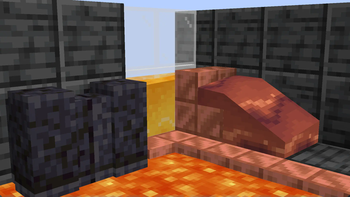
Allows waterlogging with any block and fluid and also allows fluids to pass through blocks. Everything without the usage of blockstates.
Screenshots

Über diese Mod
Fluidlogged
This description is only for version 2.0.0 and above. The old description can be found here. This is because the newer versions work completely different!
Requires YetAnotherConfigLib and Fabric API on Fabric
This mod allows literally any block to be waterloggable with any fluid and also allows them to pass through blocks. This done by separating fluids from all blockstates in each chunk which solves startup time and memory usage when a lot of mods are installed.
Many non-waterloggable blocks are fluidloggable by default. If you don't like some features such as, fluids passing through blocks, you can disable this in the config. Changes to the config are applied immediately to your world!
There's also a command to place fluids in every block without updating the config:/setfluid
IF YOU EXPERIENCE ANY INCOMPATIBILITY WITH A MOD PLEASE REPORT IT TO ME AND NOT TO THE MOD YOU ARE EXPERIENCING THE ISSUE WITH!
Why beta?
This mod interacts with chunk saving/loading which is one of the main reasons. There might also be some drastic changes to this mod's code.
Can this corrupt my world?
Even though it seems stable, please create a backup of the worlds you care about!
Can I use it in a modpack?
Feel free to use any of my mods in a modpack!
Verfügbare Versionen
Fluidlogged auf dem Server installieren
Server bestellen
Bestelle einen Minecraft Java Server mit mindestens 3 GB RAM (4 GB empfohlen).
fabric Loader setzen
Wähle im Panel unter "Egg" den fabric-Loader und die passende Minecraft-Version (1.20.1).
Mod installieren
Öffne den Mod-Browser im Dashboard und suche nach "Fluidlogged". Klicke "Installieren" – fertig! Alternativ: Lade die .jar via SFTP in den /mods Ordner.
Kompatibilität
Mod-Loader
Minecraft-Versionen
1.20.1, 1.20, 1.19.3 (+6 weitere)
Server-seitig
✓ ErforderlichEmpfohlener RAM
4 GB(min. 3 GB)Häufige Fragen
Fluidlogged Server crasht beim Start – was tun?
Häufigste Ursache: falsche fabric-Version oder zu wenig RAM. Prüfe im Server-Log (latest.log), ob ein "OutOfMemoryError" oder "Mixin"-Fehler auftritt. Bei Mado Hosting: Stelle sicher, dass mindestens 3 GB RAM zugewiesen sind und der Loader zur Mod-Version passt (1.20.1). Über das Panel kannst du den Loader mit einem Klick wechseln.
Ist Fluidlogged mit fabric und forge kompatibel?
Fluidlogged unterstützt offiziell fabric, forge für Minecraft 1.20.1, 1.20, 1.19.3. Achtung: Forge- und Fabric-Mods sind NICHT untereinander kompatibel – wähle einen Loader und bleibe dabei. Im Mado Dashboard werden inkompatible Loader-Kombinationen automatisch erkannt.
Server laggt mit Fluidlogged – wie optimiere ich die Performance?
Empfohlener RAM: 4 GB (+1 GB pro 8 Spieler). Prüfe mit /spark profiler, ob Fluidlogged den meisten Tick-Time verbraucht. Häufige Fixes: Server-View-Distance auf 8-10 reduzieren, bei Forge "performant" oder "starlight" als Zusatz-Mod installieren. Bei Mado Hosting läuft dein Server auf NVMe-SSDs mit dedizierten CPU-Kernen für minimale Latenz.
Ähnliche Mods






Modded Server mieten
Installiere Fluidlogged mit nur einem Klick auf deinem Server.