
FramePilot
FramePilot is a Fabric Minecraft mod that boosts performance automatically. It detects your GPU and applies a tuned settings profile, then dynamically adjusts render distance, particles, and entity scaling to hold a target FPS.
Screenshots
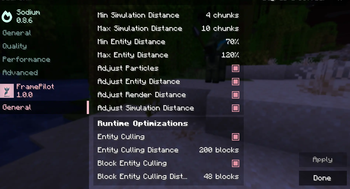
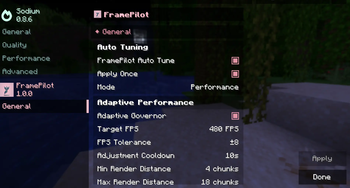
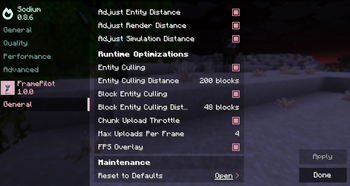
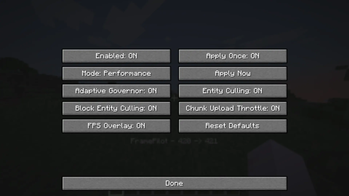
Über diese Mod
FramePilot: Intelligent FPS Optimizer for Minecraft (Fabric)
Automatic GPU detection · Adaptive FPS governor · Entity culling · Chunk throttling
Stop tweaking sliders. FramePilot is a lightweight Fabric client-side mod that automatically detects your GPU, applies a tuned settings profile, and dynamically adjusts Minecraft's performance settings in real time to keep your frame rate smooth and stable no manual configuration required.
Whether you're running a low-end laptop or a high-end gaming rig, FramePilot intelligently scales your game settings to get the best possible performance out of your hardware.
Key Features
GPU Auto-Tune
On startup, FramePilot reads your GPU information directly from OpenGL (vendor, renderer, version) and classifies it into a performance tier: low, mid, or high. Based on your tier and chosen mode (Performance, Balanced, or Quality), it automatically configures render distance, simulation distance, entity distance scaling, particles, clouds, ambient occlusion, entity shadows, biome blend radius, mipmaps, and chunk update priority. Set it once, forget about it.
Adaptive FPS Governor
FramePilot continuously monitors your FPS using an Exponential Moving Average (EMA) and compares it against your target. Too low? It reduces load. Above target? It restores quality. Adjustments are made gradually and silently in the background so you never notice a sudden change.
Soft Render Cap (No Chunk Reload Stutter)
Unlike mods that reduce render distance (triggering a full, jarring chunk reload), FramePilot uses a smart soft render cap. It filters out distant sections at render time while keeping already-loaded chunks intact, delivering smoother distance management with zero reload stutter.
Entity Culling
Mobs, items, and other entities beyond a configurable distance (default: 200 blocks) are skipped at render time entirely. They still exist in the game world; they're just not drawn when they're too far away to matter. Players are never culled.
Block Entity Culling
Chests, furnaces, signs, and other block entities beyond the cull distance are skipped during render state creation. This eliminates significant GPU overhead in built-up areas like bases and villages.
Chunk Upload Throttle
Frame spikes when loading new areas are caused by too many chunk meshes uploading to the GPU at once. FramePilot caps the number of chunk mesh uploads per frame to a user-defined limit, dramatically reducing those sudden FPS dips during exploration.
FPS Boost Overlay
After a tuning change, FramePilot optionally displays a clean before and after FPS indicator on your HUD so you can see exactly how much performance was gained. It shows once, stays for at least 2 seconds, and never spams.
Sodium Integration
FramePilot works perfectly as a standalone mod. If you have Sodium installed, FramePilot automatically integrates into Sodium's settings UI. All sliders and toggles appear directly inside the Sodium menu for a seamless experience. No separate config screen needed.
Without Sodium, theres a dedicated menu option for Frame pilot for you to mess around.
Configuration and Compatibility
All settings are saved to config/framepilot.json. Old config files from previous mod names (optimiser-mod.json, template-mod.json) are automatically migrated with no manual changes required when updating.
Loader: Fabric
Side: Client only
Sodium: Optional
Who is this for?
FramePilot is ideal for players who want better FPS without spending time on manual optimisation, users on low-to-mid-end hardware who need every frame to count, server players dealing with crowded areas full of entities and block entities, and anyone who wants a performance mod that works intelligently in the background without interrupting gameplay.
Tags: Minecraft performance mod, Fabric FPS booster, entity culling mod, GPU auto-tune Minecraft, adaptive render distance, chunk upload throttle, Sodium compatible, client-side optimisation, Minecraft lag fix, smooth FPS Minecraft
This mod was created and developed by Xeonz. All rights reserved.
FramePilot is the original work of xeonz. Reuploading, redistributing, or republishing this mod on any platform without explicit written permission from the original author is strictly prohibited.
If you encounter this mod hosted anywhere other than the official page, please report it. Support the original creator by downloading only from the official source.
Verfügbare Versionen
FramePilot auf deinem Client installieren
Mod-Loader lokal installieren
Installiere fabric für deine lokale Minecraft-Version.
Passende Datei herunterladen
Wähle die FramePilot-Datei für fabric und Minecraft 1.21.11.
Mod installieren
Lege die .jar-Datei in deinem lokalen .minecraft/mods-Ordner ab und starte Minecraft neu. Eine Installation auf dem Server ist nicht nötig.
Kompatibilität
Mod-Loader
Minecraft-Versionen
1.21.11, 1.21.10, 1.21.9
Server-seitig
✗ Nicht unterstütztEmpfohlener RAM
4 GB(min. 3 GB)Häufige Fragen
Muss FramePilot auf dem Minecraft Server installiert werden?
Nein. Modrinth kennzeichnet FramePilot serverseitig als nicht unterstützt. Installiere die Mod nur im lokalen Minecraft-Mods-Ordner. Dein Server kann unverändert bleiben, sofern die Mod-Seite keine zusätzliche Abhängigkeit nennt.
Welche Version und welchen Loader braucht FramePilot?
Nutze eine Datei für fabric und exakt deine Minecraft-Version. Unterstützte Versionen sind unter anderem 1.21.11, 1.21.10, 1.21.9. Loader-Dateien sind nicht untereinander austauschbar.
FramePilot funktioniert nicht – was kann ich prüfen?
Prüfe zuerst Minecraft-Version, Loader-Version und erforderliche Abhängigkeiten. Lege die .jar-Datei im lokalen .minecraft/mods-Ordner ab und entferne ältere Duplikate. Da die Mod clientseitig ist, löst mehr Server-RAM dieses Problem nicht.
Ähnliche Mods






Minecraft Server für deine Gruppe
FramePilot bleibt auf deinem Client. Hoste dazu eine kompatible Welt für deine Mitspieler.