FSit
Sit anywhere!
Screenshots


Über diese Mod
FSit
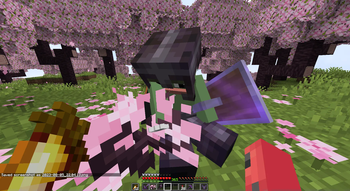
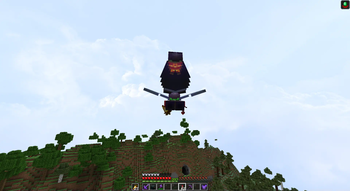
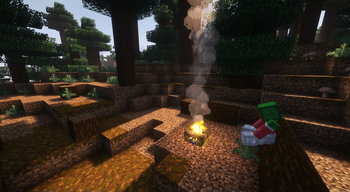
Customizable server-side mod that allows players to sit, crawl, and ride each other.
Client-side is supported too,
it allows players to improve their experience by using client configuration
and adding some client-side mod behaviour improvements.
[!NOTE]
Inspired by GSit Spigot plugin.
Usage
Having this mod installed on the server is enough, players are not forced to have it to be able to use it.
However, installation on the client will bring some QoL improvements for players using this mod.
Such as client configuration, better crawling, and key bindings.
Interacting with blocks
Interact with the topside of the block, that can be sat on, to start sitting on them.

Controlled with block-interaction.
Interacting with players
Interact with any player to start riding them.

Control angle difference with riding-minimum-yaw
Sneaking
Double sneak while looking down to sit right away.
Doing the same, but near the hole, will start crawling otherwise. (sneak-crawling)
Minimal pitch and maximum sneak window can be configured with sneak-minimum-pitch andsneak-window accordingly.
Commands
/sit and /crawl commands for corresponding actions are available.
Key bindings (client)
Use key bindings to start sitting (default: RCtrl) or crawling (default: RAlt).
Key bindings have three modes: Hold, Toggle, and Hybrid.
Hold and Toggle works the same as Vanilla.
Hybrid is an in-between mechanic, that works as Toggle on single-use and as Hold on holding.
The Hybrid window between Hold and Toggle can be configured from the Configuration Screen.
Configuration
As was stated before, players can use their own configurations if they have this mod installed on the client.
Otherwise, server configuration will be used.
Configuration can be reloaded from the file with /fsit reload.
For clients, configuration can be modified with Mod Menu and YetAnotherConfigLib installed.
Default configuration file
use-server: false
seats-trait: moveable
seats-centered: false
block-interaction: true
block-interaction-ids:
  - '#minecraft:slabs'
  - '#minecraft:stairs'
  - '#minecraft:logs'
  - '#minecraft:fences'
riding-minimum-yaw: 45
sneak-window: 10
sneak-minimum-pitch: 60
sneak-crawling: true
commands:
  root: fsit
  sit: sit
  crawl: crawl
  lay: lay
Options details
use-server
When set to true, forces all players (server) or player (client) to use server configuration.
Enabling this option will ignore client pose updates, leaving only server-to-client synchronization.
seats-trait
Controls sitting behaviour. Possible values: static, attached, moveable.
static– does nothing, ignores everything;attached– seats will be discarded if they do not have any supporting block underneath;moveable– seats can be pushed by fluids, pistons, etc. Will start falling without a supporting block.
seats-centered
Place seats in the centre of the block.
block-interaction
Allows sitting by interacting with blocks.
riding-minimum-yaw
When 1..180, allows riding by interacting with players.
Setting to 0 disables riding interactions, and 180 removes restriction.
The option controls a difference between players' horizontal facing angle to allow riding by interaction.
block-interaction-ids
List of blocks and block tags that are available to interact with.
sneak-crawling
Starts crawling instead of sitting if there is a hole nearby.
sneak-minimum-pitch
Minimal required player pitch to start registering sneak actions.
Where 90 is straight down, and -90 ignores player pitch.
sneak-window
The window in ticks between sneaks to be recognized as double sneak action.
Setting to 0 disables sneak actions.
Contributing
Pull requests are welcome.
For major changes, please open an issue first to discuss what you would like to change.
Translations
New or updated translations are more than appreciated,
they can be found at src/main/resources/assets/fsit/lang.
Fields with keys *.description.1 are indefinite and can have any number of lines,
you are free to create new or remove keys with description.<n> when needed.
Building
The project uses FabricMC and Stonecutter for multi-versioning.
> ./gradlew build
To run a specific version, switch to that version with Stonecutter, and run version configuration provided by IDE, or
> ./gradlew "Set active project to [version]"
> ./gradlew [version]:runClient # or
> ./gradlew [version]:runServer
Publishing is done with publishMods task.
Requires MODRINTH_TOKEN environment variable to be provided, otherwise the task will dry-run.
> ./gradlew chiseledPublish
License
This project is licensed under the MIT License.
Verfügbare Versionen
FSit auf dem Server installieren
Server bestellen
Bestelle einen Minecraft Java Server mit mindestens 3 GB RAM (4 GB empfohlen).
fabric Loader setzen
Wähle im Panel unter "Egg" den fabric-Loader und die passende Minecraft-Version (26.1.2).
Mod installieren
Öffne den Mod-Browser im Dashboard und suche nach "FSit". Klicke "Installieren" – fertig! Alternativ: Lade die .jar via SFTP in den /mods Ordner.
Kompatibilität
Mod-Loader
Minecraft-Versionen
26.1.2, 26.1.1, 26.1 (+25 weitere)
Server-seitig
~ OptionalEmpfohlener RAM
4 GB(min. 3 GB)Häufige Fragen
FSit Server crasht beim Start – was tun?
Häufigste Ursache: falsche fabric-Version oder zu wenig RAM. Prüfe im Server-Log (latest.log), ob ein "OutOfMemoryError" oder "Mixin"-Fehler auftritt. Bei Mado Hosting: Stelle sicher, dass mindestens 3 GB RAM zugewiesen sind und der Loader zur Mod-Version passt (26.1.2). Über das Panel kannst du den Loader mit einem Klick wechseln.
Ist FSit mit fabric und quilt kompatibel?
FSit unterstützt offiziell fabric, quilt für Minecraft 26.1.2, 26.1.1, 26.1. Im Mado Dashboard werden inkompatible Loader-Kombinationen automatisch erkannt.
Server laggt mit FSit – wie optimiere ich die Performance?
Empfohlener RAM: 4 GB (+1 GB pro 8 Spieler). Prüfe mit /spark profiler, ob FSit den meisten Tick-Time verbraucht. Häufige Fixes: Server-View-Distance auf 8-10 reduzieren, bei Forge "performant" oder "starlight" als Zusatz-Mod installieren. Bei Mado Hosting läuft dein Server auf NVMe-SSDs mit dedizierten CPU-Kernen für minimale Latenz.
Ähnliche Mods






Modded Server mieten
Installiere FSit mit nur einem Klick auf deinem Server.