
FTB Quest Translator
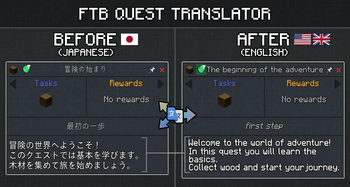
Client-side addon for FTB Quests that adds a translate button. Translates quest titles, subtitles and descriptions on-the-fly using free translation APIs (Google Translate, MyMemory).
Screenshots
Über diese Mod
🌐 FTB Quest Translator
A fully integrated client-side addon for FTB Quests that brings high-quality, real-time quest translations right into your game. Say goodbye to external translators—enjoy modpacks in your native language seamlessly!
⚠️ Important Notice from the Author This mod is developed and maintained by a single developer in their free time. While I strive to ensure the best possible experience, updates might take a little time.
If you encounter any bugs, have feature requests, or just want to chat about the mod, I'd love to hear from you!
Please join the official Discord Server (discord.gg/XsZ5czhpJ8) to report issues or share your feedback.
🎥 Showcase
✨ Key Features:
- One-Click Translation — A seamlessly integrated toggle button right inside the quest view panel. No bulky external menus.
- Advanced Translation Providers — Supports DeepL (highly recommended, preserves context and formatting) and Google Translate.
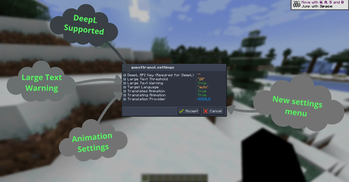
- Native UI Configuration — Forget about editing config files manually. Configure API keys, translation providers, and animations directly in-game using the gorgeous UI via FTB Library.
- Smart Language Detection — Automatically detects your Minecraft language settings and translates quests accordingly.
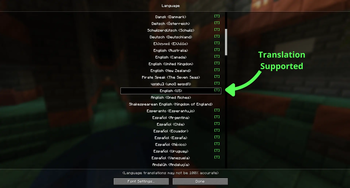
- Language Support Indicator — Look for the handy green [T] in the Minecraft Language Options screen to instantly know if your language is supported!
- Live Connection Diagnostics — Cool immersive animations around the translate button that warn you if the translation server is unreachable or if your API key is invalid.
- In-Memory Caching — Intelligent caching ensures instant translations with zero repeated API calls, saving your network and API usage.
- Client-Side Only — Zero server setup required. You can safely use it while playing on any multiplayer server!
- Text-to-Speech Voiceover — A speaker icon next to the translate
button reads quest text aloud using Google TTS. Dynamically reads
either the original or translated text depending on your current view. - Glossary (Translation Memory) — Configure words to stay untranslated
via config/tfq_glossary.json. Perfect for keeping mod names like
"Redstone", "Create", or "Mekanism" in their original form. - Batch Translation — Two new buttons in the FTB Quests sidebar let
you translate the entire questbook in the background. Uses a smart
rate-limiting queue (1.5s delay) to avoid API bans. Progress is
saved automatically — close the game and resume later anytime.
🎮 How to Use:
- Open any quest in your FTB Quests book.
- Click the Translate Button to translate the quest instantly.
- Click again to switch back to the original text.
- Use the Batch buttons in the sidebar to translate the whole questbook at once.
⚙️ Configuration:
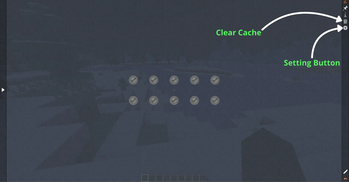
Simply open your FTB Quests book and click the Settings Gear at the top right of the main panel to open the intuitive in-game configuration menu. Here you can tweak:
- Target Language overrides
- Your DeepL API Key
- Network connection and transition animations
- Cache management and clearing
- Glossary management (config/tfq_glossary.json)
🌍 Target Language
The Target Language setting uses standard ISO language codes.
autois the default value for this setting, so in most cases you do not need to change anything manually. The mod will automatically adapt to your current Minecraft language.- Use a manual language code if you want to force a specific translation language.
- A full list of ISO language codes can be found on the Wikipedia ISO 639-1 page.
- Keep in mind that not every existing language code may be supported by Minecraft or by the selected translation provider.
📋 Requirements:
FTB Quests(Forge/NeoForge/Fabric) (Required)
FTB Library(Forge/NeoForge/Fabric) (Required)
Verfügbare Versionen
FTB Quest Translator auf deinem Client installieren
Mod-Loader lokal installieren
Installiere fabric für deine lokale Minecraft-Version.
Passende Datei herunterladen
Wähle die FTB Quest Translator-Datei für fabric und Minecraft 1.21.1.
Mod installieren
Lege die .jar-Datei in deinem lokalen .minecraft/mods-Ordner ab und starte Minecraft neu. Eine Installation auf dem Server ist nicht nötig.
Kompatibilität
Mod-Loader
Minecraft-Versionen
1.21.1, 1.20.4, 1.20.1
Server-seitig
✗ Nicht unterstütztEmpfohlener RAM
4 GB(min. 3 GB)Häufige Fragen
Muss FTB Quest Translator auf dem Minecraft Server installiert werden?
Nein. Modrinth kennzeichnet FTB Quest Translator serverseitig als nicht unterstützt. Installiere die Mod nur im lokalen Minecraft-Mods-Ordner. Dein Server kann unverändert bleiben, sofern die Mod-Seite keine zusätzliche Abhängigkeit nennt.
Welche Version und welchen Loader braucht FTB Quest Translator?
Nutze eine Datei für fabric, forge, neoforge und exakt deine Minecraft-Version. Unterstützte Versionen sind unter anderem 1.21.1, 1.20.4, 1.20.1. Loader-Dateien sind nicht untereinander austauschbar.
FTB Quest Translator funktioniert nicht – was kann ich prüfen?
Prüfe zuerst Minecraft-Version, Loader-Version und erforderliche Abhängigkeiten. Lege die .jar-Datei im lokalen .minecraft/mods-Ordner ab und entferne ältere Duplikate. Da die Mod clientseitig ist, löst mehr Server-RAM dieses Problem nicht.
Ähnliche Mods




![[ETF] Entity Texture Features](https://cdn.modrinth.com/data/BVzZfTc1/af683d206d50b05258d865b0d6e4aa2f2cee12f2_96.webp)

Minecraft Server für deine Gruppe
FTB Quest Translator bleibt auf deinem Client. Hoste dazu eine kompatible Welt für deine Mitspieler.