
FullStack Watchdog
Make Watchdog crashes show all the code that was running for all threads
Screenshots
Über diese Mod
This is a tiny server-sided mod that makes it so that the logs show more information when the Watchdog system on the server has killed the server due to being deadlocked or stuck so long. The crash report log will now show all of the code that was running at the time of the deadlocked server. In other words, the full stacktrace of all threads instead of the normally truncated (shortened) version.
In theory, this should help with diagnosing what modded code or mixin has caused an "off-thread" to lock up. When a thread locks up, the server thread gets stuck and if it remains stuck for so long, the Watchdog kills it because a tick took too long to complete. It won't help solve all deadlock issues. But it might get you just enough info to track down the cause of a few deadlocks.
Image below is an example of before and after this mod is put on (Gallery tab shows image better): 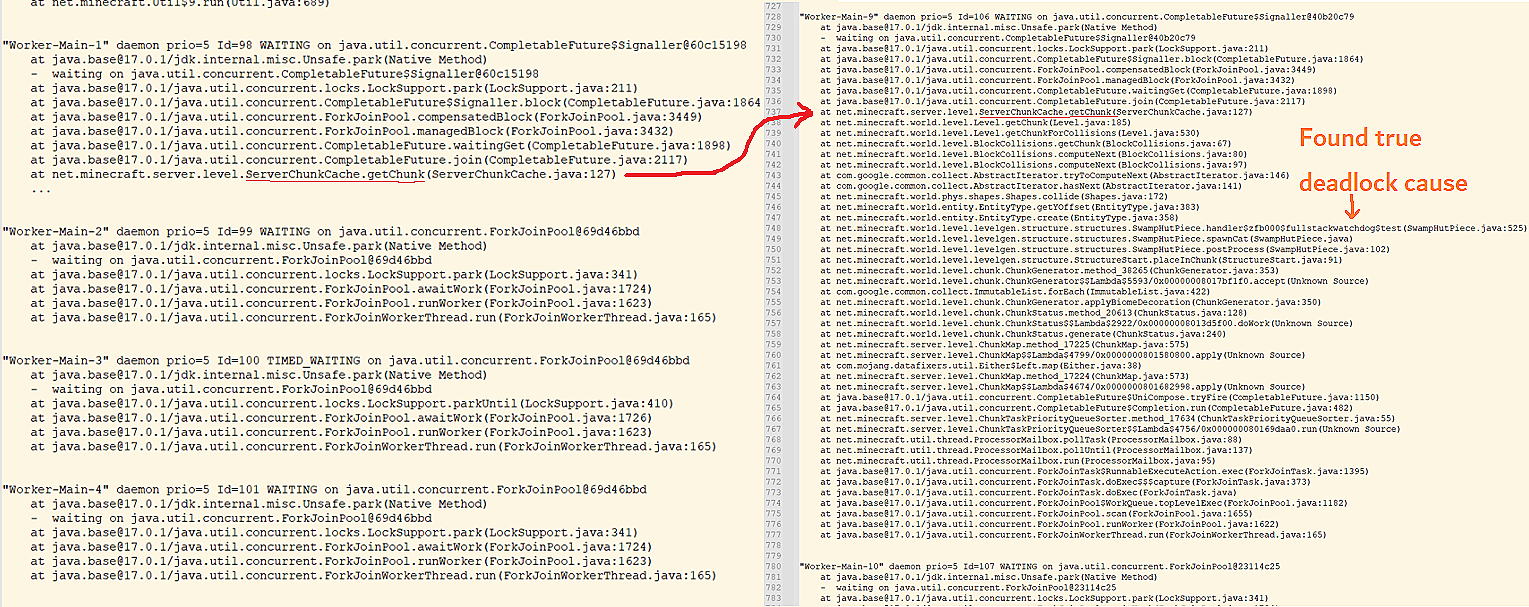
Yes you may ship this mod in a modpack. The client can also have this mod on but it won't do anything on client since the Watchdog system is only ran on servers. You can also run servers with this mod only on the server. Clients without this mod can still connect.
NOTE 1: NeoForge 20.4.107 and newer already has this mod merged into it! You do not need this mod in NeoForge for 1.20.4 MC or newer! https://github.com/neoforged/NeoForge/pull/512
NOTE 2: Fabric API 0.104.0+1.21.2 and newer already has this mod merged into it! You do not need this mod in Fabric for 1.21.2 MC or newer! https://github.com/FabricMC/fabric/pull/4052
Verfügbare Versionen
FullStack Watchdog auf dem Server installieren
Server bestellen
Bestelle einen Minecraft Java Server mit mindestens 3 GB RAM (4 GB empfohlen).
fabric Loader setzen
Wähle im Panel unter "Egg" den fabric-Loader und die passende Minecraft-Version (1.21.1).
Mod installieren
Öffne den Mod-Browser im Dashboard und suche nach "FullStack Watchdog". Klicke "Installieren" – fertig! Alternativ: Lade die .jar via SFTP in den /mods Ordner.
Kompatibilität
Mod-Loader
Minecraft-Versionen
1.21.1, 1.21, 1.20.6 (+16 weitere)
Server-seitig
✓ ErforderlichEmpfohlener RAM
4 GB(min. 3 GB)Häufige Fragen
FullStack Watchdog Server crasht beim Start – was tun?
Häufigste Ursache: falsche fabric-Version oder zu wenig RAM. Prüfe im Server-Log (latest.log), ob ein "OutOfMemoryError" oder "Mixin"-Fehler auftritt. Bei Mado Hosting: Stelle sicher, dass mindestens 3 GB RAM zugewiesen sind und der Loader zur Mod-Version passt (1.21.1). Über das Panel kannst du den Loader mit einem Klick wechseln.
Ist FullStack Watchdog mit fabric und forge und neoforge kompatibel?
FullStack Watchdog unterstützt offiziell fabric, forge, neoforge für Minecraft 1.21.1, 1.21, 1.20.6. Achtung: Forge- und Fabric-Mods sind NICHT untereinander kompatibel – wähle einen Loader und bleibe dabei. Im Mado Dashboard werden inkompatible Loader-Kombinationen automatisch erkannt.
Server laggt mit FullStack Watchdog – wie optimiere ich die Performance?
Empfohlener RAM: 4 GB (+1 GB pro 8 Spieler). Prüfe mit /spark profiler, ob FullStack Watchdog den meisten Tick-Time verbraucht. Häufige Fixes: Server-View-Distance auf 8-10 reduzieren, bei Forge "performant" oder "starlight" als Zusatz-Mod installieren. Bei Mado Hosting läuft dein Server auf NVMe-SSDs mit dedizierten CPU-Kernen für minimale Latenz.
Ähnliche Mods




![[ETF] Entity Texture Features](https://cdn.modrinth.com/data/BVzZfTc1/af683d206d50b05258d865b0d6e4aa2f2cee12f2_96.webp)

Modded Server mieten
Installiere FullStack Watchdog mit nur einem Klick auf deinem Server.