
Genesis - World Previewer & Pregenerator
Preview any seed before you create the world. Pre-generate chunks before you enter it.
Screenshots
Über diese Mod
See the world before you make it. Genesis puts a live biome map, seed tools and world pre-generation on the Create New World screen, so you can compare seeds and pre-build the terrain before you ever spawn in.
Minecraft 1.21.1 on Fabric or NeoForge, and 1.20.1 on Fabric or Forge. Needs Architectury API.
⭐ What It Does
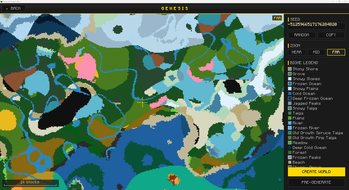
- A biome map of the world you are about to create - opened from a GENESIS button on the Create New World screen, sampled from the real generator with your seed and every mod you have installed.
- Readable in seconds - a coarse pass fills the layout immediately, then two finer passes complete the detail, sampling across as many as 16 background threads.
- Fixed at Y = 320 - so cave biomes never bleed into the surface map.
- Colored so you can actually read it - 16 biome families share a fill color, and every individual biome gets its own border color in the legend.
- Modded biomes get real colors too - matched by registry name, then grass color, then a hash of the name, so nothing shows up as anonymous gray.
- Pan, zoom and measure - drag to pan, scroll to zoom, NEAR, MID and FAR for fixed levels, with a scale bar, a live legend and a coordinate and biome readout under the cursor.
- Seed tools where you need them - type a number or any text, RANDOM for a fresh one, COPY to the clipboard, R to reroll. Leaving the screen writes the seed back to Create New World for you.
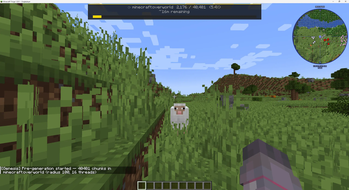
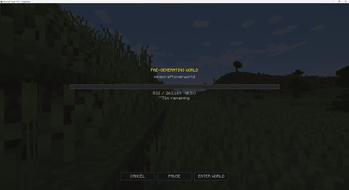
- Pre-generate before you play - set a radius and thread count and watch a progress bar with a chunk counter, a rolling ETA and the active dimension.
- On your terms - PAUSE and RESUME without losing progress, CANCEL to stop, or ENTER WORLD to keep it running in the background.
- A HUD while it runs - dimension, chunks, percentage and ETA at the top of the screen, amber while paused, gone when the job finishes.
- Or drive it from commands -
/genesis pregenby dimension orall, optionally centered on explicit coordinates, withcancel,pause,resumeandstatus, plus/genesis infofor the seed and generator. - A broken generator never takes the screen down - tiles that fail to sample are drawn neutral gray and the preview carries on.
📋 Requirements
- Minecraft 1.21.1 on Fabric or NeoForge, and 1.20.1 on Fabric or Forge.
- Architectury API 13.0.8 or later on every loader.
- Fabric API 0.116.12 or later, Fabric Loader 0.19.2 or later, and Cloth Config 15.0.140 or later, on Fabric.
- NeoForge 21.1 or later, on NeoForge.
📥 Installation
- Install your loader and Architectury API, plus Fabric API and Cloth Config if you are on Fabric.
- Install with the Modrinth App, or download the jar for your version and loader into your
modsfolder. - Open Create New World. A GENESIS button sits on the screen.
⚙️ Configuration
On NeoForge, edit config/genesis-client.toml. On Fabric, edit config/genesis.json or use any Cloth Config-compatible in-game editor.
| Setting | Default | What it does |
|---|---|---|
preview_enabled |
true |
Turns the biome preview on or off entirely. |
preview_threads |
0 |
Biome sampling threads, 0 to 16. 0 lets the mod choose. |
preview_initial_radius |
64 |
Chunks covered by the initial three-pass spiral, 16 to 512. |
preview_expand_radius |
16 |
Chunks added on each expansion after that spiral, 4 to 128. |
pregen_default_radius |
128 |
Pre-generation radius prefilled in the overlay and used by commands, 1 to 2048. |
pregen_default_threads |
4 |
Pre-generation threads prefilled in the overlay and used as the command default, 1 to 16. |
A change takes effect the next time the preview restarts, on a seed change or when the screen reopens. NeoForge enforces the ranges; the Fabric file takes what you type for the three preview options, so keep them inside those ranges yourself.
🖥️ Compatibility
- Existing worlds. The preview only runs on the Create New World screen, so it changes nothing about a world you already have. Pre-generation can be pointed at one from a command.
- Client or server. The biome preview is entirely client-side and safe to install on the client alone. Pre-generation needs Genesis on the server too, or on the integrated server in singleplayer.
- It does not touch generation. The preview reads the generator; it changes no chunk, structure or loot table.
- Worldgen mods such as Tectonic and TerraBlender are reflected accurately, because Genesis samples the same generator that builds the real terrain.
- GeoGradient is detected automatically: the map shows its latitude-based climate bands with no extra setup.
- Custom and Superflat generators fall back gracefully, showing biome colors where they can.
- Commands are operator level 2 on a server and unrestricted in singleplayer;
statusandinfoare open to everyone.
🐛 Support
- Report bugs and ask questions on this mod's Nexus Mods page, where every report is tracked.
- Include your Minecraft version, your loader and its version, the mod version, and your other mods.
📄 License
License terms are in the Alkeari License Agreement.
Verfügbare Versionen
Genesis - World Previewer & Pregenerator auf dem Server installieren
Server bestellen
Bestelle einen Minecraft Java Server mit mindestens 4 GB RAM (6 GB empfohlen).
fabric Loader setzen
Wähle im Panel unter "Egg" den fabric-Loader und die passende Minecraft-Version (1.21.1).
Mod installieren
Öffne den Mod-Browser im Dashboard und suche nach "Genesis - World Previewer & Pregenerator". Klicke "Installieren" – fertig! Alternativ: Lade die .jar via SFTP in den /mods Ordner.
Kompatibilität
Mod-Loader
Minecraft-Versionen
1.21.1, 1.20.1
Server-seitig
✓ ErforderlichEmpfohlener RAM
6 GB(min. 4 GB)Häufige Fragen
Genesis - World Previewer & Pregenerator Server crasht beim Start – was tun?
Häufigste Ursache: falsche fabric-Version oder zu wenig RAM. Prüfe im Server-Log (latest.log), ob ein "OutOfMemoryError" oder "Mixin"-Fehler auftritt. Bei Mado Hosting: Stelle sicher, dass mindestens 4 GB RAM zugewiesen sind und der Loader zur Mod-Version passt (1.21.1). Über das Panel kannst du den Loader mit einem Klick wechseln.
Ist Genesis - World Previewer & Pregenerator mit fabric und forge und neoforge kompatibel?
Genesis - World Previewer & Pregenerator unterstützt offiziell fabric, forge, neoforge für Minecraft 1.21.1, 1.20.1. Achtung: Forge- und Fabric-Mods sind NICHT untereinander kompatibel – wähle einen Loader und bleibe dabei. Im Mado Dashboard werden inkompatible Loader-Kombinationen automatisch erkannt.
Server laggt mit Genesis - World Previewer & Pregenerator – wie optimiere ich die Performance?
Empfohlener RAM: 6 GB (+1 GB pro 5 Spieler). Prüfe mit /spark profiler, ob Genesis - World Previewer & Pregenerator den meisten Tick-Time verbraucht. Häufige Fixes: Server-View-Distance auf 8-10 reduzieren, bei Forge "performant" oder "starlight" als Zusatz-Mod installieren. Bei Mado Hosting läuft dein Server auf NVMe-SSDs mit dedizierten CPU-Kernen für minimale Latenz.
Ähnliche Mods


Modded Server mieten
Installiere Genesis - World Previewer & Pregenerator mit nur einem Klick auf deinem Server.