GhostBlock
Gives you the ability to give yourself ghost block and other cool features CLIENT-SIDE
Screenshots

Über diese Mod
GhostBlock 2.0+
GhostBlock is a client-side ghost block and ghost item mod. It lets you create client-side only blocks, have ghost items and enter a fake creative mode that's let you build easily with ghost block without changing what the server actually gives you.
Features
Ghost Creative
Use:
/ghostblock creative
Ghost Creative lets you fly around from your camera and place/break client-side ghost blocks in fake creative mode while your real player stays where they actually are.
- Fake creative inventory and hotbar
- Creative-style reach
- Client-side block placing and breaking
- Pick block support
- Water/lava ghost placement
- Client-side ghost sign editing
- Your real player can still take normal damage/knockback
- Shows your real player at their actual server position
Ghost Items
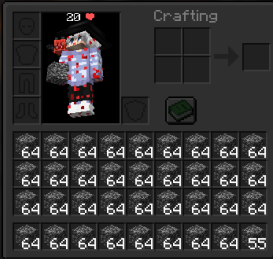
Give yourself client-side ghost items:
/ghostblock give <item> <amount>
Example:
/ghostblock give bedrock 64
Clear only ghost inventory items while keeping your real items:
/ghostblock clearinv
Ghost Block Placing
Enable right-click ghost block placing:
/ghostblock place <block>
Example:
/ghostblock place dirt
Enable right-click ghost block replacing:
/ghostblock replace <block>
Example:
/ghostblock replace glass
Run the same command again to toggle it off.
Fake Survival
Use:
/ghostblock fakesurvival
This visually switches your client to survival mode, useful for placing blocks in adventure mode client-side.
Remove Ghost Blocks
Remove all ghost blocks and restore the original client-side blocks:
/ghostblock remove
or
/ghostblock clear
Settings
Commands:
/ghostblock setting ClickDisappear true/false
Controls whether right-clicking ghost blocks removes them.
/ghostblock setting PlaceOnYourself true/false
Controls whether ghost blocks can be placed inside your own player position.
Keybind
The ghost block keybind is still available.
Default key: P
Important Notice
GhostBlock is client-side. Ghost blocks and ghost items are local to your game and are not real server-side blocks/items.
Do not use this mod on servers where ghost blocks, ghost items, fake creative, or client-side building tools are not allowed. Some servers may consider this cheating or a disallowed modification. It is your responsibility to check the server rules before using it. You are responsible if you get banned.
This mod uses FastStats Analytics https://faststats.dev/info
Verfügbare Versionen
GhostBlock auf deinem Client installieren
Mod-Loader lokal installieren
Installiere fabric für deine lokale Minecraft-Version.
Passende Datei herunterladen
Wähle die GhostBlock-Datei für fabric und Minecraft 26.3.
Mod installieren
Lege die .jar-Datei in deinem lokalen .minecraft/mods-Ordner ab und starte Minecraft neu. Eine Installation auf dem Server ist nicht nötig.
Kompatibilität
Mod-Loader
Minecraft-Versionen
26.3, 26.2, 26.1.2 (+26 weitere)
Server-seitig
✗ Nicht unterstütztEmpfohlener RAM
4 GB(min. 3 GB)Häufige Fragen
Muss GhostBlock auf dem Minecraft Server installiert werden?
Nein. Modrinth kennzeichnet GhostBlock serverseitig als nicht unterstützt. Installiere die Mod nur im lokalen Minecraft-Mods-Ordner. Dein Server kann unverändert bleiben, sofern die Mod-Seite keine zusätzliche Abhängigkeit nennt.
Welche Version und welchen Loader braucht GhostBlock?
Nutze eine Datei für fabric und exakt deine Minecraft-Version. Unterstützte Versionen sind unter anderem 26.3, 26.2, 26.1.2. Loader-Dateien sind nicht untereinander austauschbar.
GhostBlock funktioniert nicht – was kann ich prüfen?
Prüfe zuerst Minecraft-Version, Loader-Version und erforderliche Abhängigkeiten. Lege die .jar-Datei im lokalen .minecraft/mods-Ordner ab und entferne ältere Duplikate. Da die Mod clientseitig ist, löst mehr Server-RAM dieses Problem nicht.
Ähnliche Mods






Minecraft Server für deine Gruppe
GhostBlock bleibt auf deinem Client. Hoste dazu eine kompatible Welt für deine Mitspieler.