
Greedy Meshing Mod
Optimizes chunk rendering by merging identical adjacent block faces into larger quads, reducing the total number of quads the GPU needs to render.
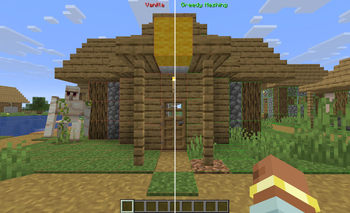
Screenshots
Über diese Mod
Greedy Meshing Mod
A client-side Fabric optimization mod that merges identical adjacent block faces into larger quads, reducing the total vertex count for better GPU performance.
Features
- Automatic merging of opaque full-cube block faces
- Custom terrain shaders for correct texture tiling on merged faces
- Aggressive Greedy (Absolute) option. It merges across ambient-occlusion boundaries for even fewer quads, at the cost of slightly coarser lighting
- Greedy Water option (VERY experimental). Merges flat still-water surfaces (open oceans, lake interiors) into larger quads. Shorelines and flowing water are unaffected. Not supported on VulkanMod
- Merge Oriented Blocks option (experimental). Allows blocks with a facing/axis/rotation property (common on modded blocks) to merge once their baked model is verified to be a plain six-face cube with standard UVs, raising the merge rate on normal terrain instead of excluding those blocks outright
- Sodium compatible
- VulkanMod compatible (1.21-1.21.5, 1.21.9-1.21.11, 26.1-26.1.2; 1.21.6-1.21.8 not available, VulkanMod was never released for those)
- Distant Horizons compatible
- Sable compatible (sub-level geometry no longer double-darkens with greedy meshing on)
- Works with Minecraft 26.2's native experimental Vulkan rendering backend
- Debug wireframe and split-screen comparison mode
- In-game config screen (requires Cloth Config + Mod Menu)
Supported Versions
| Minecraft | Loader |
|---|---|
| 1.21 - 1.21.11 | Fabric |
| 26.1 - 26.3 | Fabric |
Performance
Performance gains vary depending on your hardware and world. If your GPU is already underutilized (high FPS), the improvement may be minimal. The mod benefits most on lower-end GPUs, higher render distances, and worlds with large flat surfaces of the same block type (e.g. superflat, underground caves, large builds).
Known Limitations
- Shader packs (Iris/OptiFine) are not fully supported. The mod falls back to face-culling-only mode.
- Blocks with random texture rotation (example: grass) will be rendered with a single texture orientation instead of vanilla's randomization. This is a side effect of caching block appearance for performance and is not planned to change, as fixing it would reduce merging efficiency on affected blocks.
- Lighting on large merged surfaces may look slightly different from vanilla.
- Greedy Water is experimental (some water surfaces may render with missing or black faces on Sodium). The root cause is not yet identified. Disable Greedy Water if you see this.
- Merge Oriented Blocks is experimental. If a merged block renders with a stretched or misaligned texture, disable this option and report the block.
Credits
Fork of Greedy Meshing by BuggiestStudios, with significant modifications including multi-version support (via Stonecutter), binary meshing.
Verfügbare Versionen
Greedy Meshing Mod auf deinem Client installieren
Mod-Loader lokal installieren
Installiere fabric für deine lokale Minecraft-Version.
Passende Datei herunterladen
Wähle die Greedy Meshing Mod-Datei für fabric und Minecraft 26.3.
Mod installieren
Lege die .jar-Datei in deinem lokalen .minecraft/mods-Ordner ab und starte Minecraft neu. Eine Installation auf dem Server ist nicht nötig.
Kompatibilität
Mod-Loader
Minecraft-Versionen
26.3, 26.2, 26.1.2 (+14 weitere)
Server-seitig
✗ Nicht unterstütztEmpfohlener RAM
4 GB(min. 3 GB)Häufige Fragen
Muss Greedy Meshing Mod auf dem Minecraft Server installiert werden?
Nein. Modrinth kennzeichnet Greedy Meshing Mod serverseitig als nicht unterstützt. Installiere die Mod nur im lokalen Minecraft-Mods-Ordner. Dein Server kann unverändert bleiben, sofern die Mod-Seite keine zusätzliche Abhängigkeit nennt.
Welche Version und welchen Loader braucht Greedy Meshing Mod?
Nutze eine Datei für fabric und exakt deine Minecraft-Version. Unterstützte Versionen sind unter anderem 26.3, 26.2, 26.1.2. Loader-Dateien sind nicht untereinander austauschbar.
Greedy Meshing Mod funktioniert nicht – was kann ich prüfen?
Prüfe zuerst Minecraft-Version, Loader-Version und erforderliche Abhängigkeiten. Lege die .jar-Datei im lokalen .minecraft/mods-Ordner ab und entferne ältere Duplikate. Da die Mod clientseitig ist, löst mehr Server-RAM dieses Problem nicht.
Ähnliche Mods


Minecraft Server für deine Gruppe
Greedy Meshing Mod bleibt auf deinem Client. Hoste dazu eine kompatible Welt für deine Mitspieler.