
Gridless
Removes the grid from storage inventories, allowing you to freely place your items anywhere, pixel by pixel. Features smart auto-merge, scaling interactions, and universal UI support!
Über diese Mod
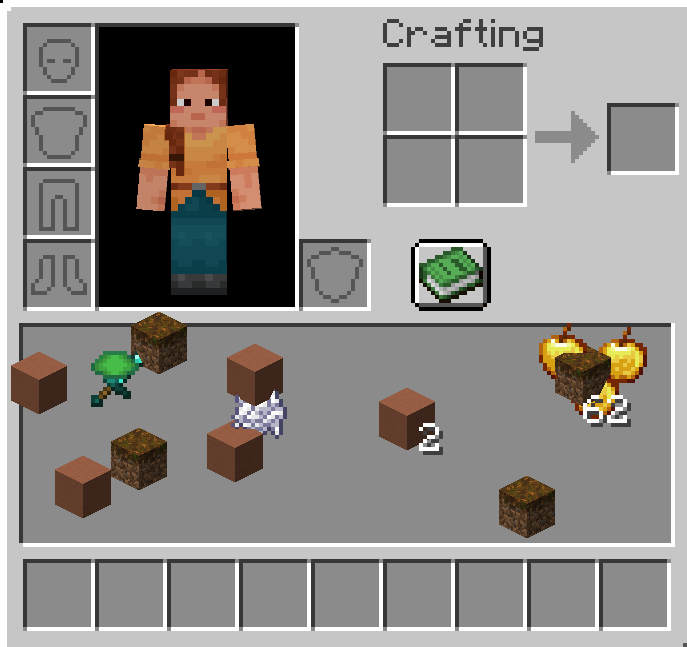
Gridless Inventory
Say goodbye to boring slots! Place your items freely, pixel by pixel.
Gridless completely removes the restrictive 9x3 grid from the player inventory, chests, and other storage screens. You can now place your items anywhere you want in a seamless, grid-free space.
✨ Features
- Free Placement: Drop your items anywhere on the screen.
- Auto-Sort & Merge (Press R): Press
Rto instantly merge partial stacks and organize your items into neat, perfect rows. Identical items stack perfectly on top of each other! - Drag & Paint: Hold Left-Click or Right-Click and drag your mouse to "paint" and place items perfectly across the screen!
- Quick Drop & Hotbar: Hover over any item and press
Qto drop it into the world, or press1-9to instantly swap it with your hotbar slots. - Smart Magnet (Double Click): Double click on an item to gather all identical items nearby into your hand.
- Shift-Click to Chest: Shift-Click items in your gridless area to instantly send them to an open chest or your hotbar.
- Universal Support: Works beautifully with player inventories, chests, shulker boxes, ender chests, barrels, and creative mode!
- ModMenu & Config Support: Easily enable or disable gridless mode for chests, ender chests, barrels, shulker boxes, and player inventories individually.
- No Data Loss: Item coordinates are saved as NBT data, so your inventory layout is always preserved.
Verfügbare Versionen
Gridless auf dem Server installieren
Server bestellen
Bestelle einen Minecraft Java Server mit mindestens 3 GB RAM (4 GB empfohlen).
fabric Loader setzen
Wähle im Panel unter "Egg" den fabric-Loader und die passende Minecraft-Version (1.20.1).
Mod installieren
Öffne den Mod-Browser im Dashboard und suche nach "Gridless". Klicke "Installieren" – fertig! Alternativ: Lade die .jar via SFTP in den /mods Ordner.
Kompatibilität
Mod-Loader
Minecraft-Versionen
1.20.1
Server-seitig
✓ ErforderlichEmpfohlener RAM
4 GB(min. 3 GB)Häufige Fragen
Gridless Server crasht beim Start – was tun?
Häufigste Ursache: falsche fabric-Version oder zu wenig RAM. Prüfe im Server-Log (latest.log), ob ein "OutOfMemoryError" oder "Mixin"-Fehler auftritt. Bei Mado Hosting: Stelle sicher, dass mindestens 3 GB RAM zugewiesen sind und der Loader zur Mod-Version passt (1.20.1). Über das Panel kannst du den Loader mit einem Klick wechseln.
Ist Gridless mit fabric kompatibel?
Gridless unterstützt offiziell fabric für Minecraft 1.20.1. Im Mado Dashboard werden inkompatible Loader-Kombinationen automatisch erkannt.
Server laggt mit Gridless – wie optimiere ich die Performance?
Empfohlener RAM: 4 GB (+1 GB pro 8 Spieler). Prüfe mit /spark profiler, ob Gridless den meisten Tick-Time verbraucht. Häufige Fixes: Server-View-Distance auf 8-10 reduzieren, bei Forge "performant" oder "starlight" als Zusatz-Mod installieren. Bei Mado Hosting läuft dein Server auf NVMe-SSDs mit dedizierten CPU-Kernen für minimale Latenz.
Ähnliche Mods






Modded Server mieten
Installiere Gridless mit nur einem Klick auf deinem Server.