
HexParse
Converts custom code into (pattern or literal) list iota by command; with various features for coding conveniently.
Screenshots
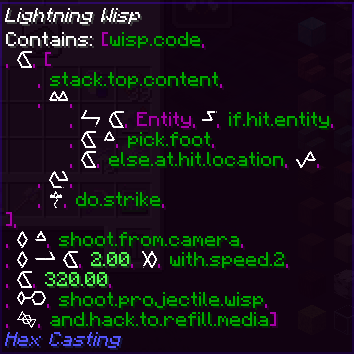
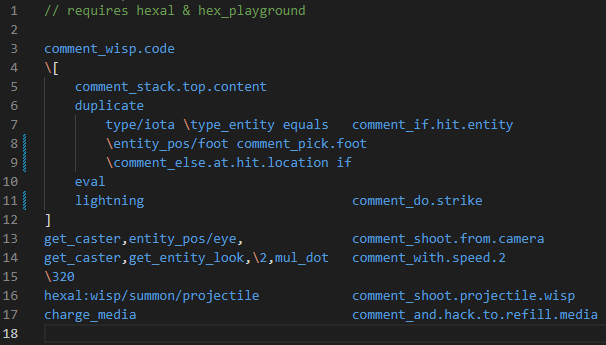
Über diese Mod
HexParse mod
Provides a pair of patterns and a set of commands to convert custom code into (pattern or literal) list iota; requires
player to have a focus item in hand.


(Old KubeJS version HERE)
| Example Code | Example Iota | Example Iota (Colorful Nested) |
|---|---|---|
 |
 |
 |
The
highlight VSCode extension
is available on the Marketplace (source code).
Supported IO Item Types
- Focuses
- Spell Books
- (1.20) Thought Knots
- recognized by item classes, able to add more via
HexParseAPIorIOMethod
Commands Added
Reading & Writing
/hexParse <code string> [rename]: parse input code into supported held item; optionalrenameargument to rename the item./hexParse read: read handheld item's iota, parse into code and show in chat window; the result will be copied
when clicked./hexParse read_signatures: same asread, but ignores all known pattern IDs and outputs all as angle signatures./hexParse clipboard [rename]: read client clipboard text and parse into supported held item; optionalrenameargument to rename
the item./hexParse clipboard_angles [rename]: same asclipboard, but only accept patterns input with raw angle string like"wedsaq"./hexParse clipboard_hexpattern [rename]: (experimental) same asclipboard, but accepts.hexpatternformat; warning: only partial features supported./hexParse share: (experimental) same asreadbut broadcasts iota's raw content and click-copy-able parsed code to
every player in the server./hexParse read_hexbug: same asreadbut translates the result to the format used by discord HexBug's/patterns hexcommand. note:
non-pattern constants and some old registry names still need to be handled manually/hexParse mind_stack ...: read/write iota from player's mind (staff casting VM)... peek: read the last iota inside mind stack; getsnullif stack is empty... push <code>: parse code and push into mind stack... push_clipboard: same as above, but code comes from clipboard
/hexParse property ...: (Hexcellularinterop) get/set data for PropertyIota; used property names all force-added leading_for security reason... read <propName>: read and parse from certain property... write <propName> <code>: write code into certain property... clipboard <propName>: same as above, but code comes from clipboard
Configs
/hexParse (macro/dialect) ...: edit client-saved code dialects (1-on-1 mapping, not starting with#) and macros (
mapped to code segments, starting with#)... list: list all saved macros/dialects; there exist several predefined macros fromthe nature... define <key> <value>: define a macro/dialect mapping; could be fresh-new or overriding existed one.macro define_clipboard <key>: same as above, but only for macros, and reads player's clipboard... remove <key>: remove mapping entry with given key (if exists)
/hexParse conflict: conflict resolver for multiple patterns with same short name (ID path)- only enables in physical client (singleplayer, local multiplayer) or with OP permission
...or... list: list all short names pointed by multiple long IDs... list <short_name>: list all conflicting IDs under certain short name... set <short_name> <long_ID>: redirect certain short name to input pattern ID
Misc. & Helpers
/hexParse donate [amount]: donate custom amount of media to the nature. Pay if you feel guilty using this mod ::)/hexParse learn_great: Read handheld items and learns great pattern(s) inside./hexParse lehmer [...nums]: calculate lehmer code for given permutation (from ascending, e.g.0 1 2 3 4); input
should be separated with space; the result number can be used for Swindler's Gambit.
OP-Only Commands
/hexParse unlock_great (unlockAll|lockAll|unlock <pattern id>|lock <pattern id>): controls great pattern unlocking
process of current
world by locking/unlocking all at once, or a single great pattern each execution.
Patterns Added
comment_switcher: Transforms input Comment Iota into String Iota, or everything else into Comment Iota.code2focus: Equivalent to/hexParse clipboard(now not only focuses).focus2code: Equivalent to/hexParse read.remove_comments: Clears comment iotas from a (nested) list input.learn_patterns: Read handheld items and learns great pattern(s) inside.create_linebreak: Adds a line-break comment iota with space-indents of given number to the stack.donate: Equivalent to/hexParse donate.- (great spell)
compile: takes in a MoreIotas string iota, and parses it into a code list.
Introduction also written in HexParse Patterns section inside the book.
Misc. Features
- At each pattern's page, press
Shiftto display the pattern's registry ID
New Iota: CommentIota
CommentIota displays string inside, and parses into a null iota (with id: "hexparse:comment") which executes doing
nothing.
Comment iotas includes text comments, line-breaks & indents, and unknown great spell placeholders.
When player holds Shift key, all comments will be hidden.
HexParseAPI
- Location:
io.yukkuric.hexparse.api.HexParseAPI - Contents:
AddForthParser(p: IStr2Nbt)AddBackParser(p: INbt2Str)<T : SpecialHandler> AddSpecialHandlerBackParser(cls: Class<T>, func: (T, CompoundTag) -> String)CreateItemIOMethod(cls: Class<*>, writer: ((ItemStack, CompoundTag) -> Unit)?, reader: ((ItemStack) -> CompoundTag?)?, priority: Int = 0, validator: ((ItemStack, Boolean) -> Boolean)?
For detailed usage guides, see How-To (Generated by GLM-5.1)
External Documents
Supported Expressions
see this file for all available symbols.
Available Configs
see this file for all available configs.
Verfügbare Versionen
HexParse auf dem Server installieren
Server bestellen
Bestelle einen Minecraft Java Server mit mindestens 3 GB RAM (4 GB empfohlen).
fabric Loader setzen
Wähle im Panel unter "Egg" den fabric-Loader und die passende Minecraft-Version (1.21.1).
Mod installieren
Öffne den Mod-Browser im Dashboard und suche nach "HexParse". Klicke "Installieren" – fertig! Alternativ: Lade die .jar via SFTP in den /mods Ordner.
Kompatibilität
Mod-Loader
Minecraft-Versionen
1.21.1, 1.20.1, 1.19.2
Server-seitig
✓ ErforderlichEmpfohlener RAM
4 GB(min. 3 GB)Häufige Fragen
HexParse Server crasht beim Start – was tun?
Häufigste Ursache: falsche fabric-Version oder zu wenig RAM. Prüfe im Server-Log (latest.log), ob ein "OutOfMemoryError" oder "Mixin"-Fehler auftritt. Bei Mado Hosting: Stelle sicher, dass mindestens 3 GB RAM zugewiesen sind und der Loader zur Mod-Version passt (1.21.1). Über das Panel kannst du den Loader mit einem Klick wechseln.
Ist HexParse mit fabric und forge und neoforge kompatibel?
HexParse unterstützt offiziell fabric, forge, neoforge für Minecraft 1.21.1, 1.20.1, 1.19.2. Achtung: Forge- und Fabric-Mods sind NICHT untereinander kompatibel – wähle einen Loader und bleibe dabei. Im Mado Dashboard werden inkompatible Loader-Kombinationen automatisch erkannt.
Server laggt mit HexParse – wie optimiere ich die Performance?
Empfohlener RAM: 4 GB (+1 GB pro 8 Spieler). Prüfe mit /spark profiler, ob HexParse den meisten Tick-Time verbraucht. Häufige Fixes: Server-View-Distance auf 8-10 reduzieren, bei Forge "performant" oder "starlight" als Zusatz-Mod installieren. Bei Mado Hosting läuft dein Server auf NVMe-SSDs mit dedizierten CPU-Kernen für minimale Latenz.
Ähnliche Mods




![[ETF] Entity Texture Features](https://cdn.modrinth.com/data/BVzZfTc1/af683d206d50b05258d865b0d6e4aa2f2cee12f2_96.webp)

Modded Server mieten
Installiere HexParse mit nur einem Klick auf deinem Server.