
History Stages
Guide your players through the ages. History Stages lets modpack creators lock items, recipes, dimensions, mobs, loot, and more behind custom research-based eras with full in-game tooling.
Screenshots



Über diese Mod

- 📖 Wiki — full documentation, config fields, JSON examples & developer API
- 💬 Discord — support, questions & sneak peeks
- 🐛 Issue Tracker — bug reports & feature requests
History Stages is a progression and gatekeeping mod for modpack creators. Lock items, recipes, dimensions, structures, biomes, mobs, fluids, merchant trades, enchantments, and loot behind custom eras — and let players unlock them however you want: research, in-game triggers, quests, or commands.
Stages can unlock server-wide (global), per player (individual), or as Dual-Phase — locked globally first, then per-player once the era is reached. You decide how progression works in your pack.
🔒 What You Can Lock
Almost everything — not just item usage:
- Items & Tags (incl. NBT criteria), entire Mods, Specific Recipes — recipe locks apply per player at the crafting table, the 2×2 grid, the stonecutter and the smithing table, and a locked recipe stays out of the recipe book
- Dimensions, Structures & Biomes — with force-field zones, damage, potion effects & a red screen overlay
- Zones [BETA] — an area you draw yourself, built from cuboids, spheres and cylinders, several shapes per zone. A locked zone pushes players back, shows a force-field wall up close and an outline from a distance, and tints the screen from the inside
- World Generation — keep locked structures out of the world entirely, or cap how many may generate (while locked, or after the stage is unlocked)
- Mobs — attacklock & interaction lock: breeding, mounting, trading, leashing, shearing, milking, naming and equipping, each toggleable per entry and filterable by held item
- Spawn rules — a spawn lock is a full rule: a phase, eight optional conditions (dimension, biome, sky, height, time of day, light, weather, moon phase) and biomes the creature additionally spawns in, with a sentence in the editor saying in plain words what the rule does
- Trades — hide a single offer, a whole profession (optionally only on some of its levels), or a merchant level, per player, back the moment the stage unlocks. A locked offer is absent from the list rather than crossed out, so nobody loses a profession or stops levelling
- Fluids — gate a fluid through whatever is carrying it: vanilla buckets, modded buckets and tank items alike, without listing a single item id. It also covers the recipes that fluid is consumed by or produces
- Loot — chests & mob drops, removed or replaced
- Blocks — breaking, GUIs & container access
- Enchantments — anvil & enchanting table
- Armor Stands & Item Frames — displayed locked items are protected
On top of that, locked items can hide or replace their names and tooltips, and per-entry unlock_actions let you allow specific interactions (e.g. pickup or crafting) while everything else stays locked.
🔓 Unlock It Your Way
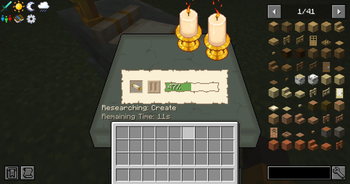
The Research Pedestal is just the default, not a requirement — every stage has a mode that defines how it unlocks:
- Default — classic research with Scrolls at the Pedestal
- Auto — unlocks via in-game triggers: item pickup, entering a biome/dimension/structure, entity kill/interact, block place/break, advancements, playtime, any vanilla statistic, XP level, a status effect, the weather, the day count and the time of day (any/all combinable)
- External — unlock only via
/history, KubeJS/CraftTweaker, or as FTB Quests reward - Temporary — unlocks and re-locks on a timer, with cooldowns & trigger limits
Mix all of these freely in the same pack — research-driven eras, exploration-based unlocks, and quest rewards can live side by side. Individual stages can also be set to be lost on death, dropping the items they gated.
🔬 Research System
Players physically bring Research Scrolls to the Research Pedestal and spend time researching the next era. Four pedestal tiers (I–IV), placeable Research Boosters, and per-stage research times let you tune the pacing. With the Dependency System, stages can additionally require XP levels, mob kills, statistics, advancements, scoreboard objectives, another stage — global, or an individual one the researcher alone has to hold — and items or whole item tags deposited directly into the pedestal.
What happens to the scroll when the research finishes is up to you, per stage:
- Consumed — the scroll is used up
- Replaced — a fresh scroll for the same stage goes back into the pedestal, so the next player needs no second copy
- Opened — an open scroll stays behind as a readable keepsake
📜 The Research Record
An opened scroll is a real, readable document — chapters for Items, Creatures and World (dimensions, structures, biomes, zones and trades), with a searchable overview of everything the stage gates. Lay it on a lectern and it stays there to be read by anyone who walks up.
Set it to Visible and it reads as a plain record; set it to Obscured and locked entries become silhouettes with their names written in enchanting glyphs. Chapters and overview blocks are re-orderable, so the document says exactly what you want it to say.
🗺️ Stage Graph
A progression map players can open from the pause menu: stages as nodes, dependencies as edges, colour-coded into Unlocked, Reachable and Locked.
- Four visibility modes — from the whole map down to unlocked only, so you decide how much of the pack's structure players get to see
- Hand-authorable — drag nodes where you want them, or leave the layout to compute itself
- Per-stage node styles — fill, border, label colour and corner radius, each editable per lock state
- Changing backgrounds — a stage can swap the map's background image once it is unlocked
- Info texts & a detail window — describe an era and show exactly what it requires and what it unlocks
It's off by default (the map reveals how a pack is built); admins always reach it through the editor. Colours, title and layout live in a Graph tab in the in-game config editor.
🛠️ In-Game Editor
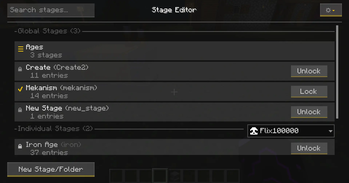
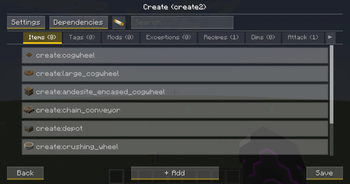
Build and tweak your entire stage setup without ever touching a config file — straight from the pause menu (OP required):
- Searchable multi-select lists, folders for your stages and an organize mode to drag them around
- A recipe picker that shows what a recipe is made of instead of its raw id, with fluids filed where the recipes are
- A zone editor with a live map you can drag, zoom and jump around in
- Dedicated editors for Dependencies, NBT criteria & Lock-Actions — Ctrl-click any inventory slot to import its NBT
- Unlock or re-lock individual stages per player right from the overview
- Design the Research Scroll tooltip line by line, with colours and a live preview
- Overlap warnings between global & individual stages, plus a full in-game config editor
🧩 Scripts & Addons
KubeJS and CraftTweaker get a real integration: four KubeJS events, two ZenScript event types and a hasStage expansion on the player. Scripts can read which stages are unlocked, unlock or re-lock them, and ask whether a given thing is gated. What belongs to a stage stays with the editor, so the editor always shows what is actually locked.
Other mods can extend History Stages without a fork and without a mixin. An addon registers its own lock categories, requirements, auto-triggers, per-stage settings and config sections, and each one gets a tab in the in-game editor built from the same widgets as the built-in ones — so a packmaker configures it without writing a script. → Addon Development
🎨 Feedback & Integrations
Players always know why something is locked: lock icons in inventories and JEI/EMI, "Locked" recipe overlays, toasts with custom per-stage icons, and configurable actionbar/chat messages.
- FTB Quests — native stage task & reward types (global + individual)
- KubeJS / CraftTweaker — full scripting API, see above
- Jade — looking at a locked block, entity, armour stand or item frame names the stage it needs
- Curios & Accessories — a locked item cannot be equipped as a trinket, ring or belt
- Spell Engine & Better Combat — a locked weapon is inert: no spell damage, no attack
📂 Creating Stages
Use the in-game editor, or write simple JSONs in config/historystages/global/ and individual/ — subfolders are picked up, so a big pack stays sorted. Full field reference: The Stage File.
The mod intentionally ships without default recipes for the Pedestal, Boosters & Scrolls — you decide how players obtain them (KubeJS, datapack, quest rewards, …). Give a scroll via:
/give @s historystages:research_scroll[minecraft:custom_data={StageResearch:"YOUR_STAGE_NAME"}]
On 1.20.1 and older, where item data is still raw NBT:
/give @s historystages:research_scroll{StageResearch:"YOUR_STAGE_NAME"}
📦 Dependencies
- Lootr — required
- Optional: JEI, EMI, FTB Quests, Jade, Curios, Accessories, Spell Engine, Better Combat
❓ FAQ
Can stages be unlocked per player instead of server-wide?
Yes — global, individual, or both mixed in the same pack (overlaps become Dual-Phase locks).
Is Lootr really required?
Yes, loot filtering is built on Lootr's container system. Without loot locking it just sits there quietly.
Do I need FTB Quests?
No — the integration only activates when it's installed.
Do I have to update the server and the client together?
For 6.0, yes. The stage sync changed format, so a 6.0 client on a 5.x server gets the incompatible-mod screen instead of being dropped mid-login with nothing in the log. Settings and stage files migrate themselves on first load.
Which versions are supported?
- 1.21.1 — NeoForge
- 1.20.1 — Forge
- 1.21.1 — Fabric
- 1.19.2 — Forge (legacy, no longer updated)
Questions or found a bug? Join the Discord or open an issue — we read everything! 🙂
Verfügbare Versionen
History Stages auf dem Server installieren
Server bestellen
Bestelle einen Minecraft Java Server mit mindestens 3 GB RAM (4 GB empfohlen).
fabric Loader setzen
Wähle im Panel unter "Egg" den fabric-Loader und die passende Minecraft-Version (1.21.1).
Mod installieren
Öffne den Mod-Browser im Dashboard und suche nach "History Stages". Klicke "Installieren" – fertig! Alternativ: Lade die .jar via SFTP in den /mods Ordner.
Kompatibilität
Mod-Loader
Minecraft-Versionen
1.21.1, 1.21, 1.20.1 (+4 weitere)
Server-seitig
✓ ErforderlichEmpfohlener RAM
4 GB(min. 3 GB)Häufige Fragen
History Stages Server crasht beim Start – was tun?
Häufigste Ursache: falsche fabric-Version oder zu wenig RAM. Prüfe im Server-Log (latest.log), ob ein "OutOfMemoryError" oder "Mixin"-Fehler auftritt. Bei Mado Hosting: Stelle sicher, dass mindestens 3 GB RAM zugewiesen sind und der Loader zur Mod-Version passt (1.21.1). Über das Panel kannst du den Loader mit einem Klick wechseln.
Ist History Stages mit fabric und forge und neoforge kompatibel?
History Stages unterstützt offiziell fabric, forge, neoforge für Minecraft 1.21.1, 1.21, 1.20.1. Achtung: Forge- und Fabric-Mods sind NICHT untereinander kompatibel – wähle einen Loader und bleibe dabei. Im Mado Dashboard werden inkompatible Loader-Kombinationen automatisch erkannt.
Server laggt mit History Stages – wie optimiere ich die Performance?
Empfohlener RAM: 4 GB (+1 GB pro 8 Spieler). Prüfe mit /spark profiler, ob History Stages den meisten Tick-Time verbraucht. Häufige Fixes: Server-View-Distance auf 8-10 reduzieren, bei Forge "performant" oder "starlight" als Zusatz-Mod installieren. Bei Mado Hosting läuft dein Server auf NVMe-SSDs mit dedizierten CPU-Kernen für minimale Latenz.
Ähnliche Mods






Modded Server mieten
Installiere History Stages mit nur einem Klick auf deinem Server.