
HoloBuilder - Schematic Loader
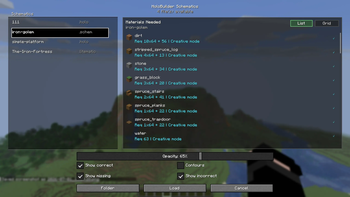
Load local schematics, preview them as translucent in-world holograms, compare them against the world, move/rotate placements, inspect materials, and export selected areas. Server installation is not required.
Screenshots
Über diese Mod
HoloBuilder
HoloBuilder is a client-side schematic hologram builder for Minecraft. It loads local schematic files and renders them as a translucent in-world guide, so you can line up a build, check what is missing, and work layer by layer without installing anything on the server.
This first public version is published as a Beta: the core workflow is usable, but feedback from real worlds and different schematic files is still expected.
What It Does
HoloBuilder focuses on planning and visual building:
- Load schematic files from
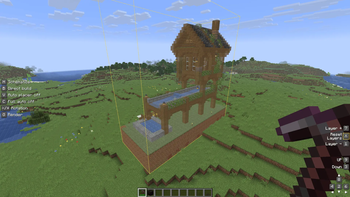
holobuilder/schematics/. - Preview the structure as an in-world hologram.
- Compare expected blocks with the current world.
- Highlight incorrect blocks in red.
- Optionally show already-correct blocks with subtle outlines.
- Move the placement relative to the direction you are looking.
- Rotate the schematic by 90 degrees around its center.
- Work with one Y layer at a time.
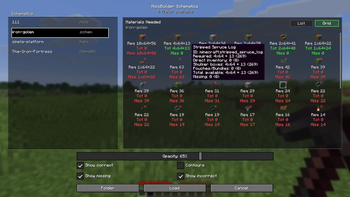
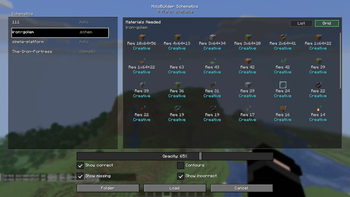
- Preview required materials from the schematic selection screen.
- Export selected areas into supported schematic formats.
The mod is client-side only. It does not need to be installed on the server.
Supported Files
The schematic selector currently accepts:
.holo.litematic.schem.schematic
The native .holo format is the safest format for this Beta. External schematic formats are supported, but some files may still expose edge cases depending on their metadata and block states.
Basic Usage
- Put schematic files in:
<game directory>/holobuilder/schematics/
- Press
Hin game. - Select a schematic.
- Click
Charger. - Move, rotate, or switch layers until the hologram is aligned.
No schematic is loaded automatically when joining a world.
Controls
Default keybinds:
H: open schematic selector.G: toggle schematic rendering.Numpad 8 / 2: move forward/backward relative to your horizontal view direction.Numpad 4 / 6: move left/right relative to your horizontal view direction.Numpad 9 / 3: move up/down.Numpad + / -: rotate by 90 degrees.Numpad 7 / 1: show higher/lower layer.X: show all layers.Numpad 5: reload the active schematic.
All keybinds can be changed in Minecraft's controls menu. The HUD displays your rebound keys instead of hardcoded defaults.
Selection And Export
HoloBuilder includes simple client commands for selecting and exporting a cuboid area:
/holopos 1/holopos 2/holopos info/holopos clear/holo save <format> [name]
Supported export formats:
holoschematicschemlitematiclitematicaas an alias forlitematic
Exports are written to holobuilder/schematics/.
Creative Build Tools
HoloBuilder includes optional build assist tools for creative mode:
B: direct-build all missing/incorrect blocks.V: toggle auto placer for the aimed hologram block.C: toggle full auto build for the aimed hologram block.
These tools are only available in creative mode and use normal Minecraft /setblock commands. On multiplayer servers, they still depend on server permissions and rules. HoloBuilder suppresses its own vanilla /setblock feedback spam locally, but it does not change world gamerules.
Survival gameplay remains visual-only: no automatic block placement is available there.
Compatibility
- Minecraft 26.1.2
Verfügbare Versionen
HoloBuilder - Schematic Loader auf dem Server installieren
Server bestellen
Bestelle einen Minecraft Java Server mit mindestens 3 GB RAM (4 GB empfohlen).
fabric Loader setzen
Wähle im Panel unter "Egg" den fabric-Loader und die passende Minecraft-Version (26.1.2).
Mod installieren
Öffne den Mod-Browser im Dashboard und suche nach "HoloBuilder - Schematic Loader". Klicke "Installieren" – fertig! Alternativ: Lade die .jar via SFTP in den /mods Ordner.
Kompatibilität
Mod-Loader
Minecraft-Versionen
26.1.2
Server-seitig
✗ Nicht unterstütztEmpfohlener RAM
4 GB(min. 3 GB)Häufige Fragen
HoloBuilder - Schematic Loader Server crasht beim Start – was tun?
Häufigste Ursache: falsche fabric-Version oder zu wenig RAM. Prüfe im Server-Log (latest.log), ob ein "OutOfMemoryError" oder "Mixin"-Fehler auftritt. Bei Mado Hosting: Stelle sicher, dass mindestens 3 GB RAM zugewiesen sind und der Loader zur Mod-Version passt (26.1.2). Über das Panel kannst du den Loader mit einem Klick wechseln.
Ist HoloBuilder - Schematic Loader mit fabric und neoforge kompatibel?
HoloBuilder - Schematic Loader unterstützt offiziell fabric, neoforge für Minecraft 26.1.2. Im Mado Dashboard werden inkompatible Loader-Kombinationen automatisch erkannt.
Server laggt mit HoloBuilder - Schematic Loader – wie optimiere ich die Performance?
Empfohlener RAM: 4 GB (+1 GB pro 8 Spieler). Prüfe mit /spark profiler, ob HoloBuilder - Schematic Loader den meisten Tick-Time verbraucht. Häufige Fixes: Server-View-Distance auf 8-10 reduzieren, bei Forge "performant" oder "starlight" als Zusatz-Mod installieren. Bei Mado Hosting läuft dein Server auf NVMe-SSDs mit dedizierten CPU-Kernen für minimale Latenz.
Ähnliche Mods




![[ETF] Entity Texture Features](https://cdn.modrinth.com/data/BVzZfTc1/af683d206d50b05258d865b0d6e4aa2f2cee12f2_96.webp)

Modded Server mieten
Installiere HoloBuilder - Schematic Loader mit nur einem Klick auf deinem Server.