
Horse Statistics
A lightweight mod that shows the stats of horses (health, jump height, speed, owner and slots for Llamas). Client-sided mod, you don't need it for your server!
Screenshots
Über diese Mod
Horse Stats Mod is a lightweight and essential tool for Minecraft breeders. It allows you to instantly visualize the precise capabilities of your mounts (speed, jump height, health) without any guesswork.
Discord: https://discord.gg/yxMhpgUGjf
Supported versions:
- Forge: 1.15 to 1.21.1 and 26.2 and future versions
- NeoForge: 1.21.1 and future versions
- Fabric: 1.21.1 and future versions
- Supported Languages: 🇫🇷 🇺🇸 🇵🇱 🇩🇪 🇯🇵 🇰🇷 🇷🇺
- Supported Mods: all horse mods are supported
✨ Features
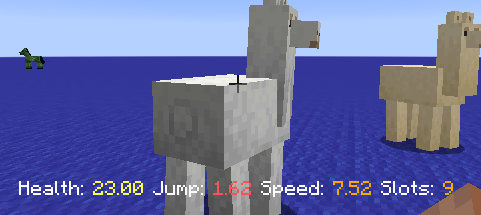
Display detailed statistics for Horses, Donkeys, Mules, and Llamas:
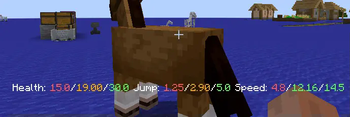
- HUD Display: View stats instantly while riding via the action bar.
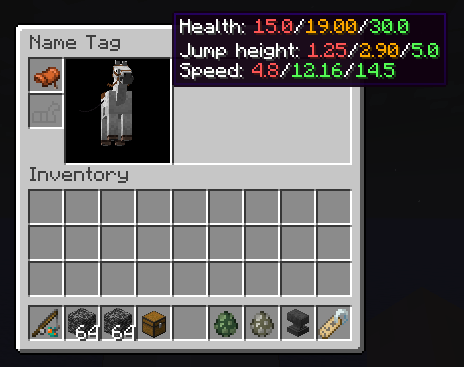
- Inventory Integration: See precise values directly inside the horse's inventory screen.
- Min/Max Comparison: Compare your mount's stats against the game's theoretical limits.
- Color-Coded Feedback: Quickly identify high-quality stats (Green) versus poor ones (Red).
- Percentage Mode: Display a global "quality score" (0-100%) to easily rank your stable.
- Multi-Loader Support: Fully compatible with both Fabric and NeoForge.
📸 Screenshots
| Live HUD Stats | Grouped Inventory Stats | Detailed Min/Max View |
|---|---|---|
 |
 |
 |
| Real-time stats while mounting | Global score and quick overview | Detailed comparison with player speed |
⚙️ Configuration
The mod is highly customizable. You can toggle features via the Mod Menu (Fabric) or the Config Screen (NeoForge) to fit your playstyle.
Customizable options include:
- Toggle display in the horse inventory.
- Change interaction triggers (Right-click vs Shift+Right-click).
- Enable/Disable color indicators and percentage calculations.
- Show/Hide Min/Max reference values.
| NeoForge Config | Fabric Config |
|---|---|
 |
 |
Verfügbare Versionen
Horse Statistics auf deinem Client installieren
Mod-Loader lokal installieren
Installiere fabric für deine lokale Minecraft-Version.
Passende Datei herunterladen
Wähle die Horse Statistics-Datei für fabric und Minecraft 26.3.
Mod installieren
Lege die .jar-Datei in deinem lokalen .minecraft/mods-Ordner ab und starte Minecraft neu. Eine Installation auf dem Server ist nicht nötig.
Kompatibilität
Mod-Loader
Minecraft-Versionen
26.3, 26.2, 26.1.2 (+29 weitere)
Server-seitig
✗ Nicht unterstütztEmpfohlener RAM
4 GB(min. 3 GB)Häufige Fragen
Muss Horse Statistics auf dem Minecraft Server installiert werden?
Nein. Modrinth kennzeichnet Horse Statistics serverseitig als nicht unterstützt. Installiere die Mod nur im lokalen Minecraft-Mods-Ordner. Dein Server kann unverändert bleiben, sofern die Mod-Seite keine zusätzliche Abhängigkeit nennt.
Welche Version und welchen Loader braucht Horse Statistics?
Nutze eine Datei für fabric, forge, neoforge und exakt deine Minecraft-Version. Unterstützte Versionen sind unter anderem 26.3, 26.2, 26.1.2. Loader-Dateien sind nicht untereinander austauschbar.
Horse Statistics funktioniert nicht – was kann ich prüfen?
Prüfe zuerst Minecraft-Version, Loader-Version und erforderliche Abhängigkeiten. Lege die .jar-Datei im lokalen .minecraft/mods-Ordner ab und entferne ältere Duplikate. Da die Mod clientseitig ist, löst mehr Server-RAM dieses Problem nicht.
Ähnliche Mods




![[ETF] Entity Texture Features](https://cdn.modrinth.com/data/BVzZfTc1/af683d206d50b05258d865b0d6e4aa2f2cee12f2_96.webp)

Minecraft Server für deine Gruppe
Horse Statistics bleibt auf deinem Client. Hoste dazu eine kompatible Welt für deine Mitspieler.
Details
- Lizenz
- GNU Lesser General Public License v3.0 only
- Server-seitig
- Nicht unterstützt