
Improved Pillager Outpost
The "Improved Pillager Outpost" Datapack revamps the standard Minecraft Pillager Outpost into a challenging, multi-level tower. This overhaul adds detailed architecture, tougher enemies, and exclusive loot, creating a more immersive and rewarding experie
Screenshots
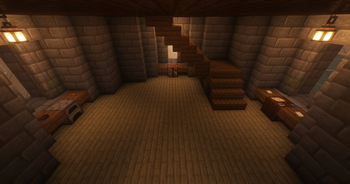
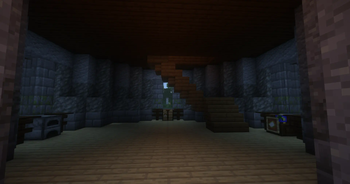
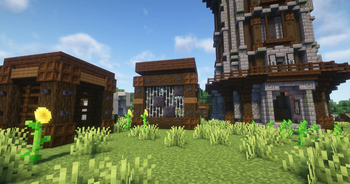
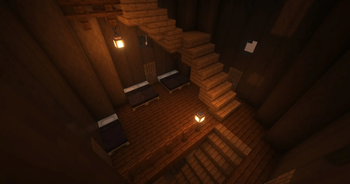


Über diese Mod
Improved Pillager Outpost Mod/Datapack




Overview
The Improved Pillager Outpost Mod/Datapack completely transforms the standard Minecraft Pillager Outpost into a formidable, fully-realized tower. Designed to enhance your gameplay experience, this mod/datapack introduces a more immersive and detailed structure that adds depth to your adventures.
Features
Overhauled Structure: The traditional Pillager Outpost is replaced with a fully-constructed tower, featuring multiple floors, detailed architecture, and strategic layouts.
Four Tower Variants:
- Normal: A standard, well-maintained tower.
- Overgrown: A tower reclaimed by nature, with vines and foliage covering its exterior.
- Damaged: A battle-worn tower showing signs of past skirmishes.
- Overgrown Damaged: A combination of both overgrown and damaged elements, giving the tower a unique, rugged appearance.
Two Top Tower Variations:
- Active: The top of the tower features a lit signal fire, indicating that the outpost is alert and ready for battle.
- Inactive: The signal fire is extinguished, suggesting that the outpost is less vigilant.
Vanilla Loot Tables: While the tower includes more chests than a standard outpost, the loot remains consistent with the vanilla game. No additional items have been added.
Unaltered Enemies: The enemies within the tower are the same as in the vanilla game. No changes to enemy difficulty or behavior have been made—yet.
Installation
For Mod Installation
- Download the Mod: CurseForge | Modrinth
- Install with Your Preferred Mod Loader:
- Forge/NeoForge: Drag the mod file into the
modsfolder located in your.minecraftdirectory. - Fabric/Quilt: Ensure you have the Fabric API installed alongside the corresponding mod loader. Place the mod file into the
modsfolder.
- Forge/NeoForge: Drag the mod file into the
For Datapack Installation
- Download the Datapack: CurseForge | Modrinth
- Locate Your Minecraft Saves Folder:
- Windows:
%appdata%\.minecraft\saves - Mac:
~/Library/Application Support/minecraft/saves - Linux:
~/.minecraft/saves
- Windows:
- Add the Datapack:
- Open the folder of the world you want to add the datapack to.
- Drag and drop the downloaded
.zipfile into thedatapacksfolder.
- Load the Datapack:
- Start Minecraft and enter your world.
- Use the
/reloadcommand if necessary. - Enjoy the newly transformed Pillager Outposts!
Compatibility
- Minecraft Version: This mod/datapack is compatible with Minecraft version 1.16.5+.
- To use the latest version as a Datapack, simply rename the file extension from .jar to .zip
- Mod Loaders: Supports Forge, NeoForge, Fabric (with Fabric API), and Quilt (with Fabric API).
- Multiplayer Support: Fully compatible with multiplayer servers.
Usage
- Raiding the Tower: Explore the new Pillager Tower, which offers a more complex layout with multiple chests to discover. Be prepared for the same vanilla enemies, but in a more challenging environment.
- Loot and Rewards: Although the loot tables are unchanged, the increased number of chests provides more opportunities to gather resources.
Feedback and Support
If you encounter any issues or have suggestions for improvements, please contact us via Discord.
License
This mod/datapack is released under the CC0-1.0. Feel free to modify and share it, but please credit the original author, sashiro.
Credits
- Creator: sashiro
- Special Thanks: Original creator of the pack for 1.16.5
Links
- Download the Mod/Datapack: CurseForge MOD | CurseForge DATAPACK | Modrinth
- Join our Community: Discord
- Support the Creator: PayPal
Thank you for using the Improved Pillager Outpost Mod/Datapack! Enjoy a more exciting and detailed Minecraft experience.
Verfügbare Versionen
Improved Pillager Outpost auf dem Server installieren
Server bestellen
Bestelle einen Minecraft Java Server mit mindestens 4 GB RAM (6 GB empfohlen).
datapack Loader setzen
Wähle im Panel unter "Egg" den datapack-Loader und die passende Minecraft-Version (26.3).
Mod installieren
Öffne den Mod-Browser im Dashboard und suche nach "Improved Pillager Outpost". Klicke "Installieren" – fertig! Alternativ: Lade die .jar via SFTP in den /mods Ordner.
Kompatibilität
Mod-Loader
Minecraft-Versionen
26.3, 26.2, 26.1.2 (+35 weitere)
Server-seitig
✓ ErforderlichEmpfohlener RAM
6 GB(min. 4 GB)Häufige Fragen
Improved Pillager Outpost Server crasht beim Start – was tun?
Häufigste Ursache: falsche datapack-Version oder zu wenig RAM. Prüfe im Server-Log (latest.log), ob ein "OutOfMemoryError" oder "Mixin"-Fehler auftritt. Bei Mado Hosting: Stelle sicher, dass mindestens 4 GB RAM zugewiesen sind und der Loader zur Mod-Version passt (26.3). Über das Panel kannst du den Loader mit einem Klick wechseln.
Ist Improved Pillager Outpost mit datapack und fabric und forge und neoforge und quilt kompatibel?
Improved Pillager Outpost unterstützt offiziell datapack, fabric, forge, neoforge, quilt für Minecraft 26.3, 26.2, 26.1.2. Achtung: Forge- und Fabric-Mods sind NICHT untereinander kompatibel – wähle einen Loader und bleibe dabei. Im Mado Dashboard werden inkompatible Loader-Kombinationen automatisch erkannt.
Server laggt mit Improved Pillager Outpost – wie optimiere ich die Performance?
Empfohlener RAM: 6 GB (+1 GB pro 5 Spieler). Prüfe mit /spark profiler, ob Improved Pillager Outpost den meisten Tick-Time verbraucht. Häufige Fixes: Server-View-Distance auf 8-10 reduzieren, bei Forge "performant" oder "starlight" als Zusatz-Mod installieren. Bei Mado Hosting läuft dein Server auf NVMe-SSDs mit dedizierten CPU-Kernen für minimale Latenz.
Ähnliche Mods




Modded Server mieten
Installiere Improved Pillager Outpost mit nur einem Klick auf deinem Server.