
Inline
A mod for inline text rendering
Screenshots
Über diese Mod
Inline
Inline is a minecraft library for rendering in-line with text. It has some player facing features, mostly for fun, but also to serve as examples and helpers for future devs.
Check out the gallery for some examples !
Player Facing Features
Clientside
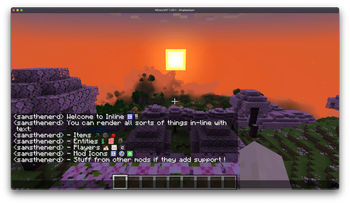
Inline comes with a couple of built-in matchers:
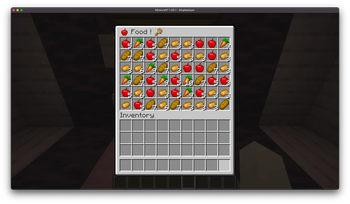
- Items -- ex:
[item:diamond_sword]-- supports any item id - Entity -- ex:
[entity:pig]-- supports any entity type id - Player heads -- ex:
[face:samsthenerd]-- supports player name - Mod Icon -- ex:
[mod:inline]
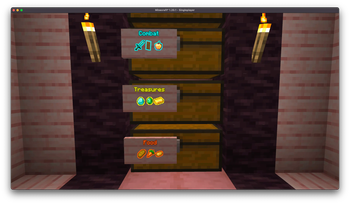
You can use various characters in place of the :, some of which modify the size of the render, good for sign labels!
;and:are normal size,is x0.75 scale!is x1.5 scale+is x2 scale
There's a clientside config for upper size limit of in-chat messages to prevent spam from blocking other messages.
You can also prefix any of these with \ to prevent it from matching.
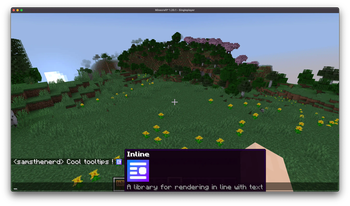
Some other mods, such as emi, rei, and probably others, add the name of the mod that an item comes from to its tooltip. Inline will look for this and attach the mod's icon to it.
All of these are configurable from the in-game config screen.
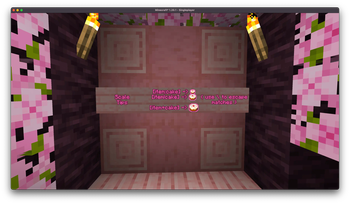
Create Interop
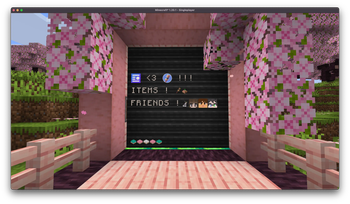
Inline renders can be used on the create display boards. Due to some limitations, it can be a bit iffy with display links where you need a wider display board than you'd think, otherwise it gets cut off and won't match/render properly.
Serverside
Server-side matchers match against [show:hand] or [show:offhand] to show off your currently held item in chat.
Known Mod Conflicts
- Emojiful - due to them replacing the text renderer, preventing inline's mixins from applying.
If you find any others, please open an issue about it !
Devs

Check out the readme for more information on developing with Inline !
Verfügbare Versionen
Inline auf dem Server installieren
Server bestellen
Bestelle einen Minecraft Java Server mit mindestens 3 GB RAM (4 GB empfohlen).
fabric Loader setzen
Wähle im Panel unter "Egg" den fabric-Loader und die passende Minecraft-Version (1.21.1).
Mod installieren
Öffne den Mod-Browser im Dashboard und suche nach "Inline". Klicke "Installieren" – fertig! Alternativ: Lade die .jar via SFTP in den /mods Ordner.
Kompatibilität
Mod-Loader
Minecraft-Versionen
1.21.1, 1.20.1
Server-seitig
~ OptionalEmpfohlener RAM
4 GB(min. 3 GB)Häufige Fragen
Inline Server crasht beim Start – was tun?
Häufigste Ursache: falsche fabric-Version oder zu wenig RAM. Prüfe im Server-Log (latest.log), ob ein "OutOfMemoryError" oder "Mixin"-Fehler auftritt. Bei Mado Hosting: Stelle sicher, dass mindestens 3 GB RAM zugewiesen sind und der Loader zur Mod-Version passt (1.21.1). Über das Panel kannst du den Loader mit einem Klick wechseln.
Ist Inline mit fabric und forge und neoforge und quilt kompatibel?
Inline unterstützt offiziell fabric, forge, neoforge, quilt für Minecraft 1.21.1, 1.20.1. Achtung: Forge- und Fabric-Mods sind NICHT untereinander kompatibel – wähle einen Loader und bleibe dabei. Im Mado Dashboard werden inkompatible Loader-Kombinationen automatisch erkannt.
Server laggt mit Inline – wie optimiere ich die Performance?
Empfohlener RAM: 4 GB (+1 GB pro 8 Spieler). Prüfe mit /spark profiler, ob Inline den meisten Tick-Time verbraucht. Häufige Fixes: Server-View-Distance auf 8-10 reduzieren, bei Forge "performant" oder "starlight" als Zusatz-Mod installieren. Bei Mado Hosting läuft dein Server auf NVMe-SSDs mit dedizierten CPU-Kernen für minimale Latenz.
Ähnliche Mods



Modded Server mieten
Installiere Inline mit nur einem Klick auf deinem Server.
Details
- Lizenz
- GNU Lesser General Public License v3.0 or later
- Server-seitig
- Optional