
inputbooster
InputBooster – Ultra-fast input polling for Minecraft PvP, capturing missed clicks, maintaining sprint, and improving combat responsiveness, even at low FPS. Compatible with Fabric and performance mods like Sodium & Lithium.
Screenshots
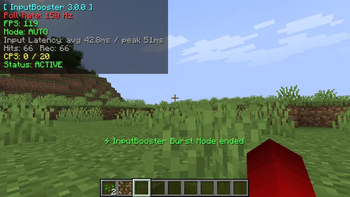
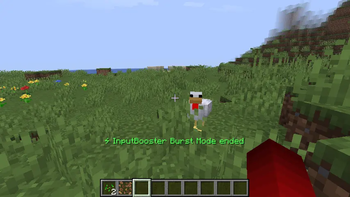
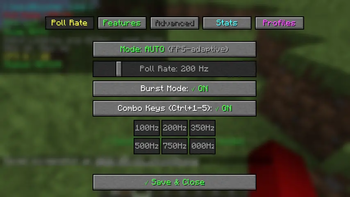
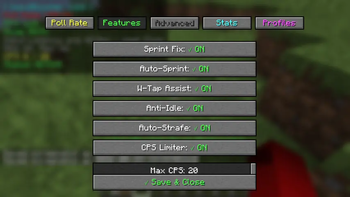
Über diese Mod
InputBooster
InputBooster is a client-side Fabric mod that improves input handling when Minecraft is running at low FPS or experiencing short stutters.
When Minecraft is under load, quick clicks or key presses can sometimes be missed. InputBooster checks inputs more frequently and can temporarily buffer some inputs so they can be handled on the next valid game tick.
Features
- Higher-frequency input polling
- Short input buffering
- Input recovery during short FPS drops
- Duplicate hit protection
- CPS limiter
- Sprint and W-tap assistance
- Auto-strafe and movement helpers
- Optional input replay recording and playback
- Per-server profiles
- In-game input statistics
- Safe mode
- Custom keybinds
The mod is client-side and does not require anything on the server.
Requirements
- Minecraft:
1.21.x / 26.1.x - Fabric Loader:
0.16.0+ - Fabric API
- Java 21+
Installation
Install Fabric Loader and Fabric API for your Minecraft version, then put the InputBooster .jar file into your mods folder.
If you find a bug or compatibility problem, please report it on GitHub with your Minecraft version, Fabric Loader version, InputBooster version, and any relevant logs.
InputBooster is developed and maintained by Ahaduzzaman Khan.
Verfügbare Versionen
inputbooster auf deinem Client installieren
Mod-Loader lokal installieren
Installiere fabric für deine lokale Minecraft-Version.
Passende Datei herunterladen
Wähle die inputbooster-Datei für fabric und Minecraft 26.3.
Mod installieren
Lege die .jar-Datei in deinem lokalen .minecraft/mods-Ordner ab und starte Minecraft neu. Eine Installation auf dem Server ist nicht nötig.
Kompatibilität
Mod-Loader
Minecraft-Versionen
26.3, 26.2, 26.1.2 (+13 weitere)
Server-seitig
✗ Nicht unterstütztEmpfohlener RAM
4 GB(min. 3 GB)Häufige Fragen
Muss inputbooster auf dem Minecraft Server installiert werden?
Nein. Modrinth kennzeichnet inputbooster serverseitig als nicht unterstützt. Installiere die Mod nur im lokalen Minecraft-Mods-Ordner. Dein Server kann unverändert bleiben, sofern die Mod-Seite keine zusätzliche Abhängigkeit nennt.
Welche Version und welchen Loader braucht inputbooster?
Nutze eine Datei für fabric, neoforge, quilt und exakt deine Minecraft-Version. Unterstützte Versionen sind unter anderem 26.3, 26.2, 26.1.2. Loader-Dateien sind nicht untereinander austauschbar.
inputbooster funktioniert nicht – was kann ich prüfen?
Prüfe zuerst Minecraft-Version, Loader-Version und erforderliche Abhängigkeiten. Lege die .jar-Datei im lokalen .minecraft/mods-Ordner ab und entferne ältere Duplikate. Da die Mod clientseitig ist, löst mehr Server-RAM dieses Problem nicht.
Ähnliche Mods


Minecraft Server für deine Gruppe
inputbooster bleibt auf deinem Client. Hoste dazu eine kompatible Welt für deine Mitspieler.