
Inv Tweaker
Inventory sorting and grouping mod, also has auto fill for the hotbar
Screenshots
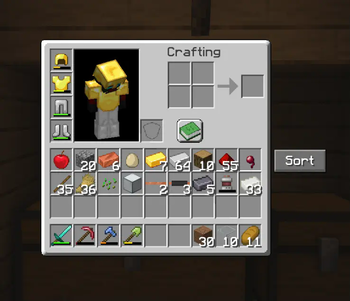
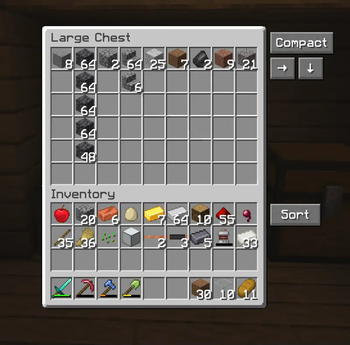


Über diese Mod
An inventory sorting mod trying to be a homage to the old original "Inventory Tweaks" mod.
The difference to some of the other sorting mods, this one does not only sort alphabetically, but also has the ability to sort in horizontal and vertical groups, making chests etc. look less cluttered and more tidy. This is what Inventory Tweaks did in the past and i haven't found a modern and updated sorting mod, that did exactly that, only alphabetical sorting.
Another feature is the automatic refilling of the hotbar. Inventory Tweaks had a feature, where when you finished a stack of food or a stack of blocks, it would take another stack from your inventory and put it in the last used slot slot in your hotbar, so that you can continue building, eating etc. without having to open your inventory or pressing middle mouse button. Really just quality of life things that bother me lol.
How to use:
Simply use the buttons next to the inventory, or use the key binds as explained below.
The arrows simply mean which way it's sorted, so the arrow pointing right means it's row grouped and the arrow pointing down means it's column grouped.
To sort the player inventory simply press R. To sort chests etc. press T. To cycle between compact sorting (alphabetical), Row Grouping and Column Grouping, simply press Z, or rebind the keys.
Hotbar auto refill can be enabled, or disabled, by pressing H.
The horizontal and vertical sorting works best when chests aren't too full with many different item types, otherwise it starts putting stuff where it doesn't seem logical. I'm trying to improve that. Compact sorting works quite well in all cases.
Works both in singleplayer and multiplayer. Also supports other mods, like Reinforced Chests.
Requires the Fabric API mod.
License & Use
May not be altered, changed or redistributed without permission.
Using and sharing it in mod packs is allowed.
Verfügbare Versionen
Inv Tweaker auf deinem Client installieren
Mod-Loader lokal installieren
Installiere fabric für deine lokale Minecraft-Version.
Passende Datei herunterladen
Wähle die Inv Tweaker-Datei für fabric und Minecraft 1.21.8.
Mod installieren
Lege die .jar-Datei in deinem lokalen .minecraft/mods-Ordner ab und starte Minecraft neu. Eine Installation auf dem Server ist nicht nötig.
Kompatibilität
Mod-Loader
Minecraft-Versionen
1.21.8, 1.21.7, 1.21.6
Server-seitig
✗ Nicht unterstütztEmpfohlener RAM
4 GB(min. 3 GB)Häufige Fragen
Muss Inv Tweaker auf dem Minecraft Server installiert werden?
Nein. Modrinth kennzeichnet Inv Tweaker serverseitig als nicht unterstützt. Installiere die Mod nur im lokalen Minecraft-Mods-Ordner. Dein Server kann unverändert bleiben, sofern die Mod-Seite keine zusätzliche Abhängigkeit nennt.
Welche Version und welchen Loader braucht Inv Tweaker?
Nutze eine Datei für fabric und exakt deine Minecraft-Version. Unterstützte Versionen sind unter anderem 1.21.8, 1.21.7, 1.21.6. Loader-Dateien sind nicht untereinander austauschbar.
Inv Tweaker funktioniert nicht – was kann ich prüfen?
Prüfe zuerst Minecraft-Version, Loader-Version und erforderliche Abhängigkeiten. Lege die .jar-Datei im lokalen .minecraft/mods-Ordner ab und entferne ältere Duplikate. Da die Mod clientseitig ist, löst mehr Server-RAM dieses Problem nicht.
Ähnliche Mods






Minecraft Server für deine Gruppe
Inv Tweaker bleibt auf deinem Client. Hoste dazu eine kompatible Welt für deine Mitspieler.