
Inventory Buttons
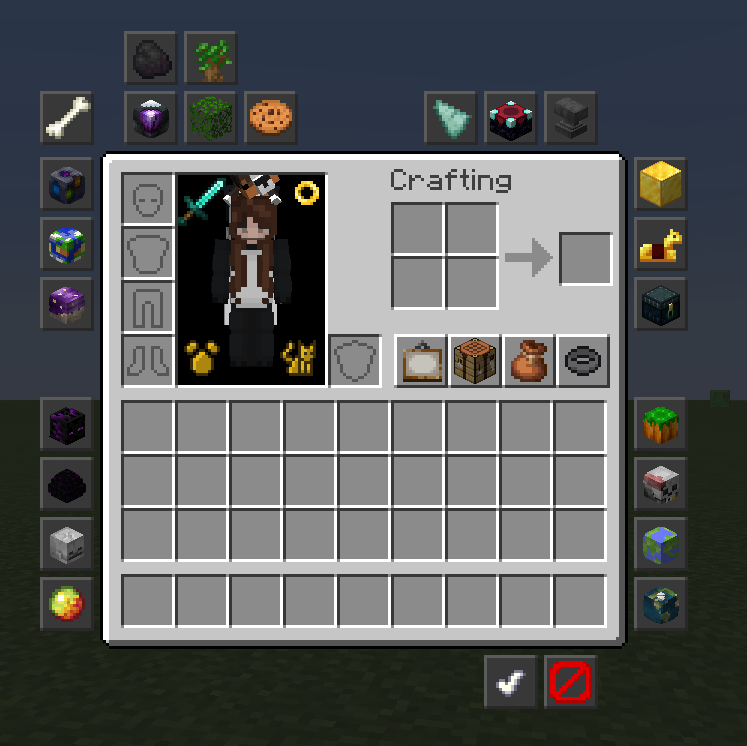
Brings the "Inventory Buttons" feature from NotEnoughUpdates (NEU) to modern versions of Minecraft (26.1 / 1.21.11 / 1.21.5)
Screenshots
Über diese Mod
Inventory Buttons (Unofficial Port)
A Fabric mod that brings the popular "Inventory Buttons" feature from NotEnoughUpdates (NEU) to modern version of Minecraft.
Current Versions Supported: 1.21.11, 26.1
Deprecated version on 1.21.5
This mod requires Fabric API
Features
- Inventory Buttons: Add customizable buttons to your inventory for quick commands.
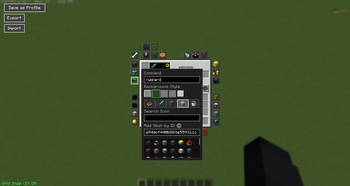
-> Create customizable buttons to run any command
- Editor Mode: Easily move and configure buttons to suit your playstyle.
-> Add custom skulls or use any Vanilla item as your button icon.
-> Move the button on a grid with snapping or anywhere without snapping
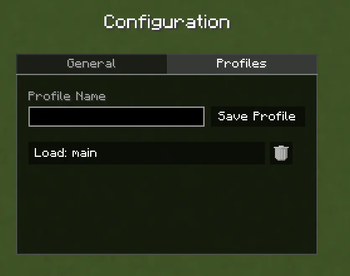
- Profiles: Save button layouts in profiles.
-> Export layouts to share or save. Import them via clipboard.
-> Switch between profiles with the built in command or in the config menu.
-> In the Profile menu (access through main config), type to save
Mod Commands
/invbuttons or /inventorybuttons: open the mod's main config. At the moment, there are just a few qol settings:
- Turn Inventory Buttons off entirely
- Show Tooltips on buttons (your commands)
- Hide buttons in Creative Mode
- Grid Snap defaults to on each time you enter the edit menu or not (otherwise, it keeps your last used setting)
/invbuttons edit: access the button editor via command
/invbuttons profile <name>: switch between button profiles by simply listing the name (compatible with buttons!)
/invbuttons help: display all of these commands and usages
Bugs and Issues
Please report bugs and issues to the mod's GitHub issues page here (also accessible on the right hand side of the Modrinth page)
Credits & Attribution
This mod is a derivative work based on NotEnoughUpdates (NEU).
- Original Author: Moulberry, Many other contributors
- Original Repository: NotEnoughUpdate
- Assets & Design: All textures and design concepts for the buttons and editor are the intellectual property of the NotEnoughUpdates contributors.
This port is not endorsed by, affiliated with, or supported by the official NotEnoughUpdates team. Please do not report bugs regarding this mod to the official NEU tracker.
License
This project is licensed under the GNU Lesser General Public License v3.0 (LGPLv3), the same license as the original NotEnoughUpdates mod.
You are free to modify and redistribute this mod under the terms of the LGPLv3. See the LICENSE file for the full text.
Verfügbare Versionen
Inventory Buttons auf deinem Client installieren
Mod-Loader lokal installieren
Installiere fabric für deine lokale Minecraft-Version.
Passende Datei herunterladen
Wähle die Inventory Buttons-Datei für fabric und Minecraft 26.2.
Mod installieren
Lege die .jar-Datei in deinem lokalen .minecraft/mods-Ordner ab und starte Minecraft neu. Eine Installation auf dem Server ist nicht nötig.
Kompatibilität
Mod-Loader
Minecraft-Versionen
26.2, 26.1.2, 26.1.1 (+3 weitere)
Server-seitig
✗ Nicht unterstütztEmpfohlener RAM
4 GB(min. 3 GB)Häufige Fragen
Muss Inventory Buttons auf dem Minecraft Server installiert werden?
Nein. Modrinth kennzeichnet Inventory Buttons serverseitig als nicht unterstützt. Installiere die Mod nur im lokalen Minecraft-Mods-Ordner. Dein Server kann unverändert bleiben, sofern die Mod-Seite keine zusätzliche Abhängigkeit nennt.
Welche Version und welchen Loader braucht Inventory Buttons?
Nutze eine Datei für fabric und exakt deine Minecraft-Version. Unterstützte Versionen sind unter anderem 26.2, 26.1.2, 26.1.1. Loader-Dateien sind nicht untereinander austauschbar.
Inventory Buttons funktioniert nicht – was kann ich prüfen?
Prüfe zuerst Minecraft-Version, Loader-Version und erforderliche Abhängigkeiten. Lege die .jar-Datei im lokalen .minecraft/mods-Ordner ab und entferne ältere Duplikate. Da die Mod clientseitig ist, löst mehr Server-RAM dieses Problem nicht.
Ähnliche Mods




![[ETF] Entity Texture Features](https://cdn.modrinth.com/data/BVzZfTc1/af683d206d50b05258d865b0d6e4aa2f2cee12f2_96.webp)

Minecraft Server für deine Gruppe
Inventory Buttons bleibt auf deinem Client. Hoste dazu eine kompatible Welt für deine Mitspieler.