
Inventory Extended
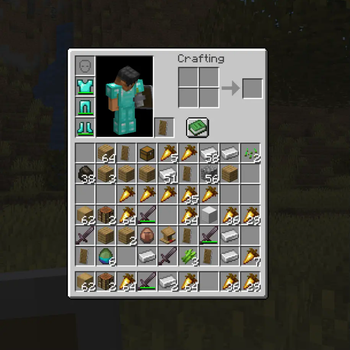
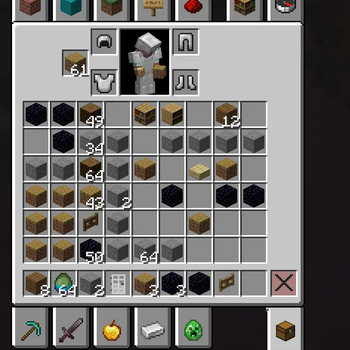
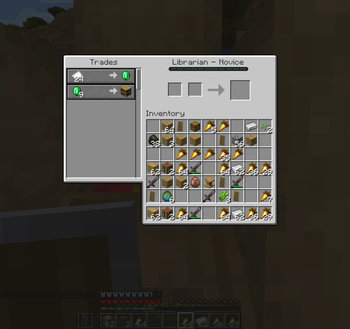
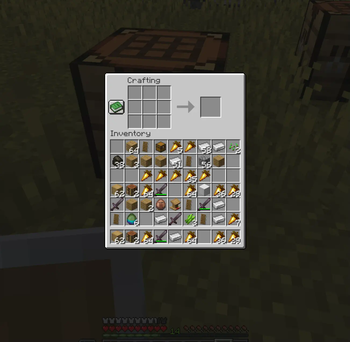
📥 Adds 3 rows of player inventory! Extends storage in a vanilla way.
Screenshots
Über diese Mod
The default Minecraft inventory was designed when the game had far fewer items. Nowadays, it feels restrictive as it's quickly filling up with junk and making inventory management a hassle.
Shulker boxes and bundles aren’t practical alternatives - they require constant placement, breaking, and micromanagement, disrupting the flow rather than improving it.
Features:
- Expands the inventory in a vanilla way by adding 3 more slot rows
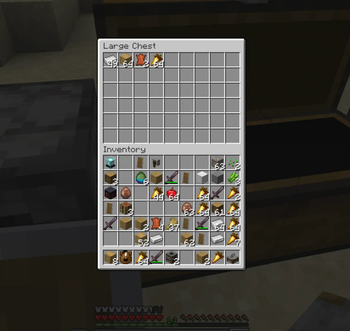
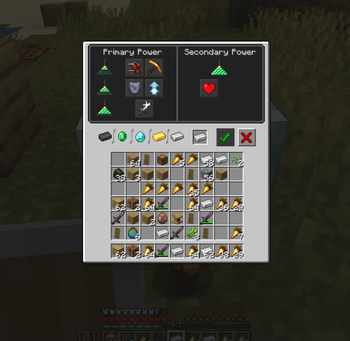
- The extended inventory is usable in all in-game inventory screens
- Works seamlessly with the
KeepInventorygame rule - Working
QuickSortfor all vanilla inventory screens
Notes on compatibility:
Because this mod changes the core player inventory structure (slot count and layout), compatibility issues with other mods are expected.
I’ve updated vanilla GUIs and all systems under my control, but external mods that assume the default 36-slot layout or rely on fixed slot indices may require updates from their authors.
Mods using their own container systems (e.g. backpacks) should generally remain unaffected.
This tradeoff is inherent to extending a core system like the player inventory.
Status:
This is a WIP version and may contain other bugs and glitches! Use at your own risk!
Bug reports:
Want to help improve the mod? Report any bugs by opening an issue on GitHub :)
Important:
Uninstalling the mod deletes your extra inventory and its contents permanently. I’m not responsible for lost items or data corruption. Back up your items/player data before removing or upgrading the mod or Minecraft version.
Verfügbare Versionen
Inventory Extended auf dem Server installieren
Server bestellen
Bestelle einen Minecraft Java Server mit mindestens 3 GB RAM (4 GB empfohlen).
fabric Loader setzen
Wähle im Panel unter "Egg" den fabric-Loader und die passende Minecraft-Version (26.2).
Mod installieren
Öffne den Mod-Browser im Dashboard und suche nach "Inventory Extended". Klicke "Installieren" – fertig! Alternativ: Lade die .jar via SFTP in den /mods Ordner.
Kompatibilität
Mod-Loader
Minecraft-Versionen
26.2, 26.1.2, 1.21.11 (+6 weitere)
Server-seitig
~ OptionalEmpfohlener RAM
4 GB(min. 3 GB)Häufige Fragen
Inventory Extended Server crasht beim Start – was tun?
Häufigste Ursache: falsche fabric-Version oder zu wenig RAM. Prüfe im Server-Log (latest.log), ob ein "OutOfMemoryError" oder "Mixin"-Fehler auftritt. Bei Mado Hosting: Stelle sicher, dass mindestens 3 GB RAM zugewiesen sind und der Loader zur Mod-Version passt (26.2). Über das Panel kannst du den Loader mit einem Klick wechseln.
Ist Inventory Extended mit fabric kompatibel?
Inventory Extended unterstützt offiziell fabric für Minecraft 26.2, 26.1.2, 1.21.11. Im Mado Dashboard werden inkompatible Loader-Kombinationen automatisch erkannt.
Server laggt mit Inventory Extended – wie optimiere ich die Performance?
Empfohlener RAM: 4 GB (+1 GB pro 8 Spieler). Prüfe mit /spark profiler, ob Inventory Extended den meisten Tick-Time verbraucht. Häufige Fixes: Server-View-Distance auf 8-10 reduzieren, bei Forge "performant" oder "starlight" als Zusatz-Mod installieren. Bei Mado Hosting läuft dein Server auf NVMe-SSDs mit dedizierten CPU-Kernen für minimale Latenz.
Ähnliche Mods






Modded Server mieten
Installiere Inventory Extended mit nur einem Klick auf deinem Server.