
ISB - Inventory Sorter Button
One-Click Inventory Sort Button.
Screenshots
Über diese Mod
The mod adds a small button inside the inventory screen that allows players to quickly sort items in a simple and predictable way.
The goal of the mod is very straightforward: make it easier to organize inventories without changing how the game works.
🔹 What the Mod Does
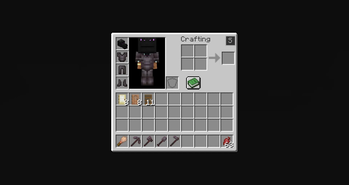
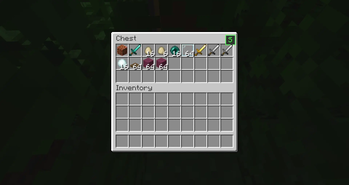
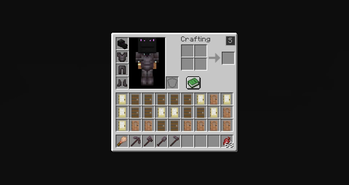
When you open your inventory or a chest, a small button appears in the top-right corner of the GUI.
When this button is clicked, the mod:
• Reads the item stacks in the inventory
• Sorts them alphabetically based on their item registry name
• Reorders the slots according to that order
The items themselves are not modified. The mod only changes where the stacks are placed inside the inventory.
📦 Supported Screens
The sorting button works in:
✔ Player inventory
✔ Chest GUI
The sorting logic only affects the inventory slots visible in the container.
⚙️ Behavior
The sorting system follows a few simple rules:
🔹 Alphabetical order
Items are sorted using their registry names.
🔹 Stacks stay intact
Item stacks are never split or merged by the mod.
🔹 Slots are only reordered
The mod does not modify NBT data, durability, enchantments, or any other item information.
🔹 Client-side only
The mod runs entirely on the client and does not add any server-side functionality.
🖥 Interface
The mod adds a small button to the inventory GUI.
It is placed in the top-right area of the inventory screen so it is accessible but does not interfere with the rest of the interface.
Clicking the button immediately triggers the sorting process.
Verfügbare Versionen
ISB - Inventory Sorter Button auf deinem Client installieren
Mod-Loader lokal installieren
Installiere fabric für deine lokale Minecraft-Version.
Passende Datei herunterladen
Wähle die ISB - Inventory Sorter Button-Datei für fabric und Minecraft 1.21.11.
Mod installieren
Lege die .jar-Datei in deinem lokalen .minecraft/mods-Ordner ab und starte Minecraft neu. Eine Installation auf dem Server ist nicht nötig.
Kompatibilität
Mod-Loader
Minecraft-Versionen
1.21.11, 1.21.10, 1.21.9 (+26 weitere)
Server-seitig
✗ Nicht unterstütztEmpfohlener RAM
4 GB(min. 3 GB)Häufige Fragen
Muss ISB - Inventory Sorter Button auf dem Minecraft Server installiert werden?
Nein. Modrinth kennzeichnet ISB - Inventory Sorter Button serverseitig als nicht unterstützt. Installiere die Mod nur im lokalen Minecraft-Mods-Ordner. Dein Server kann unverändert bleiben, sofern die Mod-Seite keine zusätzliche Abhängigkeit nennt.
Welche Version und welchen Loader braucht ISB - Inventory Sorter Button?
Nutze eine Datei für fabric, forge, neoforge und exakt deine Minecraft-Version. Unterstützte Versionen sind unter anderem 1.21.11, 1.21.10, 1.21.9. Loader-Dateien sind nicht untereinander austauschbar.
ISB - Inventory Sorter Button funktioniert nicht – was kann ich prüfen?
Prüfe zuerst Minecraft-Version, Loader-Version und erforderliche Abhängigkeiten. Lege die .jar-Datei im lokalen .minecraft/mods-Ordner ab und entferne ältere Duplikate. Da die Mod clientseitig ist, löst mehr Server-RAM dieses Problem nicht.
Ähnliche Mods


Minecraft Server für deine Gruppe
ISB - Inventory Sorter Button bleibt auf deinem Client. Hoste dazu eine kompatible Welt für deine Mitspieler.